What’s happening now on the NASDAQ?

In this article i’m going to talk about what’s happening now on the NASDAQ and give you some technical analysis on the recent price movements. Let’s just get straight into it:

What’s happening now on the NASDAQ? The Monthly Time Frame

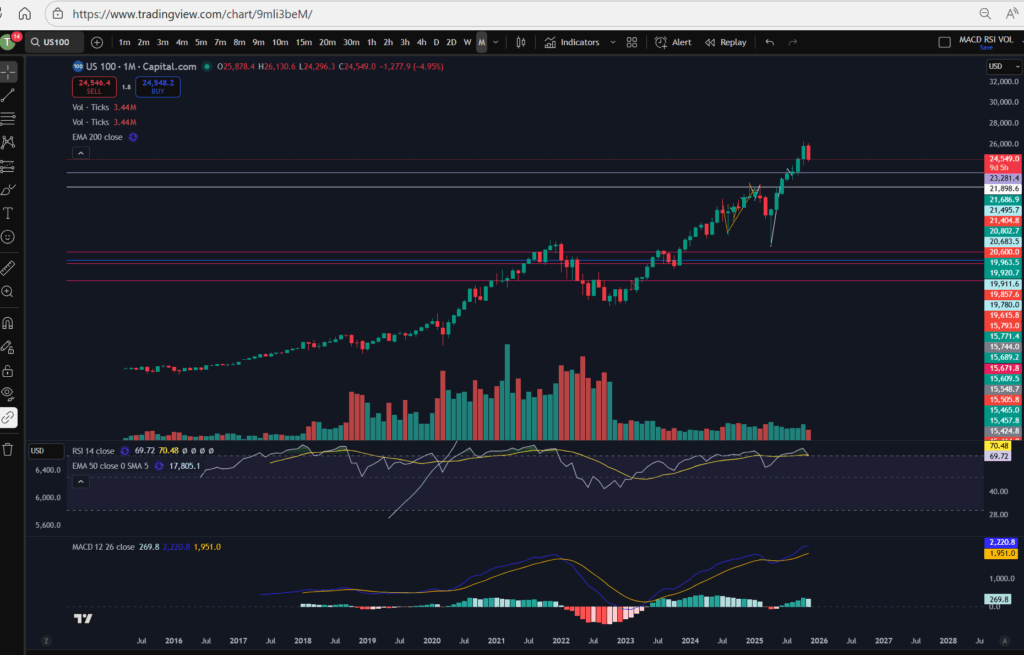
Let’s take a look at the monthly timeframe to remind ourselves of the highs the NASDAQ had reached recently:
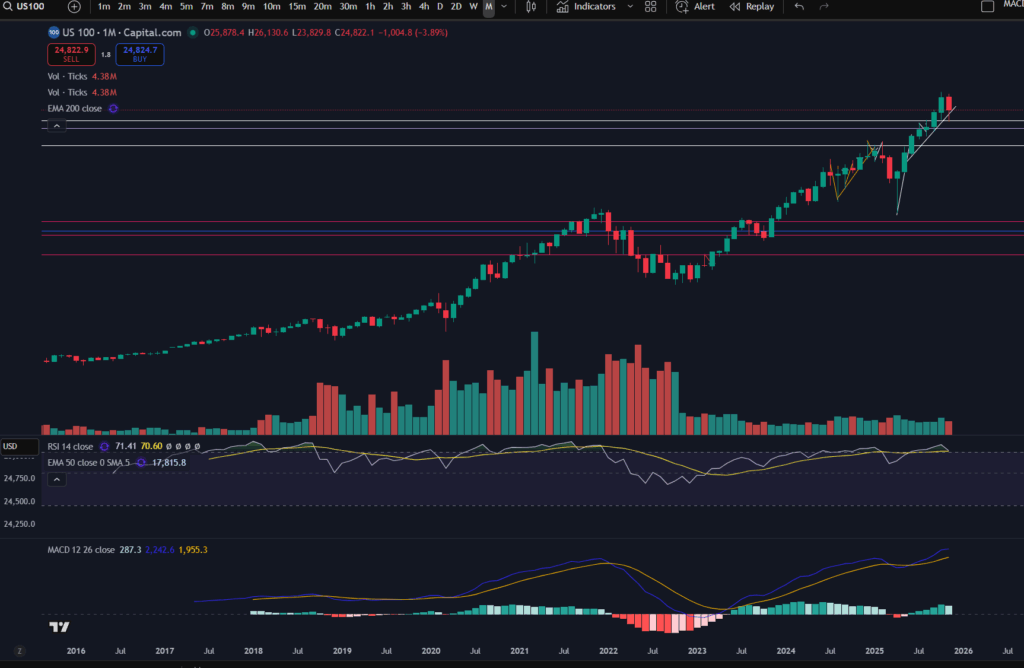
As you can see, before this month, marked with the big red, most recent candle on the monthly timeframe, the market had pushed up considerably. The RSI was very overextended and the volume was not significant compared to the periods where significant momentum was noted (see the period between July 2018 and July 2022, for example. The market did look like it was in need of a pull back, at the very least.

Now let’s take a look at the daily timeframe.

What’s happening now on the NASDAQ? – The Daily Timeframe
happening now on the NASDAQ

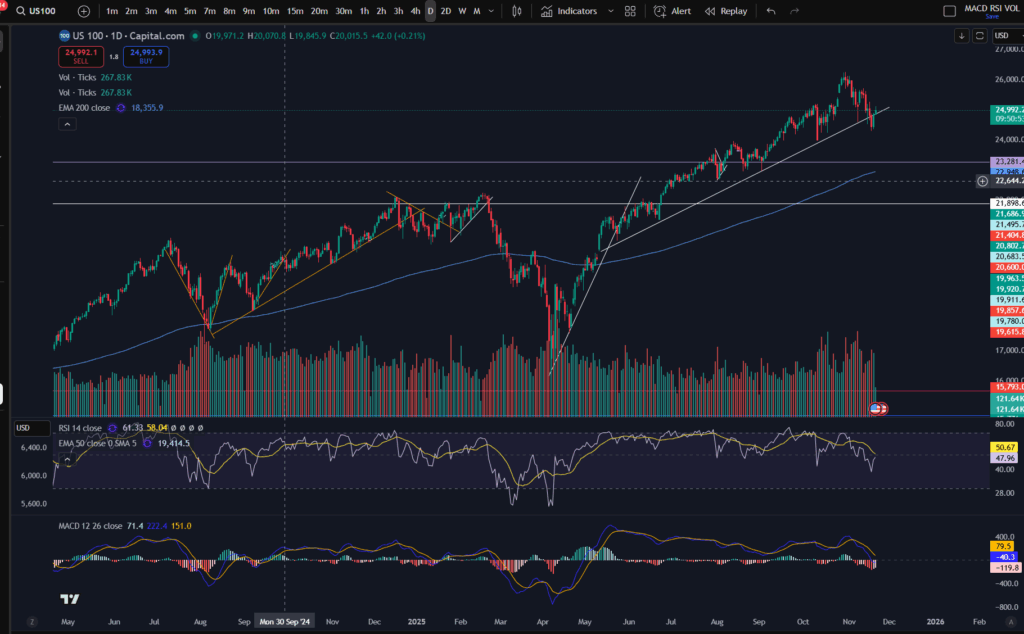
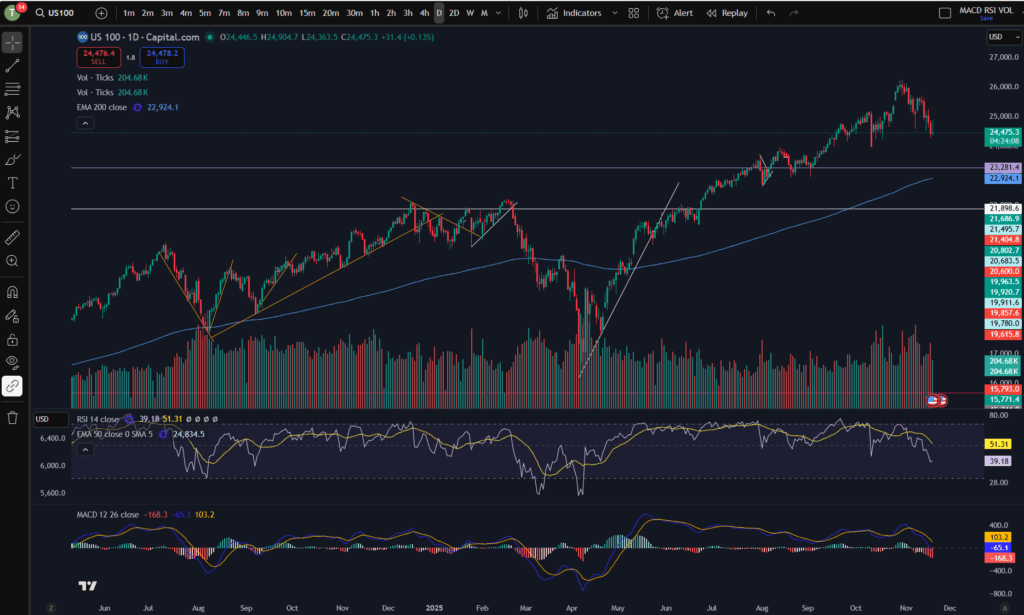
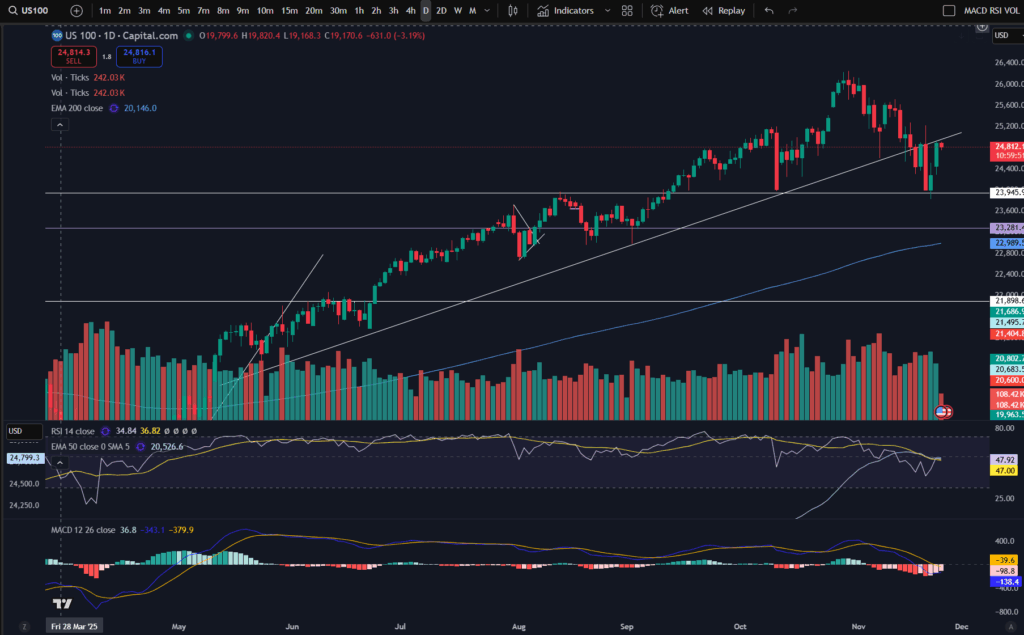
As you can see, the market was trending for a lengthy period of time, above the diagonal trend line marked on the chart. (If you would like a discount to the software I use – Trading View, please click the link below). In November the price broke this support and sailed down. It kept going until it reached the next lower level support area marked horizontally on the chart at price 23,945.

Currently the market is at a critical point – it has bounced slightly on the support level, but will it continue to sail away from this area? It’s currently touching the ‘underside’ of the diagonal support, which, as we know, can now be seen as a potential resistance.

Let’s take a look at the ‘zoomed in’ view, on the 30 minute timeframe. By the way, if you would like to understand more about ‘multiple timeframe analysis’, please see the video below:

The 30 minute timeframe:
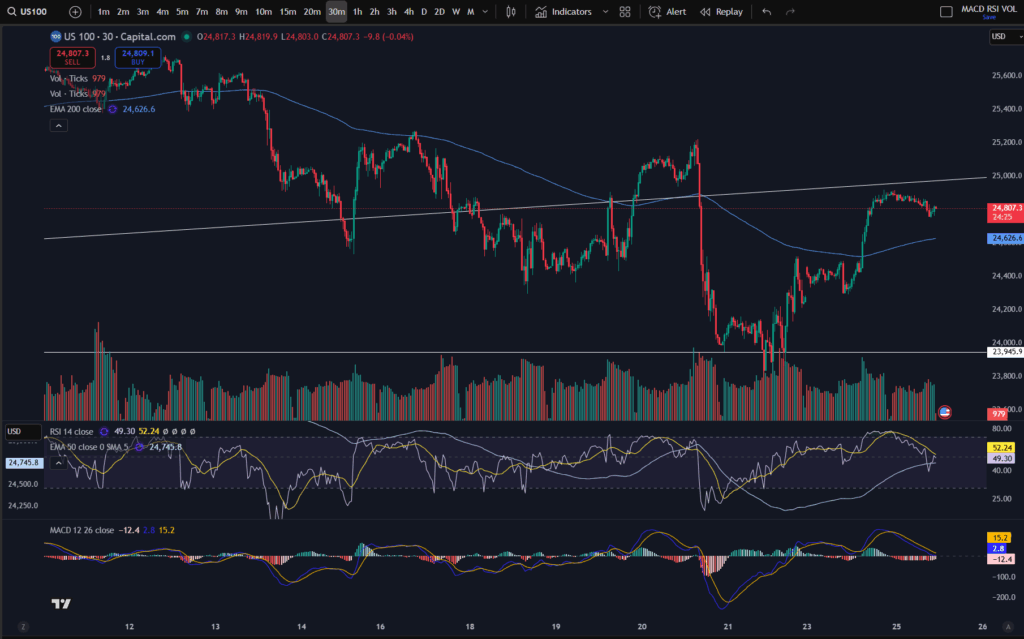
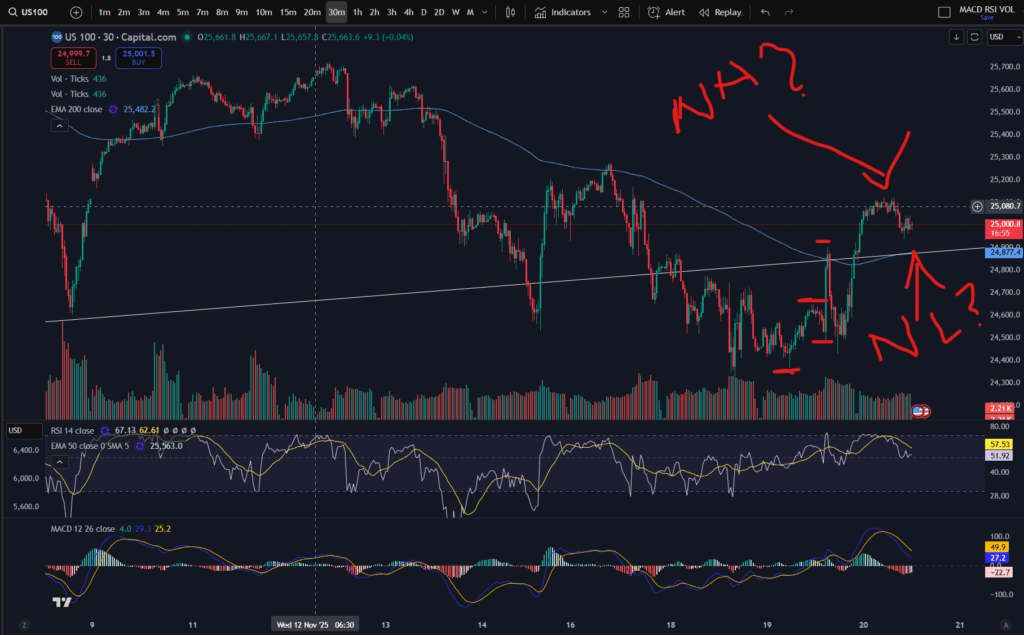
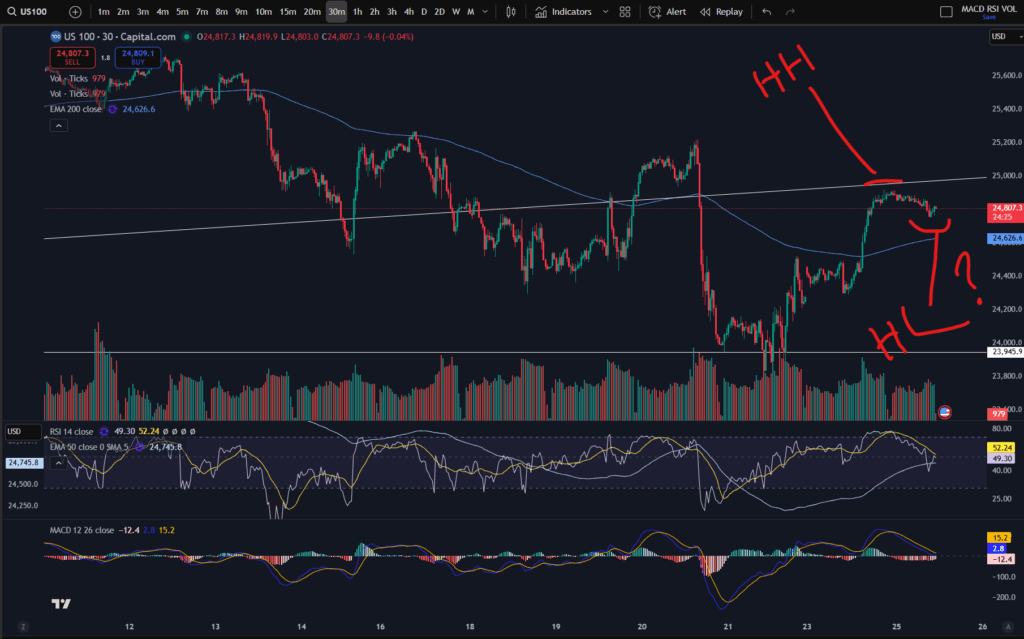
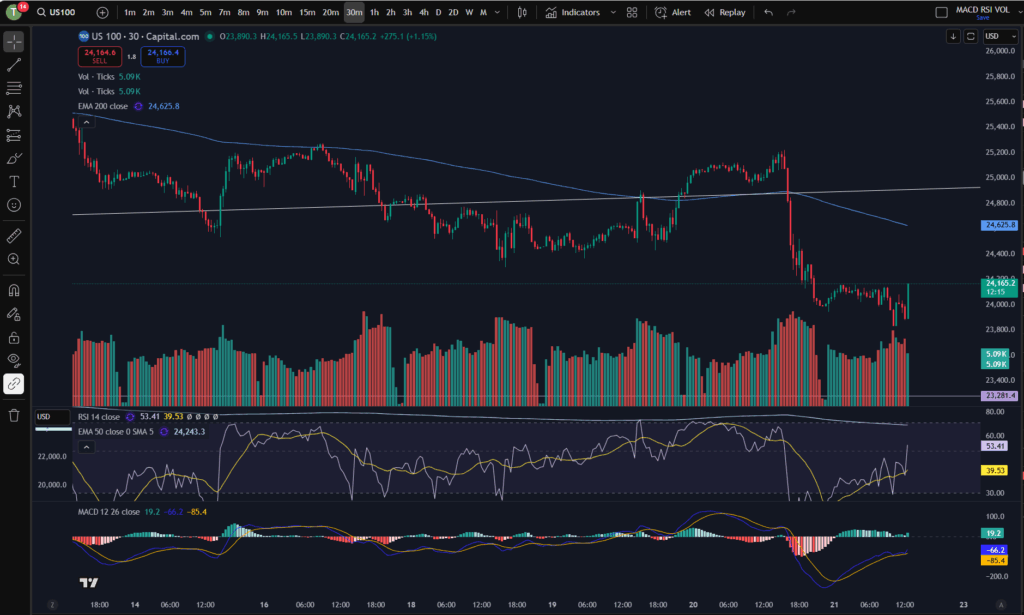
You can see more clearly on the 30 minute timeframe, that the price is currently exactly at the diagonal resistance level. It has just made a ‘higher high’ and it’s currently trying to form a ‘higher low’:
happening now on the NASDAQ

Why does this matter? The market will be considered to be trending ‘up’ once it is making higher highs and higher lows, consistently. It remains to be seen whether this will continue at the moment. As I mentioned in previous videos and posts, it could do the same thing it did previously, and pop back down, below the EMA line – you can see it did this on around the 20th – 21st November and before this, around the 13th to 14th of November.

If you would like to understand more about support and resistance levels, and how to read the markets by identifying highs and lows in a trend, please see my video here and related article:

Highs and lows video:

Blog article to help you spot whether a trend is changing direction:

Amazing secrets to help you make more money trading – spot a downtrend early! – Trader Pro

Support and resistance levels – blog article:

Support and Resistance – Trader Pro

So what’s happening on the NASDAQ then?

So ultimately, what’s happening now on the NASDAQ is that the market is trying to recover but patience is required to understand whether it will continue trying to push up. Patience is key for traders who do not short the markets.

Understand my strategy in full: https://www.patreon.com/Traderpro8320

For more great tips on trading the financial markets, please visit my blog:

https://sophiatrades.co.uk

Discount on Trading View:

https://www.tradingview.com/?aff_id=117138

My performance in the live markets:

https://sophiatrades.co.uk/category/my-performance-statistics

Finally, thank you to my existing members on Patreon, and for your likes, comments and subscribes. Happy trading!

Please note any subscriptions taken via my affiliate link with Trading View may result in me earning a small commission.

Nothing in this video should be taken to constitute financial advice. Although we make observations on the current state of the markets, nothing we suggest should be taken as an indication of what they will do next. You are required to carry out your own due diligence before entering any of the markets.
Understanding a stock chart – valuable knowledge for beginner traders

In this article i’m going to help you with understanding a stock chart, and share some tips which may help beginner traders navigate the chart’s features. This will take the beginner trader through the basic foundation of what appears on the chart, normally by default.

Understanding a stock chart – price movements

The default position you will likely find when you first look at any stock chart is that the ‘price’ movements are shown with ‘Candlesticks’. This is key to understanding a stock chart. Let’s take a look…

Understanding a stock chart

If you would like a discount to the ‘Trading View’ software which I use and highly recommend, please click the button below:

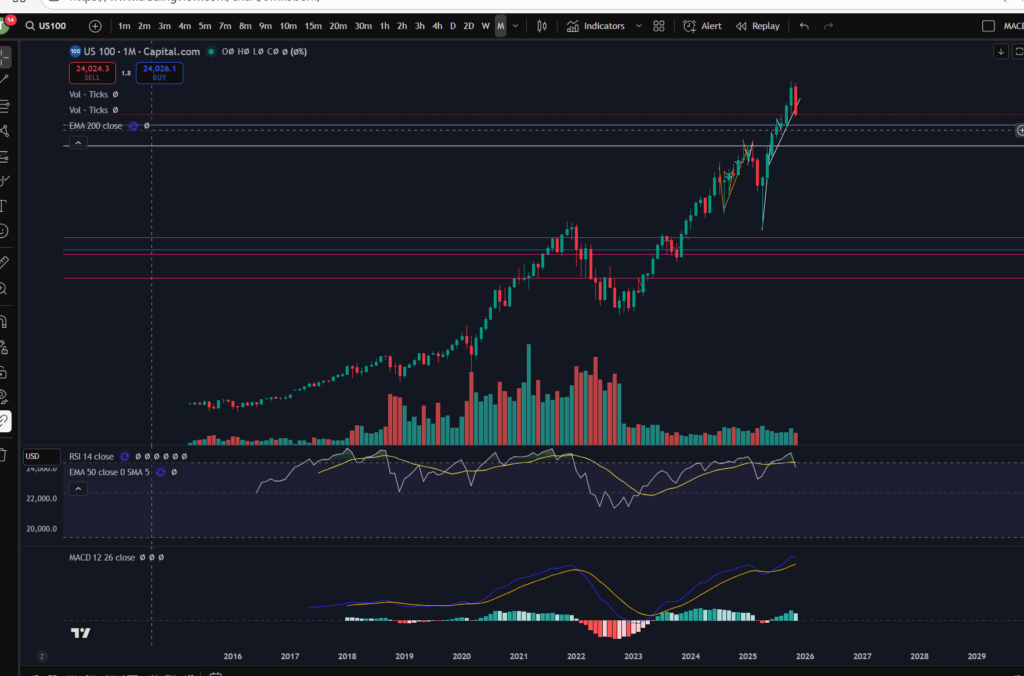
Each green or red candlestick shape you see on the chart, represents the price movement within one interval of time. The interval is determined by the ‘time interval’ buttons selected on the chart. As you can see on the above screen shot, ‘M’ is highlighted in the ribbon at the top – what this means is that this is a ‘monthly chart’ – each candlestick represents the price movements within one month’s period. I’ve posted separate articles on understanding candlesticks, which you will find here:

Make more money with Japanese Candlesticks – an Introduction – Trader Pro

The basic premise of candlesticks is that if they are green, it means the price closed higher in the interval, and if they are red, the price closed lower within the interval.

You can also understand more about the pattern formations of these, here:

Japanese Candlesticks – Trader Pro

The price ‘level’ is normally displayed down the right hand side of the chart. You can see here, that the price range is 23,281 USD to 26,000 USD.

You will need to pay careful attention to which ‘price’ is being displayed… is it the price inclusive of the spread for example, or does it not include the spread? When I was a new trader, this used to catch me out – the stop loss would sometimes be triggered when the price seemingly did not go there on the chart!? It’s because the price displayed on the chart did not include the spread so the gap which was covered with the spread seemed like a mystery to me, and almost felt like broker manipulation. I understand more now.

If you check the settings in your chart carefully, you will find a setting to tell the chart to either include the spread, or not. Your wish with this, may change depending on what you are doing on the chart! If you are setting an order to ‘buy’ at a particular price, you may want to include the spread in the settings…

Understanding a stock chart – Time intervals

Each chart will have a couple of ribbons of time intervals – probably along the top and also the bottom. One of these ribbons allows you to select alternative time intervals to be displayed, as mentioned above. When these are clicked, you can toggle between for example, the ‘daily’ timeframe, and the 4 hour time frames. The daily timeframe will show you candlestick price movements, with each one representing the movement within one day, and the four hour will likewise, show you the movements for each four hours that have occurred. The other ribbon shows you the relevant tie that the price movements occurred – so you can see on the above chart, that the time spans from the year 2016 to 2029 (no candles formed yet as this is in the future at the time of writing this article).

Deal tickets

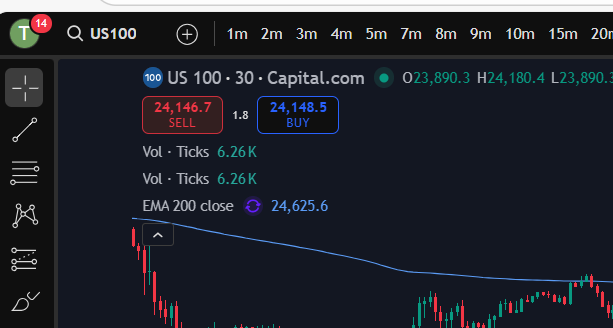
You can bring up a ‘deal ticket’ or ‘order ticket’ by clicking on the Buy or Sell buttons at the top of the screen. The value indicated on the button, is the buy or sell price and the ‘spread’ sits in between these values as below:

You do need to understand the spread, and I have linked another article below, which gives you an understanding of this:

Understanding the spread – Trader Pro

In short, the spread is the bit of price, in between the buy and sell values and it’s the ‘cut’ that the broker takes from the market.

The different types of deal tickets and orders you can place in the market, will be covered in another article.

Toolbar

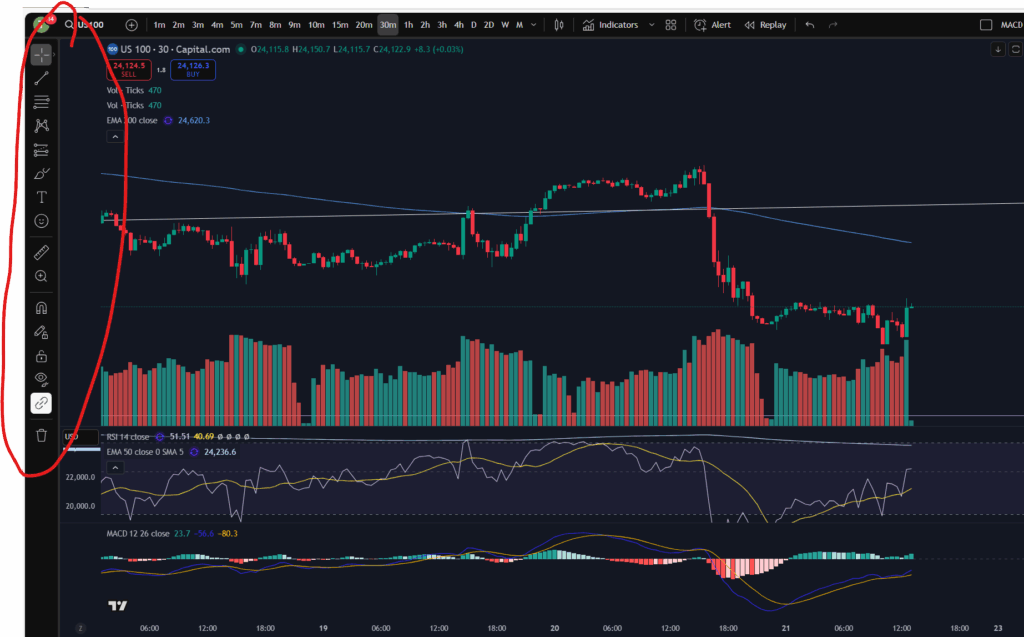
You will see somewhere on your chart, a toolbar with different symbols on it. On Trading View, this is down the left hand side of the screen:

This gives you various different tools for drawing symbols and diagrams on your chart. You can draw ‘support and resistance’ lines including horizontal and diagonal ones. You can also measure price and time interval values with the ‘ruler’ shown. It’s got a zoom in/out function. You can make notes and keep them pinned to the chart indefinitely.

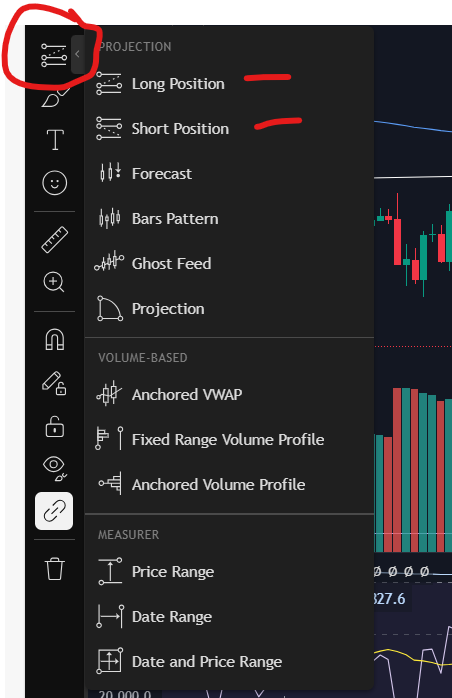
You can also plan trade set ups in terms of where you will enter, take profit or take a loss, with this icon:

Technical indicators

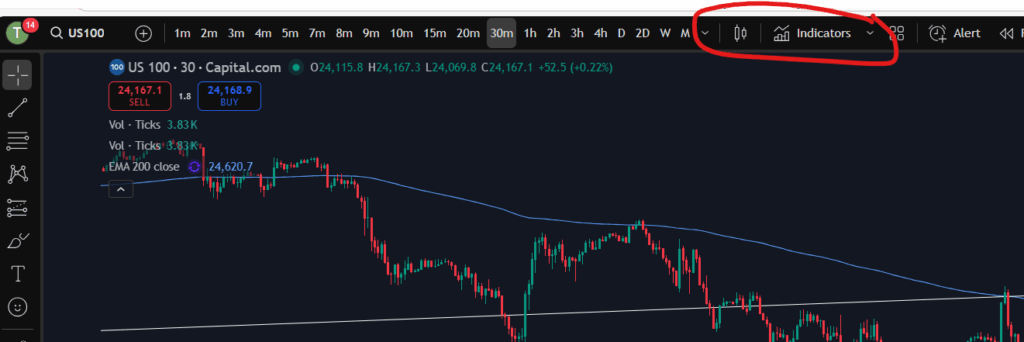
Another important aspect of understanding a stock chart which you will want to become familiar with, is the technical indicators menu. This is where you will find the MACD indicator, the volume, moving averages – any type of indicator you wish to add to your chart. There is a wide variety with Trading View which is another reason I really like the software.

For my own strategy and set up, I use the RSI, the MACD, the volume, and the 50 and 200 period EMA lines (exponential moving averages).

In Trading View, you can find the Technical Indicators menu, here:

Understand my strategy in full: https://www.patreon.com/Traderpro8320

To see my YouTube video explaining this article, please click the following link:

For more great tips on trading the financial markets, please visit my blog:

https://sophiatrades.co.uk

Discount on Trading View:

https://www.tradingview.com/?aff_id=117138

My performance in the live markets:

https://sophiatrades.co.uk/category/my-performance-statistics

Finally, thank you to my existing members on Patreon, and for your likes, comments and subscribes. Happy trading!

Please note any subscriptions taken via my affiliate link with Trading View may result in me earning a small commission.

Has the NASDAQ pull back ended? Trade now?

Has the NASDAQ pull back ended? In this article i’m going to consider the answer to this. I will talk about some signs which ‘could’ indicate that the NASDAQ may have finished pulling back. As with all my technical analysis you are strongly encouraged to do your own due diligence before placing any trades or investments in the markets. Let’s take a look at whether the NASDAQ pull back has ended.
NASDAQ pull back ended? – Recent movements

As I mentioned a day or so ago, the markets in general are in a well needed correction phase. They had pulled back quite a bit per the daily timeframe… Let’s take a look at the NASDAQ per the daily timeframe to get a reminder of where it sits currently. This will help us to decide whether the NASDAQ pull back ended…

NASDAQ pull back ended

For a discount to the chart software I use, and highly recommend, please click the link below!

As you can see above, the NASDAQ had pulled back down to just below the diagonal trend line. It seems like it could be bouncing there… Note the MACD histogram is losing it’s pigmentation and shrinking in size, and this can indicate that the move is running out of steam.

Let’s take a look at the 30 minute timeframe.

Let’s zoom in with the 30 minute timeframe!

NASDAQ pull back ended

I mentioned a day or so, ago, that the market looked like it was forming new highs and lows after the downward move and this trend seems to have continued. As you can see marked above, it seems to be forming a new high and a new low, but I would want to wait to see another MACD cross over for this high/low to be confirmed. You can see my separate blow article, on how to decide where the highs and lows are, here:

Amazing secrets to help you make more money trading – spot a downtrend early! – Trader Pro

So has the market finished its pull back?

Since the markets were very overbought recently, I would want to see continued highs and lows in this way before I decide that the market has turned around. It does look for now, like it’s trying to recover and push up. I’m conscious the US market is not currently open at the time of writing this, so I will be interested to see what happens at market open today. I am also very conscious that the markets are quite choppy currently and this scenario is a repeat of what happened previously, mid-downtrend – see the section to the left of the 30 minute timeframe chart above, where, in a similar way, the price popped up over the EMA lines and started up trending temporarily, only for it to descend further, subsequently. There is a possibility that this will happen again – I will be watching and waiting.

I hope you found this article helpful.

For more great tips on trading the financial markets, please visit my blog:

https://sophiatrades.co.uk

Discount on Trading View:

https://www.tradingview.com/?aff_id=117138

My performance in the live markets:

https://sophiatrades.co.uk/category/my-performance-statistics

Finally, thank you to my existing members on Patreon, and for your likes, comments and subscribes. Happy trading!

Please note any subscriptions taken via my affiliate link with Trading View may result in me earning a small commission.

Markets are dropping – how to beat them!

Markets are dropping and in this article we take a look at the recent activity on the NASDAQ and possible technical factors which have triggered this. We hope you find this useful.

Markets are dropping – recent NASDAQ activity

The recent activity on the NASDAQ has been extremely bullish… let’s take a look at the monthly chart:

As you can see, the NASDAQ recently reached all time highs. The RSI was very over extended, and the price had been pushing up for a sustained bull run period. It was about time they pulled back! You can see the history of the RSI indicator above. When uptrending, the RSI purple line above, pulls back and forth at the top of the RSI indicator area. Each time the RSI level reaches the highs it had stretched to before, a pull back happened. This time was no different – we were waiting for it! The pull back currently happening feels large, but in reality, it is small in comparison to the amount the markets have pushed up recently.

Markets are dropping – a view from the Daily Time Frame…

Markets are dropping

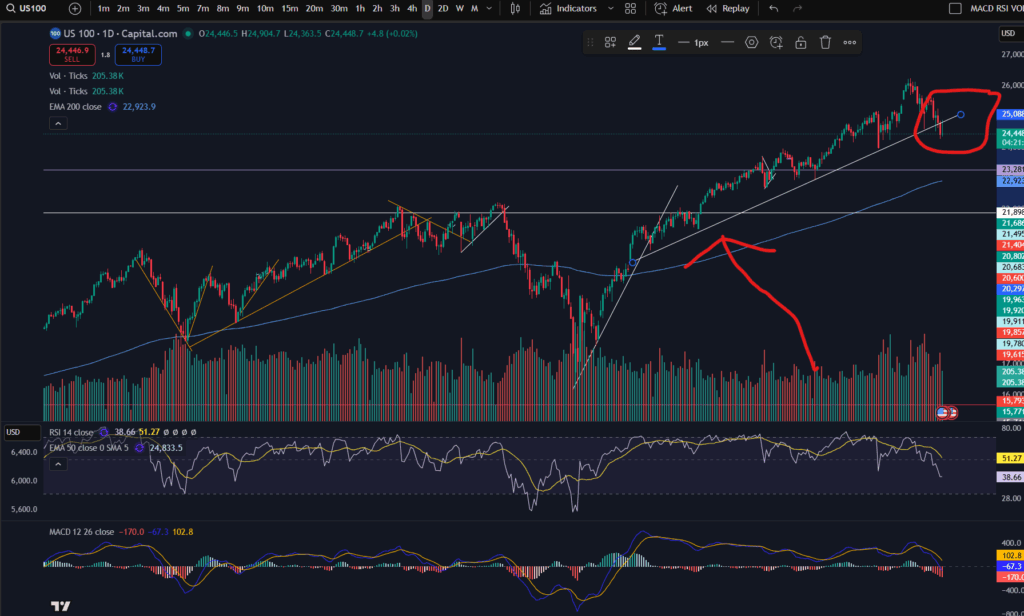
As you can see from the daily timeframe above, the pull back happening was almost necessary. The price has pulled back down further than the diagonal trend you can see on the bottom of the pattern above – please see this marked below…

You can see above, that the price as bouncing on a nice diagonal support level on the daily time frame, but within the last couple of days, the price has broken this support level.

The RSI has sunk down quite low on the daily timeframe – as you can see above, but the MACD histogram is still showing dark red bars which are growing in size (meaning the downwards move is not yet running out of steam). We could see lower prices still – it remains to be seen whether the price will start recovering or commence a return back up to where it was.

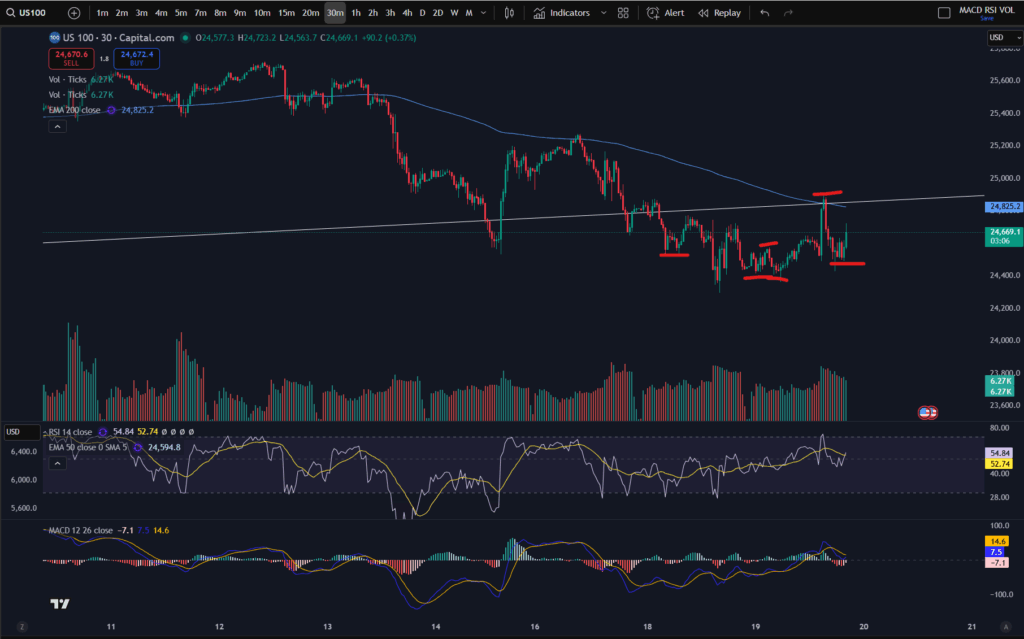
This evening I can see it has started bouncing around on the 30 minute timeframe:

A view from the 30 minute timeframe:

You can see the downtrend on this 30 minute screen shot in more detail… however, note that the price is currently trying to find support… Note the ‘steps’ I have marked on the chart in terms of the highs or lows… the first three marks counting from the left, were confirming that the 30 minute timeframe was still down trending. However, note that the fourth mark created a ‘higher low’ and the next one reached a ‘higher high’… it may be that the market has started to recover – I will be watching it carefully. My next steps will be to look out for solid signs of support and a turn around on the chart. Once I feel comfortable that the price is recovering, I will be more comfortable to place some more trades… for now, I wait….

I hope you found this article and my technical analysis helpful. If you would like to reach out with any trading questions or analysis questions, I would love to hear from you.

For more great tips and advice on trading the stock market, please visit:

https://sophiatrades.co.uk

To watch me trade live please visit my patreon page here:

https://www.patreon.com/Traderpro8320

Finally, if you would like to receive a discount on the Trading View charting software I use, please click on the relevant link here:

https://www.tradingview.com/?aff_id=117138

Please note any subscriptions taken via my affiliate link with Trading View may result in me earning a small commission.  However, I provide complete transparency on me using Trading View personally – I publish my success on the financial markets via my broker reports and any profits earned were done so by using my own Trading View subscription,  so I genuinely do recommend them and have been using the Trading View charts for many years.

Breaking down my profitable trades on Google for you

In this article I’m going to be breaking down my profitable trades on Google for you. These are in line with my MACD trading strategy which is a multi-timeframe analysis strategy, the details of which can be found linked on this blog and on my Patreon page and You Tube account. I will breakdown my entry and exists and the reasons behind these decisions. I hope you find the article useful.

What strategy to use for making profitable trades on Google?

I recently shared a strategy on my You Tube channel which outlines a flexible, profitable way of placing trades repeatedly on a market. The strategy is especially suited to trading the NASDAQ but I have been applying it to other markets with success. It can be applied to Google to make profitable trades on Google too. You can find the strategy below:

The strategy is based on my original MACD strategy which you can find on my Patreon account, linked below. However, it is now tailored to deal with the Trump tweets and trade wars as well as the other turbulence on the markets. I used to use a stop loss but I no longer control my risk in this way. You can find a video on what I changed to make my trading style more adaptable to the turbulence in the stock markets, here:
So now that I’ve explained which strategy I’m using currently, I’m going to be breaking down my profitable trades on Google for you.

Trades on Google – explained

So as you will know from reviewing my strategy above, the first thing I look for is a market which is ‘uptrending’ on the daily timeframe. I make sure that there is plenty of headroom before it reaches the previous high. Let’s take a look at Google Class C’s daily timeframe chart per Trading View to analyse the profitable trades on google I placed. (To get a discount on Trading View, please see the link below):

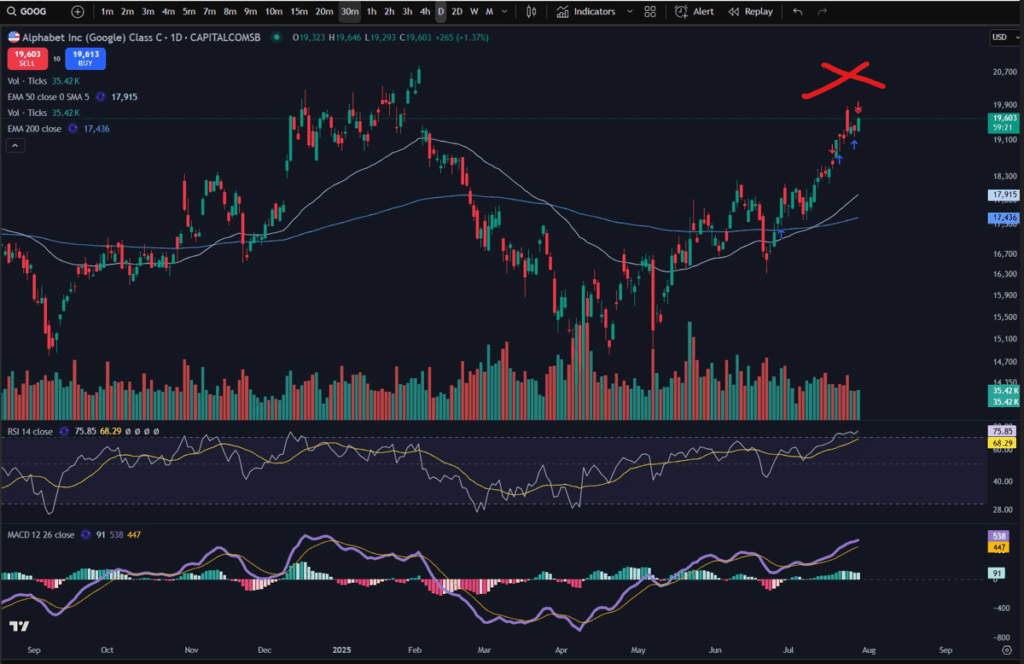
Google Class C – Daily Time Frame:

profitable trades on Google

You can see that the previous highs reached in around February 2025 are some way off from the recent prices where I have marked the chart with a red cross. Since there is plenty of scope for the price to come up to previous levels, and the price has been in a nice uptrend since around April – May 2025, I began to look for opportunities on a smaller time frame. It is worth noting that another key item I focus on, on the daily timeframe is the position of the MACD indicator. The MACD indicator was ‘on its way up’ after the MACD and signal lines had crossed over, and the histogram bars were still green. I also look at the RSI indicator. This one was showing that the market was in fact a little overbought when I entered. However, knowing that the market had plenty of scope to come up and given my more flexible trading style outlined in the video above in terms of adapting to turbulent market conditions, I knew I had a good chance of making profit on the stock from this position. I waited for a pull back on the smaller timeframe (30 minute timeframe) – examined below.

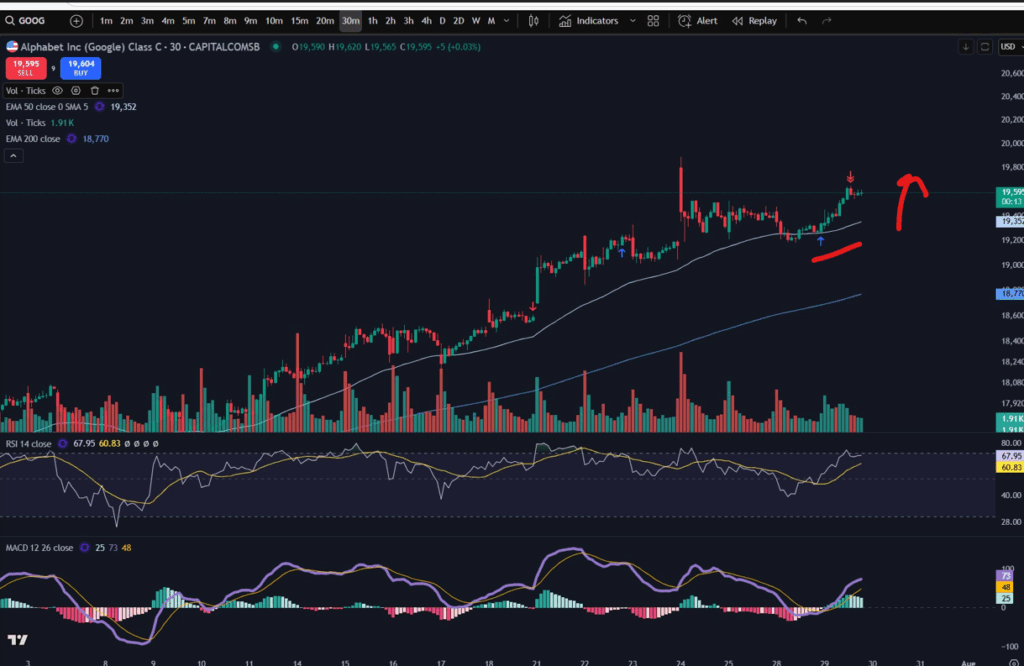
Google Class C – 30 Minute Time Frame:

As you can see in the above chart screen shot, I entered the market where the blue arrow is – a perfect entry according to my MACD strategy. The price did indeed go on towards previous highs and this is where I exited. (I actually had two positions on this market when I exited. You can see the preceding blue arrow where I entered for the first time. Unfortunately I missed my exit with that first one and got out of both trades at the red arrow. As per my video shared above, I no longer set profit targets or stop losses habitually. I do set a stop in certain conditions only – when the market has gone into profit and I want to ride a trend.

You can see on the 30 minute timeframe that the RSI was low at the point of entry, the MACD and Signal lines had just made a cross over and I knew from analysis on the daily timeframe that the market had a good chance of coming up further. The market was also making higher highs and higher lows on this 30 minute timeframe which is a crucial check I carry out before entering on the smaller timeframe.

The trade was profitable. I am finding this method of trading with a more flexible approach to risk management, much more beneficial (and less stressful).

I hope you enjoyed this article. I encourage you to carry out your own due diligence before placing any trades but I hope this analysis was of some assistance to you in terms of you understanding some possible approaches to trading.

If you appreciate these free articles it would really help me to finance them and produce more of them, if you are able to make a purchase on my Patreon page by subscribing as a member or purchasing a video – linked below.

Useful links for you:

Understand my strategy in full: https://www.patreon.com/Traderpro8320

For more great tips on trading the financial markets, please visit my blog:

https://sophiatrades.co.uk

Discount on Trading View:

https://www.tradingview.com/?aff_id=117138

My performance in the live markets:

https://sophiatrades.co.uk/category/my-performance-statistics

Finally, thank you to my existing members on Patreon, and for your likes, comments and subscribes. Happy trading!

Please note any subscriptions taken via my affiliate link with Trading View may result in me earning a small commission.

NASDAQ trading strategy that will make you thousands! ££££££

NASDAQ trading strategy that will make you thousands! ££££££

In this article i’m going to talk about a NASDAQ trading strategy which can literally make you thousands!! I’ve been using this strategy on the NASDAQ for the last few months and it has proved to be very successful. I’ve also linked below a video showing you some of my entry and exit points on Trading View. The video explains the strategy but I have outlined it below, too. This strategy builds on my MACD strategy which regular visitors to this site will know me well for. However, I made a few tweaks to take account of the unique personality of the NASDAQ index, and I also made some allowances for Trump’s tweets which have been sending the markets loopy lately! I hope you enjoy this article.

NASDAQ trading strategy – how it works

The NASDAQ trading strategy applies my usual MACD strategy as follows:

  • * Identify a nice uptrend on the daily time frame;
  • * Make sure the price is above the 200 period EMA;
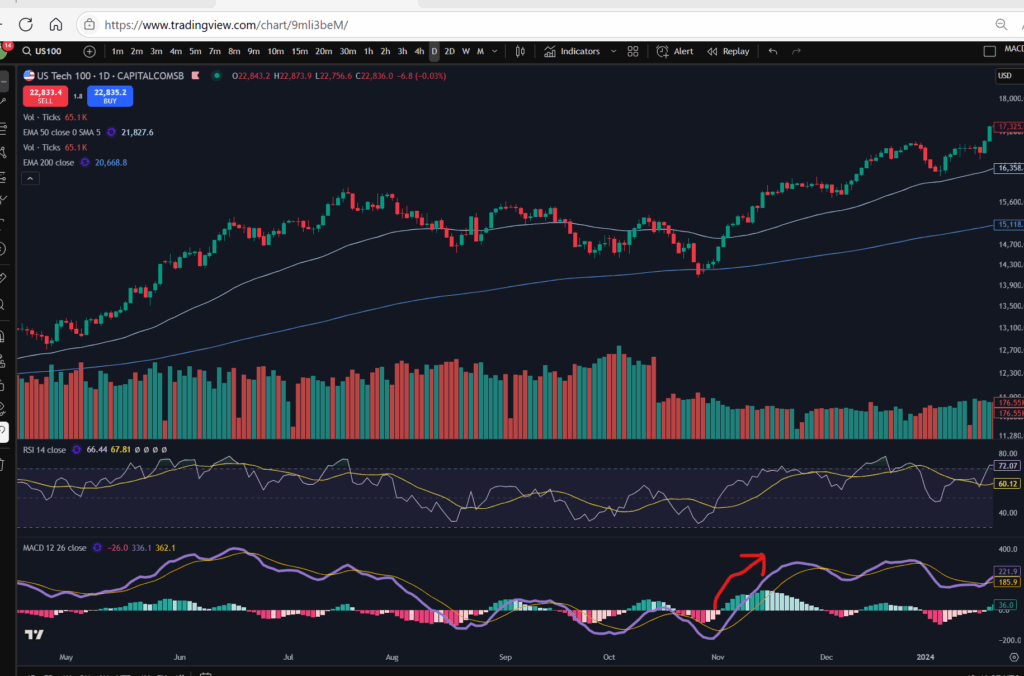
  • * You want to get in per this NASDAQ trading strategy when the market is pushing up per the daily timeframe. To identify this, get in after the MACD and signal lines have made a cross over, ideally from a point below the zero level of the histogram. Ideally the RSI will be low at this point or at least not at a very high/overbought level:
NASDAQ trading strategy
  • *Once the MACD and signal lines have crossed over or are about to cross and go up again on the daily timeframe, you can visit a quicker/lower timeframe to find your entry and exit points, like the 30 minute timeframe.
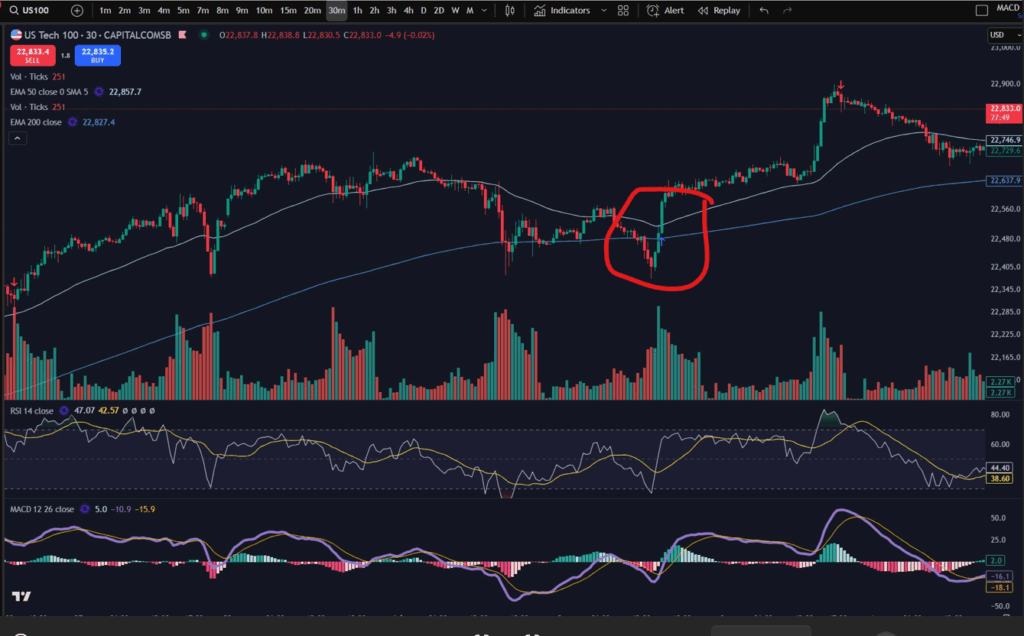
  • *On the 30 minute timeframe, wait for the price to pop up over the 50 period EMA on the quicker timeframe as in the picture below:
NASDAQ trading strategy
  • *Once the price has popped up over the 50 period EMA, this would be a good place to enter the trade, based on your 30m timeframe and daily timeframe analysis.
  • *You can trail a stop below the latest low of the 30 minute timeframe trend, to scoop as much profit as possible from the move, before the trend reverses.

NASDAQ trading strategy – my recent entries and exits:

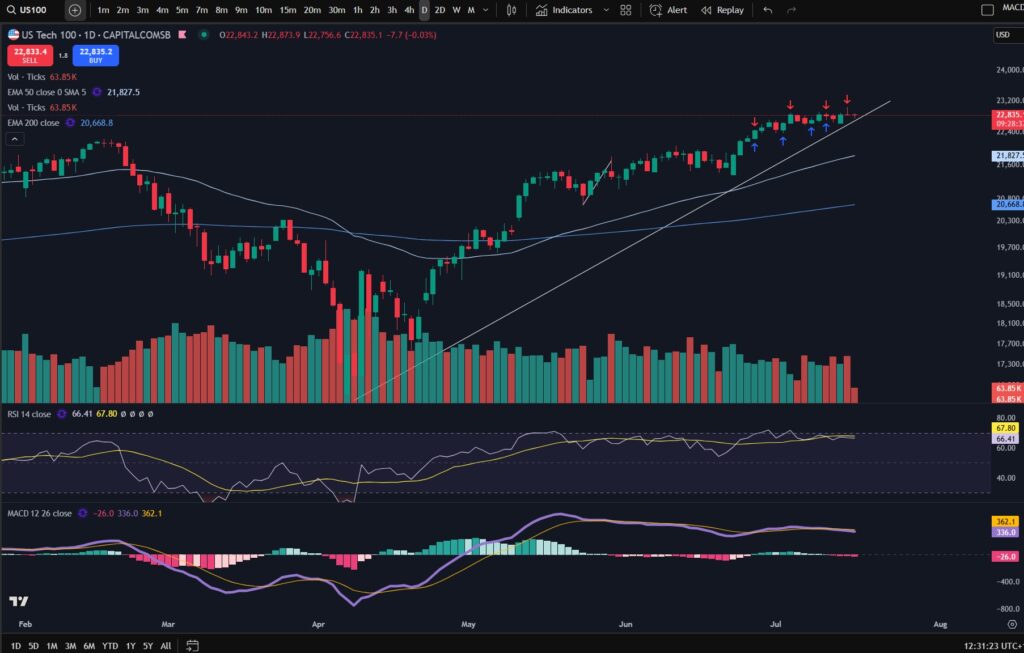
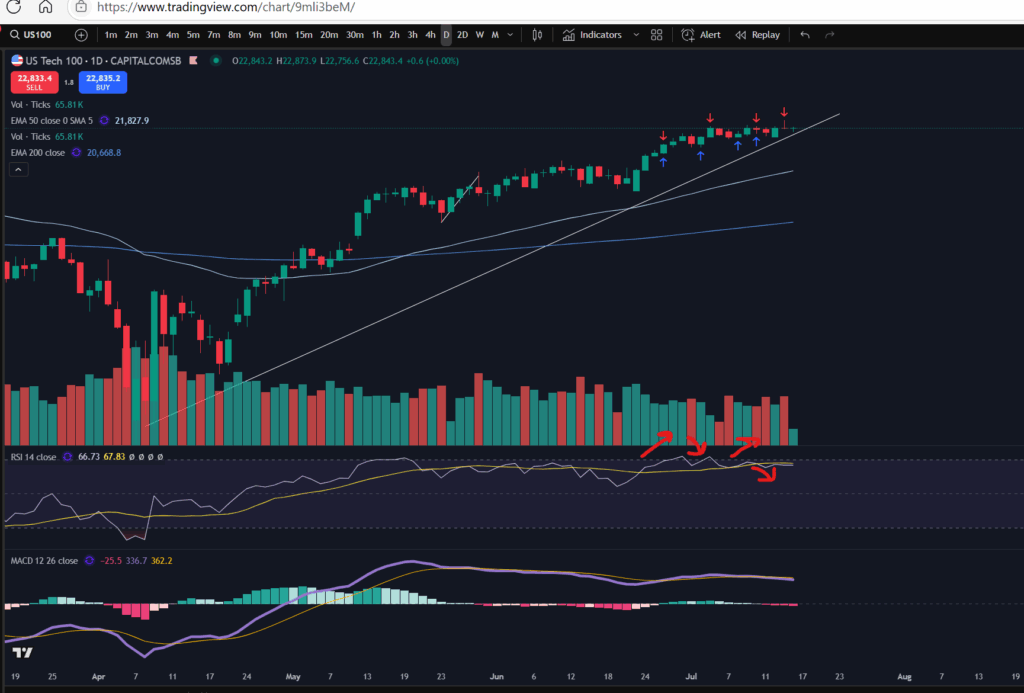
I’ve shared below the view from the daily timeframe of my own recent entries and exists using the NASDAQ trading strategy:

NASDAQ trading strategy

You can see i’ve been entering and exiting the market over and over and i’ve made a nice profit in the last few months in this way, not just on the NASDAQ but on other markets too!

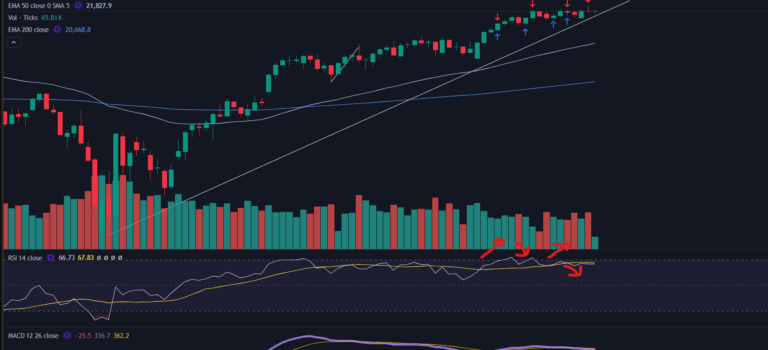
In terms of the view from the daily timeframe, some things to watch for include the ‘personality’ of the RSI indicator. I suggest you have this on your chart and watch for the subtle ebs and flows of this indicator up and down to check when the market has likely reached another little peak/trough:

NASDAQ trading strategy

Its’ a bit difficult to show clearly here but you can see the little red arrows I have marked on the direction of the RSI indicator. I got in, each time the RSI had pulled back to a tiny dip position, and got out again when it extended to the top of the RSI channel. You can use the RSI indicator to help you identify the peaks and troughs in this way and to get in and out of the market several times over. Compare the blue and red arrows on the candlesticks above which show my entries and exits, to the flows of the RSI indicator below.

Now let’s look at the entries and exits on the 30 minute timeframe:

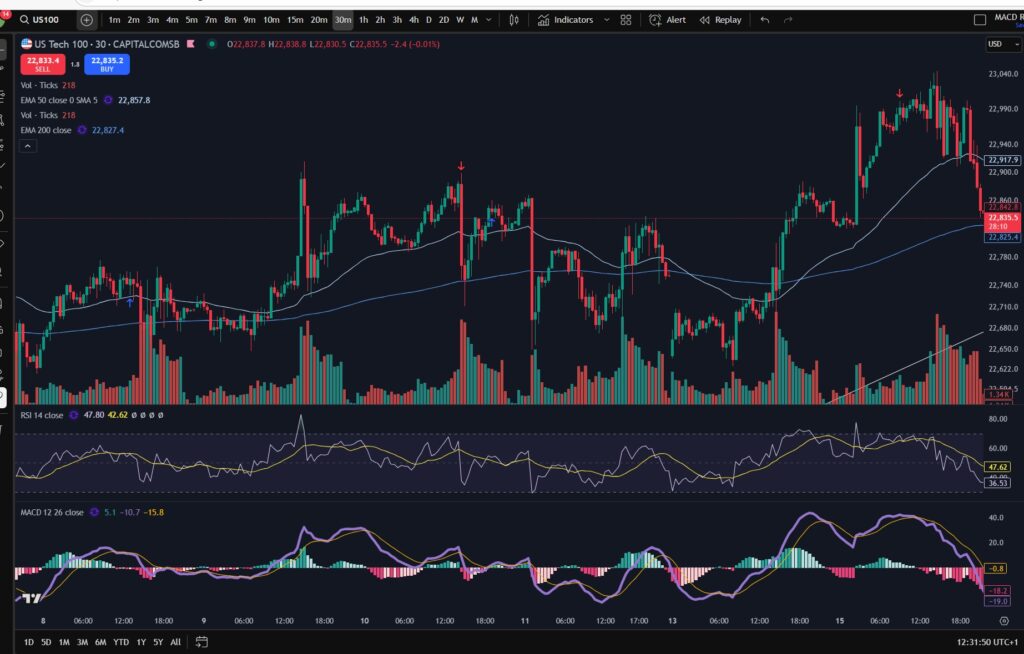
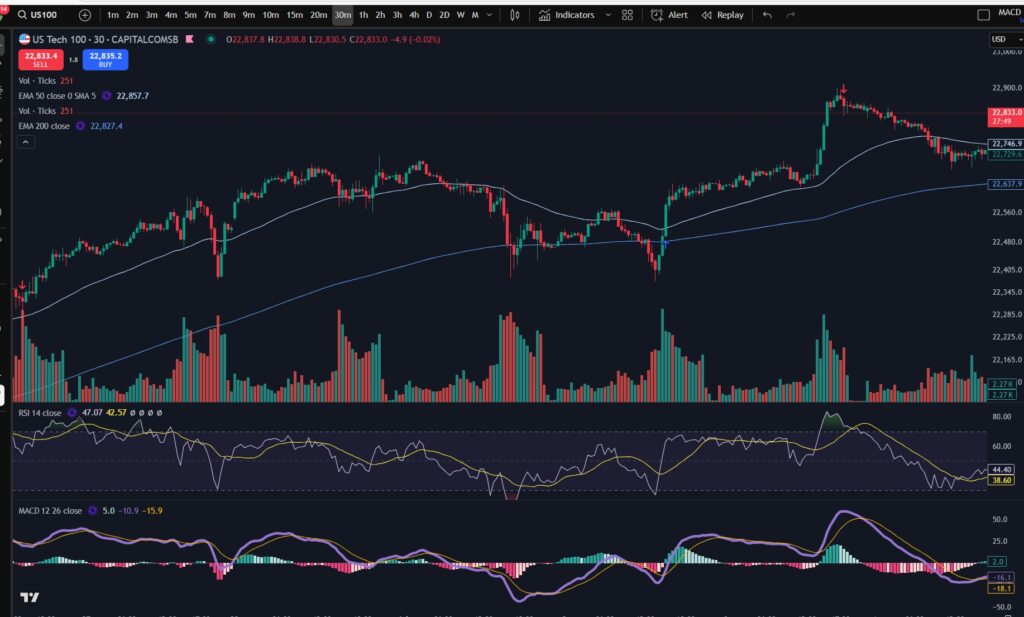
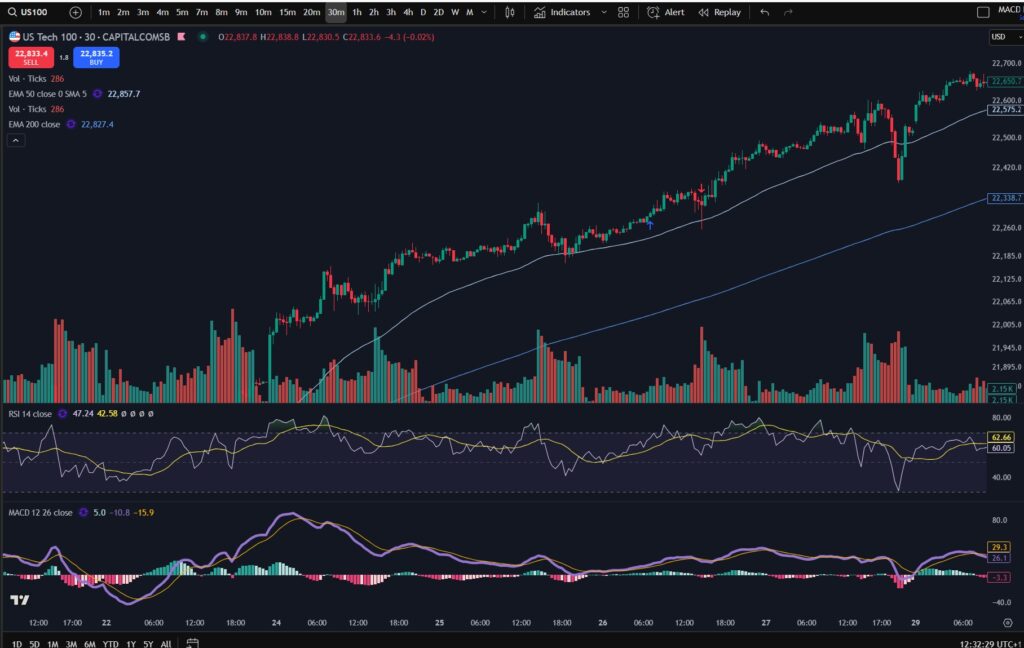
Here are some screen shots of the recent entries I made per the 30 minute timeframe view:

NASDAQ trading strategy

Some notes for you on the 30 minute timeframe view to bear in mind while you are applying this NASDAQ trading strategy – my entries and exits were not always perfect! There was one or two occasions where the market pulled back a bit further, after I entered. I prepared another recent article about how Trump’s tweets are affecting the stock market and I talked in that article about how to deal with the turbulent fallout. Here is a link to that video:

Here is the blog article I wrote about adapting my trading style to deal with President Trump’s tweets:

How President Trump is affecting the stock market – Trader Pro

As a result of my adaption to dealing with the markets in this new ‘Trump’ era, I learnt to ‘loosen’ my trading style. The key points I made were that I control my position size and I no longer use a stop loss. (I actually started out not using a stop and then started applying one some time into my trading journey, but now I have reverted back to not using one). This can only work if you control your position size and you are unlikely to get a margin call when the market goes slightly against you! It is not a recommendation to get into huge position sizes and not apply a stop loss.

The NASDAQ can be good for someone learning this NASDAQ trading strategy because it’s an average of some of the top stocks in America. Therefore, they are highly likely to push up overall and the ‘bad news’ of one of the companies on the index, is unlikely to pull the whole index down indefinitely. So… if the market dips a little and I entered at the wrong place/it was not a perfect entry, it’s ok. I wait – confident that I checked the daily timeframe and I was satisfied it is indeed near a low point overall. I wait for it to recover, and then take my profit again.

If the market did not recover for some time after my entry, I am still confident I will not be given a margin call – you can see other blog articles on my website which explain what a margin call actually is, and how to avoid it. If the markets have dipped down so much that they don’t recover for a while, it’s also a good time to stay out of the markets so I will be waiting in any event, and there is no loss for me except the little bit of profit on the portion of my account size which has been trapped/locked into my trade further up on the chart. In this scenario my plan would be to wait for the market to bottom out, and then get back in with another portion of my account, once i’m confident it’s recovering, and make profit all the way back up in the way I have illustrated above. I hope this makes sense to beginners but if you want to reach out and ask for further explanation I would be happy to help!

How do you know that the market had bottomed out after such a large pull back? You wait to see that it’s started making higher highs and higher lows, on the daily timeframe again. Here is a link to an article, showing you how to identify highs and lows properly:

Amazing secrets to help you make more money trading – spot a downtrend early! – Trader Pro

A video which will help you understand the strategy…

I’m sharing a video of the strategy being explained on You Tube which I hope you will find helpful:

I hope you found this NASDAQ trading strategy article helpful!

Understand my strategy in full: https://www.patreon.com/Traderpro8320

For more great tips on trading the financial markets, please visit my blog:

https://sophiatrades.co.uk

Discount on Trading View:

https://www.tradingview.com/?aff_id=117138

My performance in the live markets:

https://sophiatrades.co.uk/category/my-performance-statistics

Finally, thank you to my existing members on Patreon, and for your likes, comments and subscribes. Happy trading!

Please note any subscriptions taken via my affiliate link with Trading View may result in me earning a small commission.

How President Trump is affecting the stock market

How President Trump is affecting the stock market

Hi guys! It’s been a while because my trading style has changed over the last few months and I’ve really been trying to figure out what i’m comfortable with. I want to address how President Trump is affecting the stock market. In my opinion, leading up the elections in America and beyond during his time in office, the markets have been extremely erratic. This has affected my win rate when applying my usual strategy. Therefore, I have adjusted my approach. More below!

How President Trump is affecting the stock market – how it’s affected my own trading

During the period leading up to the elections, my usual win rate was not materialising in my own trading style and strategy. I started to understand that President Trump is affecting the stock market. As my followers know, I apply a MACD entry across multiple timeframes and get in at the support per the daily timeframe. During the period leading up to the elections, what I was finding was that the charts were indicating a good buy entry for me, but then shortly after entry, the price would come crashing down. This phenomenon has not ceased during the time that President Trump has been in office, and I have heard many other traders confirming that their own strategies have been affected by him being in office. It seems whenever he opens his mouth, the markets either come crashing down, or they start to shoot upwards. This phenomenon is believed by some to be deliberate!

So what have I done about this in my own trading style?

I have adjusted my style to become more ‘loose’ and manage risk in a slightly different way, so as to avoid the chaos which was ensuing as a result of the way in which President Trump is affecting the stock market. I have stopped using a stop loss. (I do not encourage you to trade without a stop loss unless you really know what you are doing!). I enter minimal position sizes until i’m sure that the market is going in the direction I predicted and I increase my position size as it progresses in the right direction. I make use of very little leverage. I am now moving my stop loss to follow the trend upwards on the daily timeframe. Mostly I am doing this on the indices such as the NASDAQ and the S&P 500. I move my stop up below the previous low of the trend, as the position moves into profit and keep doing this. When the market reaches a peak on the daily timeframe, I am very cautious about getting into larger positions and once they start pulling back, I allow them to stop out against the stop loss which, at that point, is in a position of profit.

I have found being more flexible with my trading style is working well for me and is helping me to avoid erratic swings due to news or announcements. I do not close the small positions I enter when they go against me – I just wait for them to start coming up again.

So to summarise:

  • – I enter small positions until i’m sure of direction;
  • – I do not make use of a lot of leverage – if the markets completely go against me, I am aware that I have enough money in my account to not get a margin call in light of the position sizes i’m trading. Even if the market went down by 50% of its value, I would still not get a margin call!
  • -I enter larger positions as the markets move in my favour;
  • -I enter a stop loss on the chart in a position of profit only (or neutral) and continually move it upwards just beneath the previous low of the trend
  • – Once the price reaches the peak area on the daily timeframe in terms of the previous high, I proceed with caution, and if necesary I allow the positions to trigger my stop loss which will be in profit at that point.

I hope you found this useful – even if it’s just knowing that you are not alone in believe your trading outcomes have changed from the way President Trump is affecting the stock market, since around the time of the elections. Please comment if you have found that his term in office has affected yFor more great tips and advice on trading the stock market, please visit:

https://sophiatrades.co.uk

To watch me trade live please visit my patreon page here:

https://www.patreon.com/Traderpro8320

Finally, if you would like to receive a discount on the Trading View charting software I use, please click on the relevant link here:

https://www.tradingview.com/?aff_id=117138

Please note any subscriptions taken via my affiliate link with Trading View may result in me earning a small commission.  However, I provide complete transparency on me using Trading View personally – I publish my success on the financial markets via my broker reports and any profits earned were done so by using my own Trading View subscription,  so I genuinely do recommend them and have been using the Trading View charts for many years.our trading!

Make more money trading – how to enter a trade step by step

In this article I’m going to explain in simple detail how to enter a trade in a margin spread betting or CFD account. I will explain how to enter a market order, set a stop loss and take profit/limit/target. I hope you find this helpful.

How to enter a trade

Entering a trade is quite simple but it should really tie up very well to your overall trading plan and strategy including your plan of managing risk. You can find articles on these on our blog here:

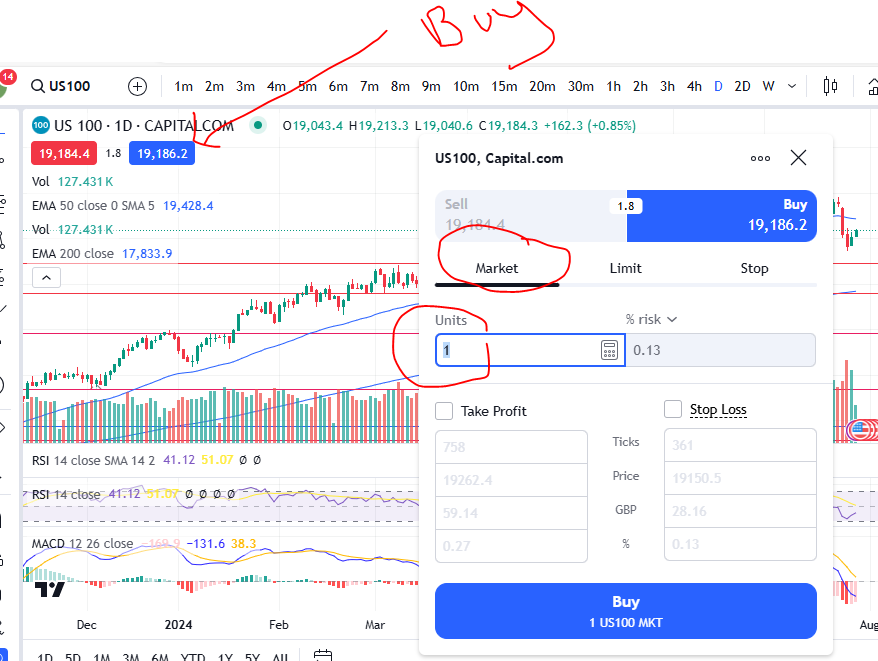
Right… getting back to how to enter a trade…if the above articles make sense to you, you can then choose to enter the market according to your strategy on your entry signal by opening up a deal ticket ‘market order’. A market order is an order which lets you enter the market immediately at whatever ‘buy’ price is displayed on your screen/chart. Let’s take a look:

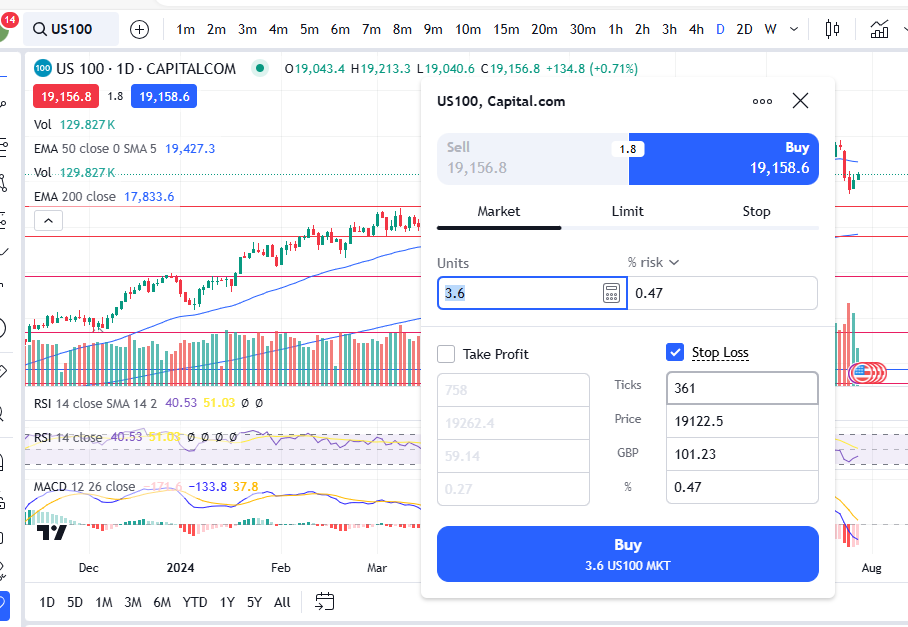
First, I selected the blue ‘buy’ button. I use Trading View but you should find that your broker account is displayed/arranged in a similar way. This brings up a deal ticket and you can see the default is that it opens on the ‘market’ order tab – see the ‘Market’ heading circled and the number of units you are about to purchase. You will want to fix your stop and then control your number of units afterwards – see below. This is so that you can fix the amount you lose on each trade to be exactly the same, regardless of market and trade set up. I produced a video explaining this on Patreon, here:

https://www.patreon.com/posts/how-to-control-104741853?utm_medium=clipboard_copy&utm_source=copyLink&utm_campaign=postshare_creator&utm_content=join_link

How to set a stop and limit/take profit

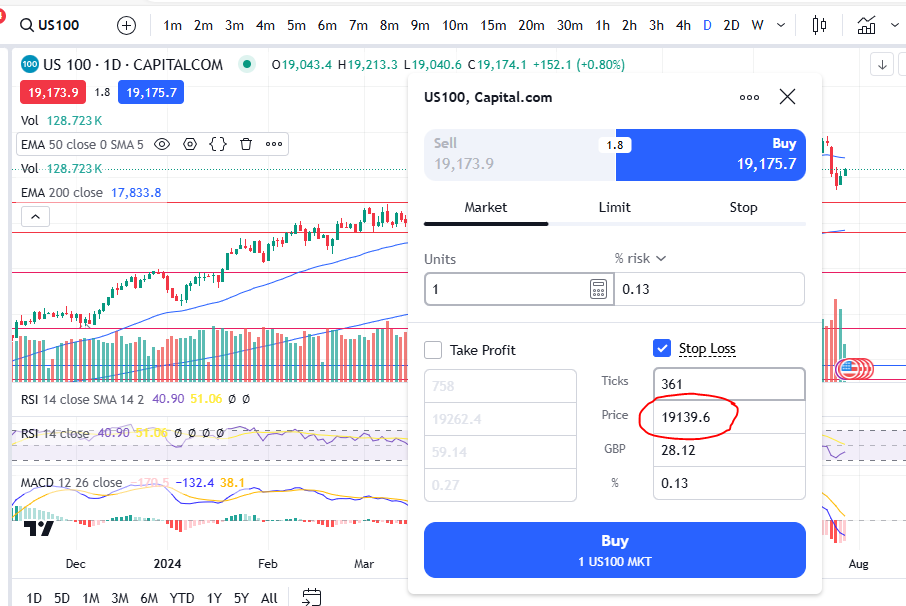
As stated above, it’s best to set a stop loss first. You should be aware of what ‘price’ you want your trade to exit the market at, should it go against you. See the section above on how to enter a trade. You can add this ‘price’ level to the trading view platform in the stop loss ‘price’ box, here:

In the above screen shot you can see that the ‘price’ level option is available for you to input a number. What you might find with some brokers, however, is that you need to choose an arbitrary ‘points away’ value and then adjust this on the chart by pulling the stop up or down on the chat, until it reaches the correct price according to your trade set up/strategy and plan. This was explained in my video on Patreon linked here:

https://www.patreon.com/posts/how-to-control-104741853?utm_medium=clipboard_copy&utm_source=copyLink&utm_campaign=postshare_creator&utm_content=join_link

Once you have set your stop price, you should be controlling the ‘quantity’/number of portions of the market you want to open. This should be etched up or down until you get to the required stop loss ‘value’:

In this example, I have controlled the number of portions to be such that the value I lose on the above deal ticket would be no more than £100. Note that this is not always perfect – you cannot always fix it exactly to the number you want. The closest I could get this on this example was £101.23 rather than £100. This is ok – such a small difference in stop value will not have an impact on your win rate or the success overall, of the strategy.

Once you have set your stop loss and chosen the quantity, you can then set your limit in terms of price. As with the stop, some brokers will force you to choose a ‘points away’ value and then you may need to adjust this line on the chart to pull your limit/take profit target to the correct position.

Once your stop, quantity and limit have been set, you are good to go, and you can just click buy/enter.

I hope all of the above makes sense, and it’s clear how to enter a trade, but if you are stuck, please do reach out and I would be glad to help!

Entering the market at a chosen price

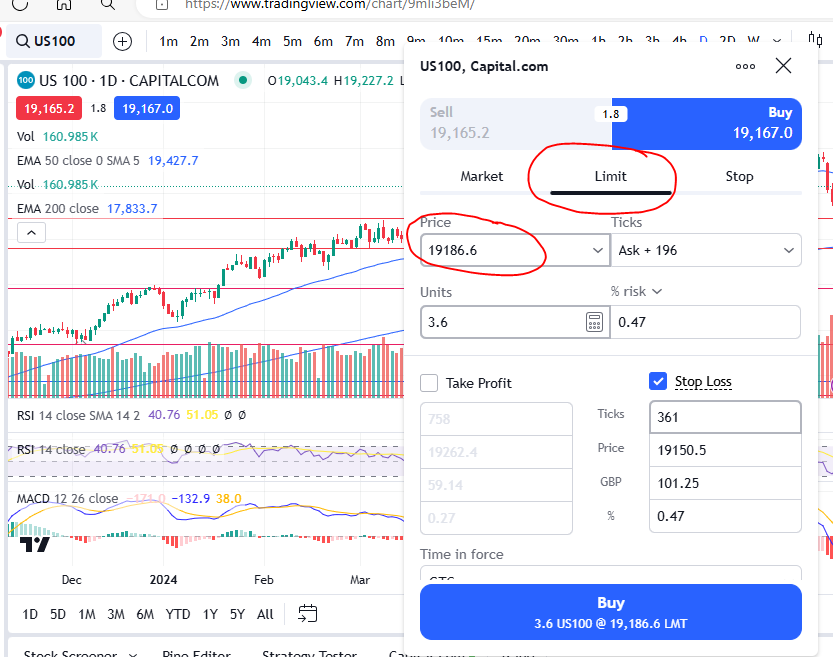
You can also enter a trade with a ‘limit’ order at a specific price. This will allow you to only enter the market at a given price, and if the market does not reach this required price, you will not enter. This will be exactly the same as the steps above but you will start by entering the ‘price’ at which you wish to enter the market, on a ‘Limit Order’ ticket, into the relevant box:

How to enter a trade

Once you have chosen the limit order and entered your limit price, the other steps will be the same as above for a market order.

I hope you found this article helpful.

For more great tips and advice on trading the stock market, please visit:

https://sophiatrades.co.uk

To watch me trade live please visit my Patreon page here:

https://www.patreon.com/Traderpro8320

Finally, if you would like to receive a discount on the Trading View charting software I use, please click on the relevant link here:

https://www.tradingview.com/?aff_id=117138

Please note any subscriptions taken via my affiliate link with Trading View may result in me earning a small commission.  However, I provide complete transparency on me using Trading View personally – I publish my success on the financial markets via my broker reports and any profits earned were done so by using my own Trading View subscription,  so I genuinely do recommend them and have been using the Trading View charts for many years.

MACD secrets to help you make more money trading

MACD secrets to help you make more money trading

In this article I’m going to share with you some MACD secrets on how you can use the MACD indicator in a really practical way to make more money trading. You will not likely find these useful, very simple and practical tricks discussed anywhere! If you are intrigued please read on!

MACD Secrets… First, what is the MACD indicator?

The MACD indicator stands for Moving Average Convergence Divergence. We discussed in detail the technical side of how this indicator works in one of our other blog posts. You can read the technical detail here:

OK. So now you know what the MACD is, how can you use it in a practical way to make even more money when you are trading?

MACD tips which other traders don’t tell you…

The first MACD secrets we would like to share with you, is how to use the MACD to help you avoid taking losses when an uptrending market is starting to change direction and it’s running out of steam. We discussed how this can be done by noting the swings high or low of the MACD indicator, and whether or not the market is making higher highs based on these, in this article:

So how else can you use the MACD? What other MACD secrets are there to share? The MACD can show you the strength of momentum. Let’s take the histogram bars as an example… when the histogram bars are growing in size, it means the market is either increasing strongly or decreasing strongly in price. Also, when the histogram bars turn from dark green or dark red to light green or light red, it means the market’s price is losing it’s strength in which ever way it has been travelling… let’s take a look at some examples:

For a discount on the charting software used (Trading View), please click here:

https://www.tradingview.com/?aff_id=117138

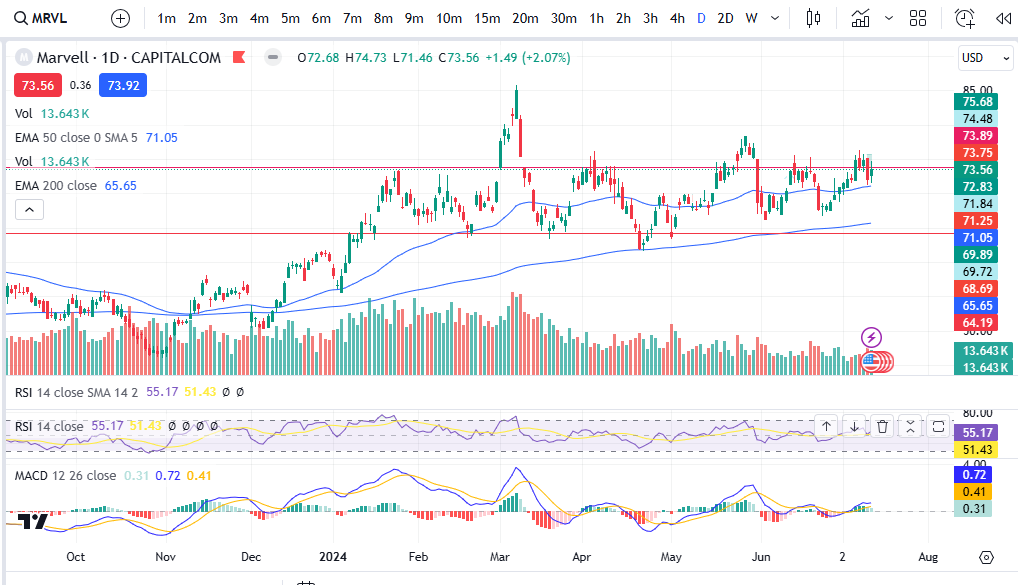
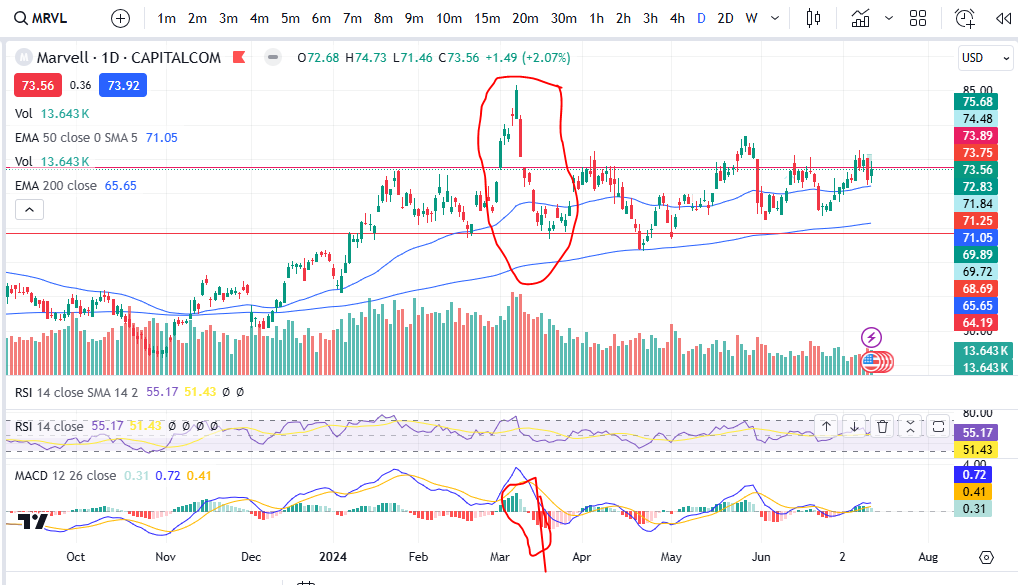
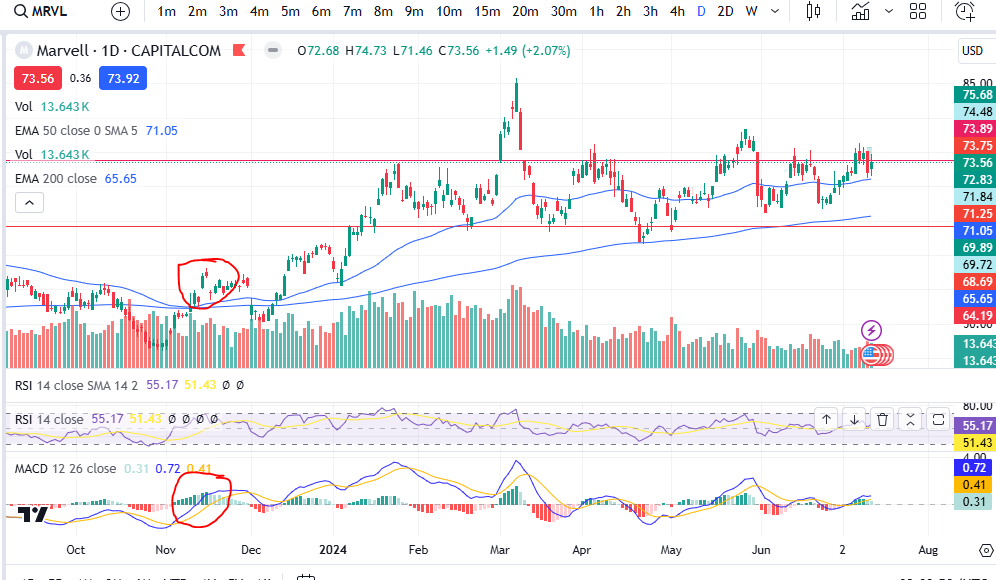
I’ve provided the example of Marvel above. As you can see, the MACD histogram bars are dark green usually straight after a cross over, which is why this indicator can be used to spot an entry signal after a cross over below the zero line of the histogram, but after the cross over, how do you know whether the market is losing it’s strength? Note the colour change of the histogram bars on the above chart and then compare that to the price action above:

I’ve circled an example – you can see when the histogram started turning light green, the market’s price started dropping like a brick. On this occasion the indicator was slightly ‘lagging’ but you can see other examples where there was an early warning before the market dropped! See the example below:

You can see the colour of the histogram bars were flicking on and off from dark to light green – a warning sign! Then what followed? The upwards move completely lost it’s strength and the market started making a pull back.

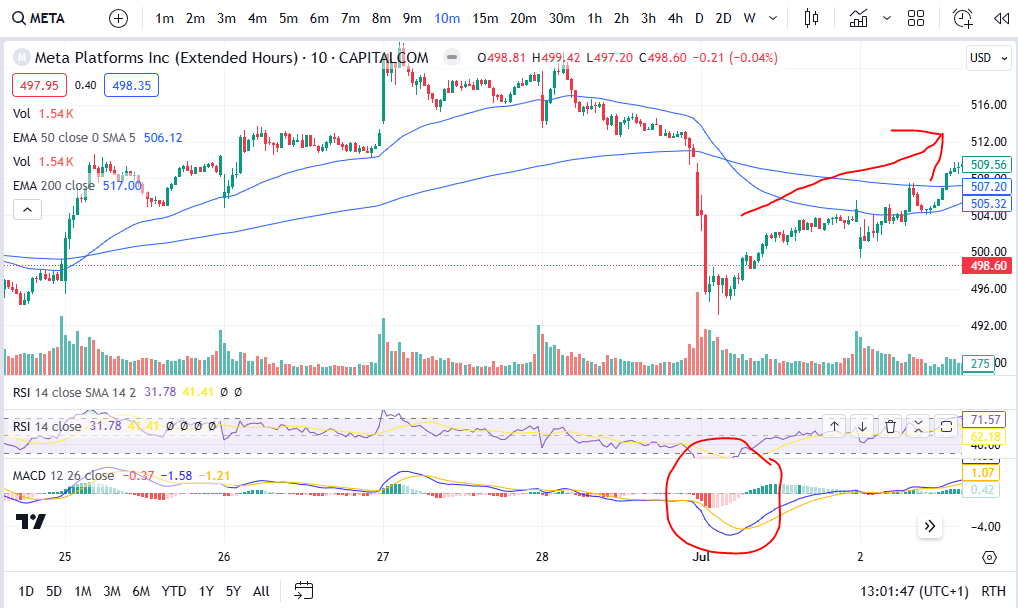
Another way you can use the MACD to tell you what the market is likely to do, is by looking at the shape of the MACD cross over. If the shape of the MACD and Signal lines going into the cross over are such that they are almost at a vertical angle, this can be a really good indication that the price is going to move quickly in the direction of your choice… if the cross over is happening with a gradual ‘sliding’ ‘converging’ of the two lines this can be less fruitful. Let’s take a look at some examples:

As you can see in this example on Meta Platforms, the blue MACD line scooped under in such a way that it had a lot of momentum and the price pushed significantly higher after this on the chart. Let’s look at the opposite situation:

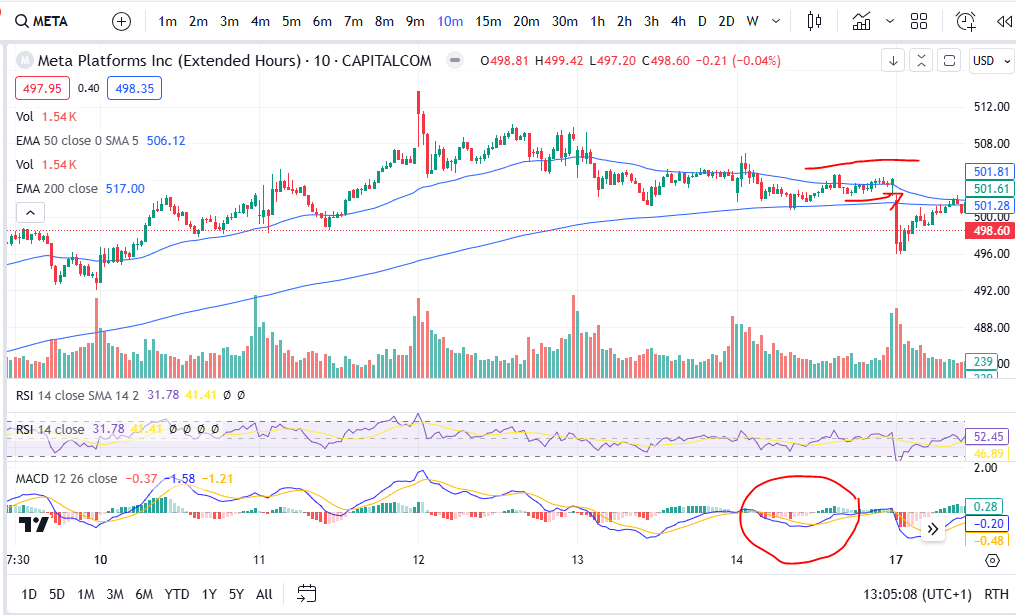
MACD secrets

As you can see here, the price movements are almost flat after the cross over circled above- the MACD and Signal lines were very closed up after the cross and before the cross – and the price movement following the cross was insignificant. Indeed, the price actually took a nose dive shortly after this area on the chart! The momentum for the price to go up was weak and exhausted.

Once you get the hang of spotting these very practical MACD secrets, they really can help you in understanding the markets. We hope you found this article helpful.

For more great tips and advice on trading the stock market, please visit:

https://sophiatrades.co.uk

To watch me trade live please visit my patreon page here:

https://www.patreon.com/Traderpro8320

Finally, if you would like to receive a discount on the Trading View charting software I use, please click on the relevant link here:

https://www.tradingview.com/?aff_id=117138

Please note any subscriptions taken via my affiliate link with Trading View may result in me earning a small commission.  However, I provide complete transparency on me using Trading View personally – I publish my success on the financial markets via my broker reports and any profits earned were done so by using my own Trading View subscription,  so I genuinely do recommend them and have been using the Trading View charts for many years.

Support and Resistance – how to make more money trading

Support and Resistance – how to make more money trading

In this article I’m going to explain what support and resistance is, how it affects the markets and how you can use it to make more money in your trading. All traders have got knowledge about support and resistance, and they use this knowledge frequently when placing trades on the market – it would be suicide to attempt trading without it! So let’s get started in understanding it!

What is support and resistance?

Support and resistance refers to areas which are particular zones of a financial chart where the price tends to touch the area and then rebound away from it. These areas are where there tends to be a lot of buying and selling pressure. Let’s take a look at some examples:

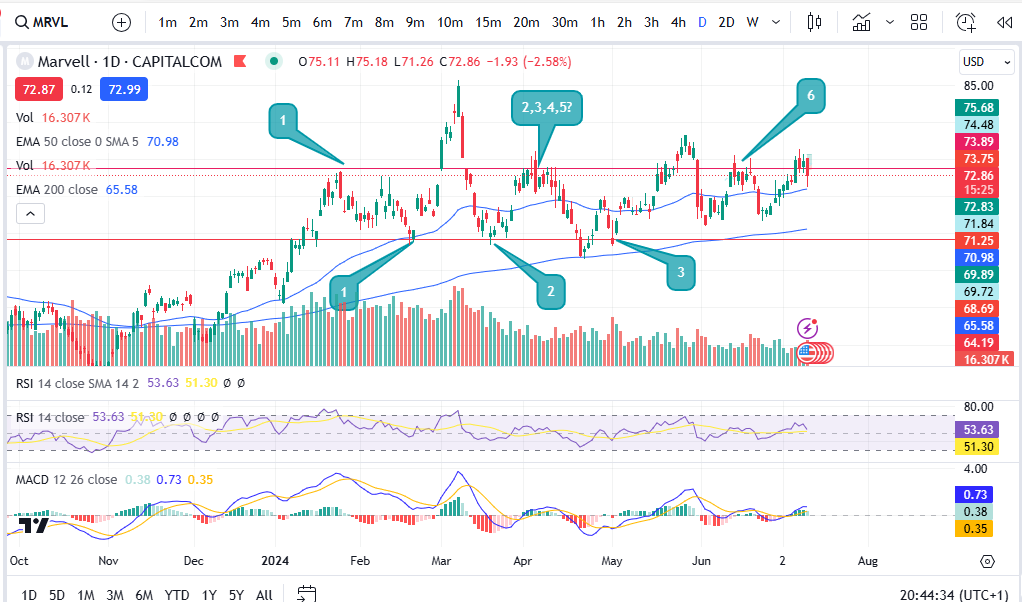
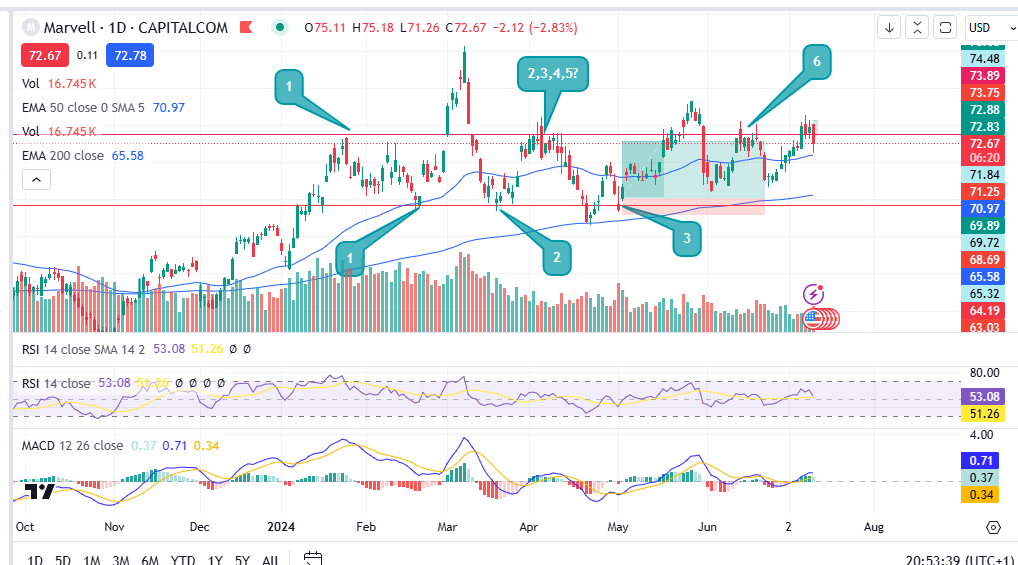
OK… So I’ve given you the example of the chart of Marvell. (If you would like a discount on the chart software I use, please click here):

https://www.tradingview.com/?aff_id=117138

As you can see on the chart, the price tends to touch the red lines and then rebound away. It has done this several times (numbered with the chat bubbles). When the price gets to around 71.25, the price tends to react at this level and push up from there. The opposite is true for the red line at the top of the price movements which is around 73.69.

So why does the price move in this way?

The answer is that many sellers including hedge funds and institutional investors, are aware that the price historically has reached such a level as a limit to the extent to which it can stretch before rebounding. Sellers and buyers are aware of these historical levels – and they then reinforce them by buying and selling at these levels even more, which creates something similar to a self fulfilling prophecy.

For example, if historically on the chart it can be noted that the price always moves up after it falls to the 71.25 level, many buyers will be watching and waiting for the price to reach this level before they place a buy order. They know there is a strong probability that the price will increase from this area. This in turn leads to more buying pressure and volume, creating the movement again away from the area – and so a pattern is formed after some time where this happens repeatedly. This leads me on to discuss the ‘usefulness’ of support and resistance in trading.

So how can support and resistance be used in trading?

If you can see historically that the price tends to move upwards after it touches a particular point on the chart, you can make a note of this and wait patiently for the price to enter the ‘support’ zone. The area will be called a support if there is a lot of buying pressure there. Likewise, the area is referred to as a ‘resistance’ when there is a lot of selling pressure at the area. Once the price has entered the support zone, the buyer can place a buy order and wait for the price to ascend upwards in line with the historical movements. The movement upwards from a support is not guaranteed but it will have a strong probability to move upwards from that spot.
The same is true for placing a sell order at a resistance level. A seller can place an order there and wait for the price to descend towards a profit target.

The stop losses can be set to the other side of the support/resistance zone, as so:

The stop loss would be placed where the bottom of the red zone is on the trade set up diagram above. The target could be set for the upper resistance area/line. This would apply the opposite way for a sell at the top line with the stop loss being placed above the top red line and the profit target being placed at the bottom red line.

As well as taking profit at these types of zones, some traders also place ‘break out’ trades. Break out trades work on the basis of the event of the price breaking through a strong support or resistance level. If this happens the price tends to move far and quickly beyond the level. Some break out traders achieve a 4:1 reward risk ratio for example. To understand risk management, please see my other article here:
How do you identify and draw these lines on the charts?

When ‘identifying’ support and resistance zones, you want to go to the daily time frame and zoom out as far as you can go, to see the greatest amount of historical price movement on the screen. Then take note of any really obvious levels. If you are squinting to see whether a level is present or not, it’s not! It needs to jump out at you and be really obvious. You want the price to have touched the level and rebounded at least three times but preferably more. The greater number of times it has touched the level and rebounded away, the better! I shared a video on my Patreon channel on how to draw support and resistance, here:

https://www.patreon.com/posts/support-and-102073984

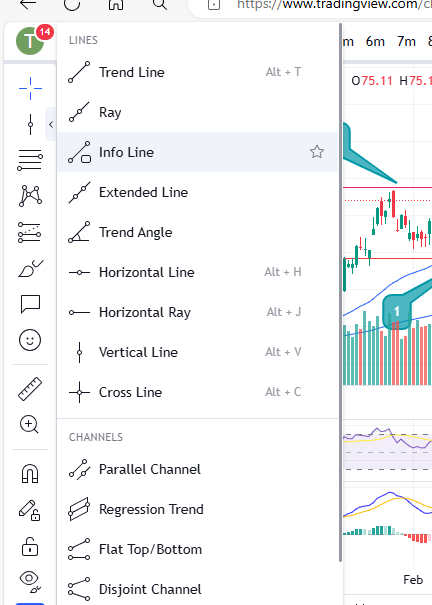
You can select some tools on most charts to apply horizontal or diagonal lines to a chart (support and resistance can happen diagonally too but these are less strong than the horizontal lines) – you can see them in Trading View in the menu on the left here:

support and resistance

Also note that the most recent activity is the most important activity. Be sure to observe any recently formed support and resistance lines as well as really old ones.

Another thing to be aware of is that when the price busts through one of these zones, let’s say a resistance level, this resistance will then likely become a support for the higher prices – meaning it will in future touch it and go up, whereas previously it was touching the level and rebounding down.

I hope you found this article helpful.

For more great tips and advice on trading the stock market, please visit:

https://sophiatrades.co.uk

To watch me trade live please visit my patreon page here:

https://www.patreon.com/Traderpro8320

Finally, if you would like to receive a discount on the Trading View charting software I use, please click on the relevant link here:

https://www.tradingview.com/?aff_id=117138

Please note any subscriptions taken via my affiliate link with Trading View may result in me earning a small commission.  However, I provide complete transparency on me using Trading View personally – I publish my success on the financial markets via my broker reports and any profits earned were done so by using my own Trading View subscription,  so I genuinely do recommend them and have been using the Trading View charts for many years.