How to trail a stop to make big profits trading

How to trail a stop to make big profits trading

In this article i’m going to talk about how you can trail a stop loss to make even more profit when trading the stock market. I’m going to take you through the different types of manual trailing stops you can use, and the types of scenarios they might be useful in. Let’s get straight into it!

How to trail a stop loss – what do we mean by trailing a stop?

When you ‘trail a stop loss’, it means you follow the price at a safe distance, with a stop loss – you move your stop slowly to mimic the price increases on the chart so that if the price descends, you will not lose the profit on the table you have already earned. However, it allows scope for the price to increase further and in this way, you can make profit out of long trends! What’s not to love?

To understand stop losses and risk management, please see our other article, here:

Risk Management – setting a stop loss? How to make money – Trader Pro

Please also see our YouTube video, here, on managing risk:

How to trail a stop loss – the manual way

There are some automatic ways to trail a stop but please note, they are not covered by this article. I’m going to share with you, how I trail a stop manually here. There are different scenarios which would help me to decide how ‘closely’ to trail a stop. This would depend on how much leverage i’m using, whether I have profit on the table, how far I think the price will go and how much room I believe it needs to breath and fluctuate if I’m trying to catch a long trend.

The way I trail a stop is to look for a support – the support could be either a candle (to trail a stop closely), a low on a trend (perhaps to try and trail a trend for a long time), a support line (either diagonal or horizontal) – you could also use this latter type for long trends and breakouts. I would keep my stop at the most recent support and move it manually once the price moves up into a new zone/level.

For scenarios where i’ve made a little trade, the price has gone near my target, and I believe there is a chance it could grow a little more, but I don’t want to risk the profit i’ve made already, I would trail a stop very closely, using the candles. This is the type of scenario where I would not be looking to catch a long trend with the trailing stop. Let’s look at an example…

Trailing a stop closely using candles
trail a stop

To get a discount to the Trading View software that I use, please click the link below:

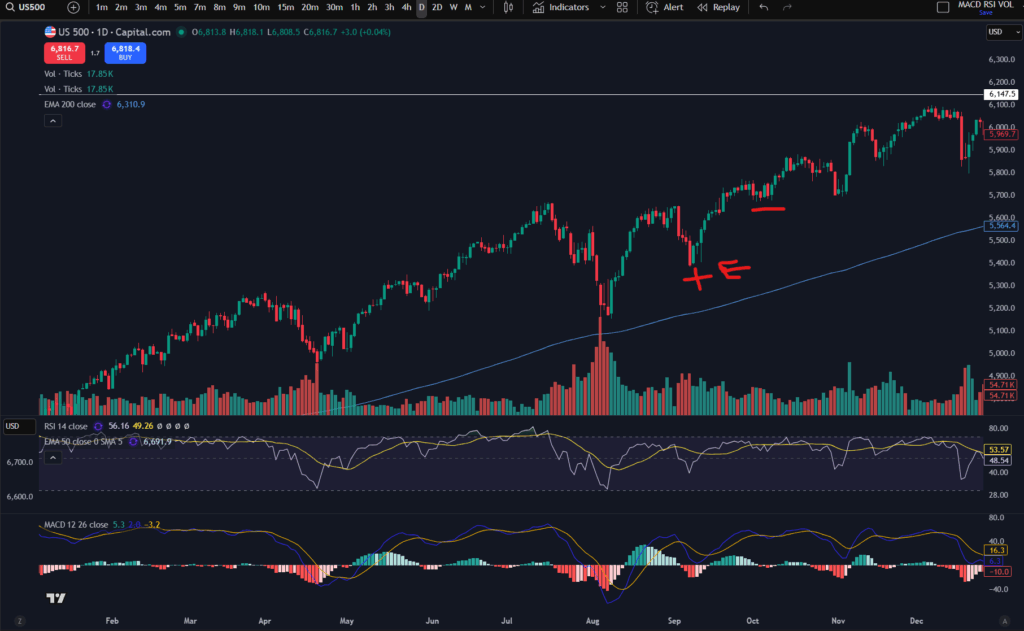
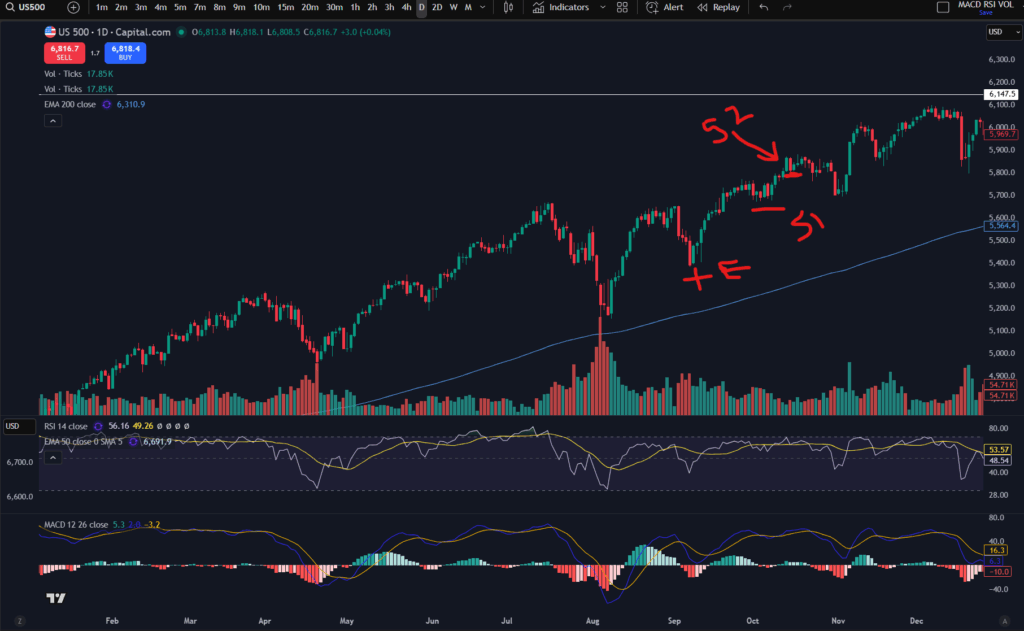
Let’s say you entered the market in the above trend where i’ve marked a + sign and ‘E’. Your initial intention was to take profit near the previous high so you’ve got some profit on the table, but the market is showing no sign of resistance and you are tempted to see if it will keep going…. you can trail a stop underneath one of the red/lowest candles where it has breathed/pulled back slightly. If you placed a stop where i’ve marked the next red line/marker on the chart, the price did indeed carry on going up further until it pulled back again… at this point you could have taken profit off the table. Alternatively, after the initial stop position, if I were in such a trade, I might be tempted to move it up again, just under the next red candle – marked below:
trail a stop

You can see in the chart above, where I have marked ‘S2’ that this was anther red/low candle and it tried to push up further after this, but it then pulled back down. You would have got stopped out at this level which is a nice bit of profit over and above your original target!

Trailing a stop on long trends

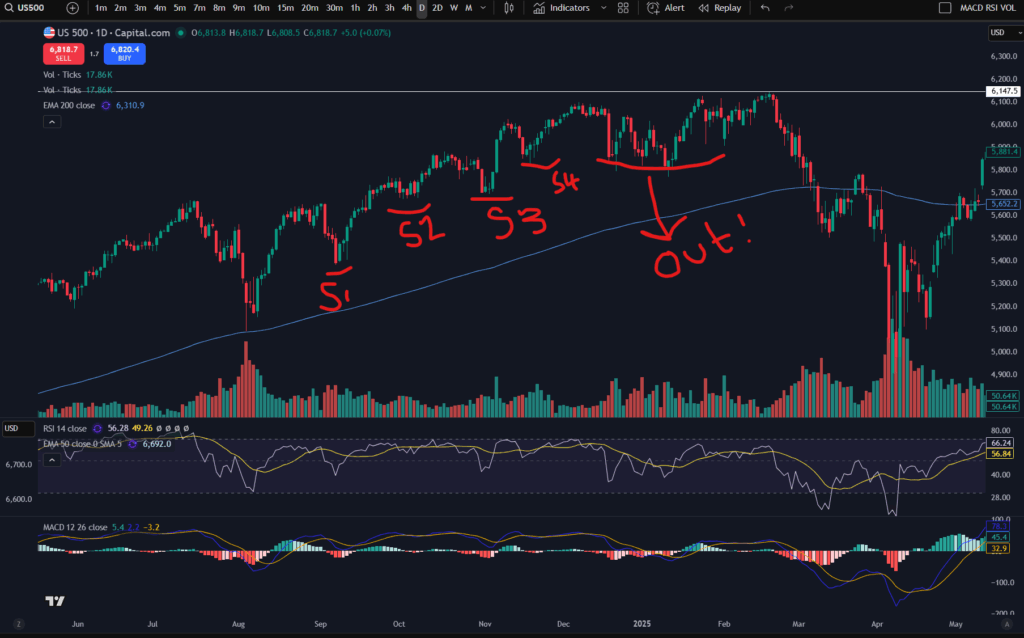
For trailing a long trend, I would instead use the highs and lows of the trend, or diagonal/horizonal support and resistance lines. Let’s take a look at how this could work:
trail a stop

OK, so as you can see in the above chart, i’ve marked out where your stop loss would be moved to manually – every time the trend makes a higher low the stop is moved. I use the MACD indicator to tell me where the highs and lows are in a trend. If you would like to understand this more, please see the following article:

Amazing secrets to help you make more money trading – spot a downtrend early! – Trader Pro

Also please see my video on this:

Back to the chart! So you can see that you would have been able to ride this trend up to just before it crashed down and you would have scooped a large amount of profit from the market. You can see that the stop position ‘4’ would have stopped you out in this trade because shortly afterwards the price fell back down to this level.

Trailing a stop in horizontal steps of resistance and support

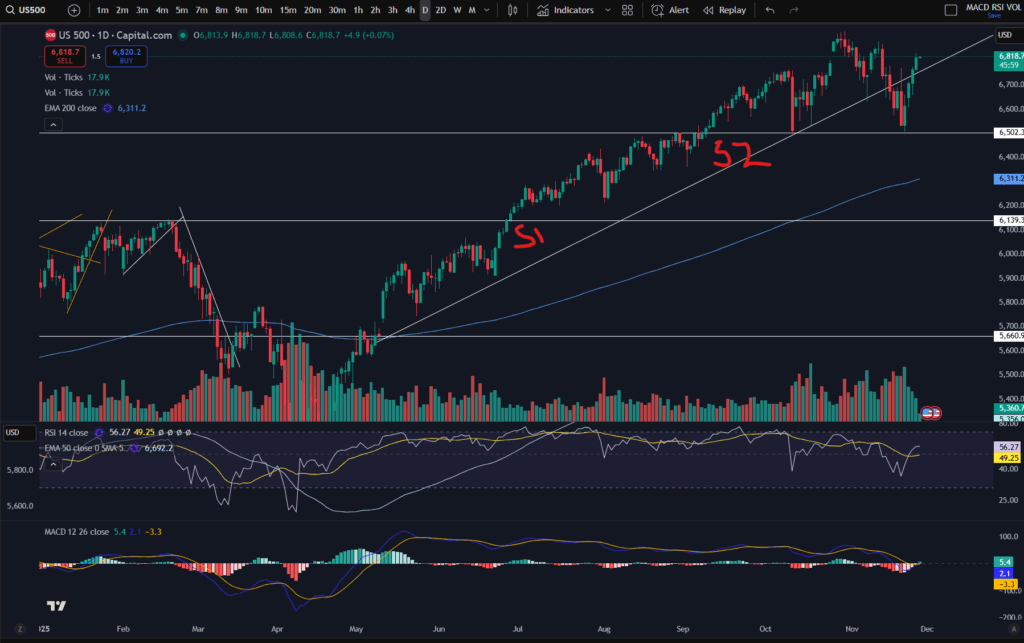
In the same way as you can trail a stop in a diagonal movement, you can also trail it in a horizontal step up movement. If you have got support and resistance lines drawn on your chart, you can move the stop up just under the last support level, every time the price pops up into a new zone. For information on understanding how to draw support and resistance levels, please see this article:

Support and Resistance – how to make more money trading – Trader Pro

Let’s take a look at what this looks like on the chart:
trail a stop

As you can see, there are major support and resistance levels marked on this chart in white. I’ve added S1 and S2 as suggested places to which the stop loss could be moved, as the price pushes up through these stepped levels.

I hope this helped you understand how you can trail a stop loss and take even more profit from the market. I’ve also shared below my video on this in case you find it easier to digest:

Understand my strategy in full: https://www.patreon.com/Traderpro8320

For more great tips on trading the financial markets, please visit my blog:

https://sophiatrades.co.uk

Discount on Trading View:

https://www.tradingview.com/?aff_id=117138

My performance in the live markets:

https://sophiatrades.co.uk/category/my-performance-statistics

Finally, thank you to my existing members on Patreon, and for your likes, comments and subscribes. Happy trading!

Please note any subscriptions taken via my affiliate link with Trading View may result in me earning a small commission.
Multiple Timeframe Analysis – mind blowing knowledge that will change everything!

Multiple Timeframe Analysis – mind blowing knowledge that will change everything!

In this article i’m going to talk about something which is paramount to your trading – multiple timeframe analysis. This will blow your mind and change the way you trade forever! Multiple timeframe analysis is essential for new traders to learn – it will change the way you trade and see the markets, forever! Let’s get straight into it…

What is multiple timeframe analysis?

Multiple timeframe analysis is what it says on the tin – undertaking analysis on multiple timeframes to get a clearer idea of what’s happening in the markets. So how does this work, and how can it help you in your trading? The basic premise is that you use ‘larger/higher’ timeframes to get a bird’s eye view of the market – where the price is going long term, what the long term trend is, if there is one. Is it in a range long term? Then you can use the smaller timeframes to ‘zoom in’ and plan and execute your trades with greater precision. Let’s take a look at how this might work. It is common for people to use the ‘daily’ timeframe as their higher timeframe. I personally use this timeframe as a higher timeframe, but note that I also refer to the ‘monthly’ timeframe as another level up, to get an even higher ‘birds eye view’ as compared to the daily.

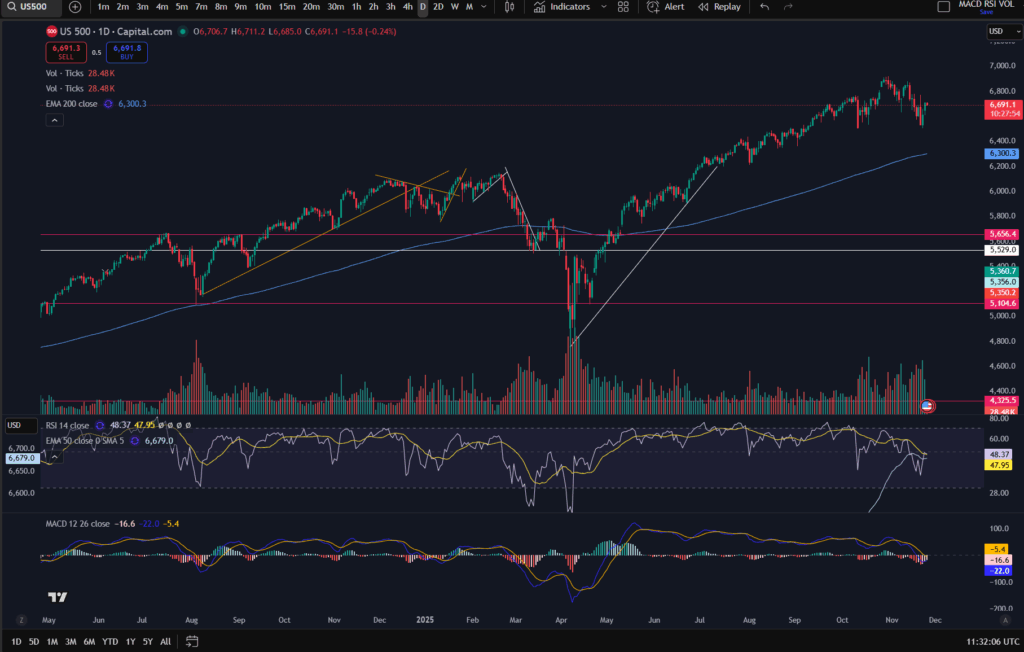
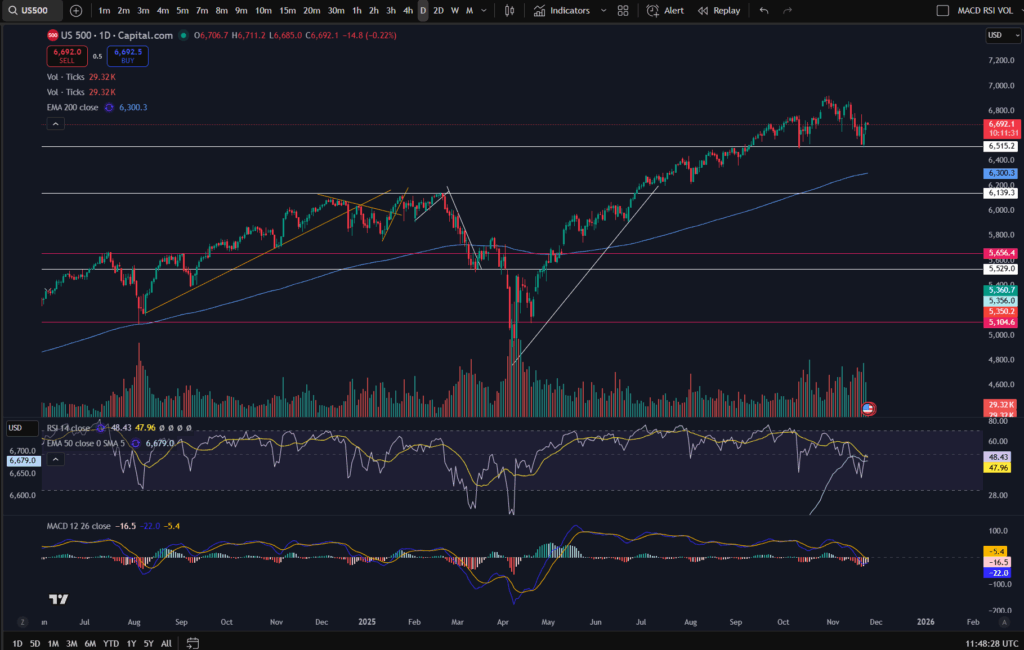
Let’s look at the daily timeframe on the S&P 500 most recently:

multiple timeframe analysis

You can use the daily/higher timeframe, to mark major support and resistance levels, as below:

multiple timeframe analysis

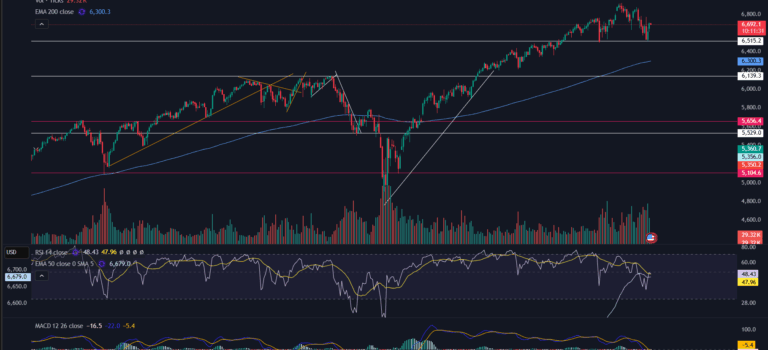
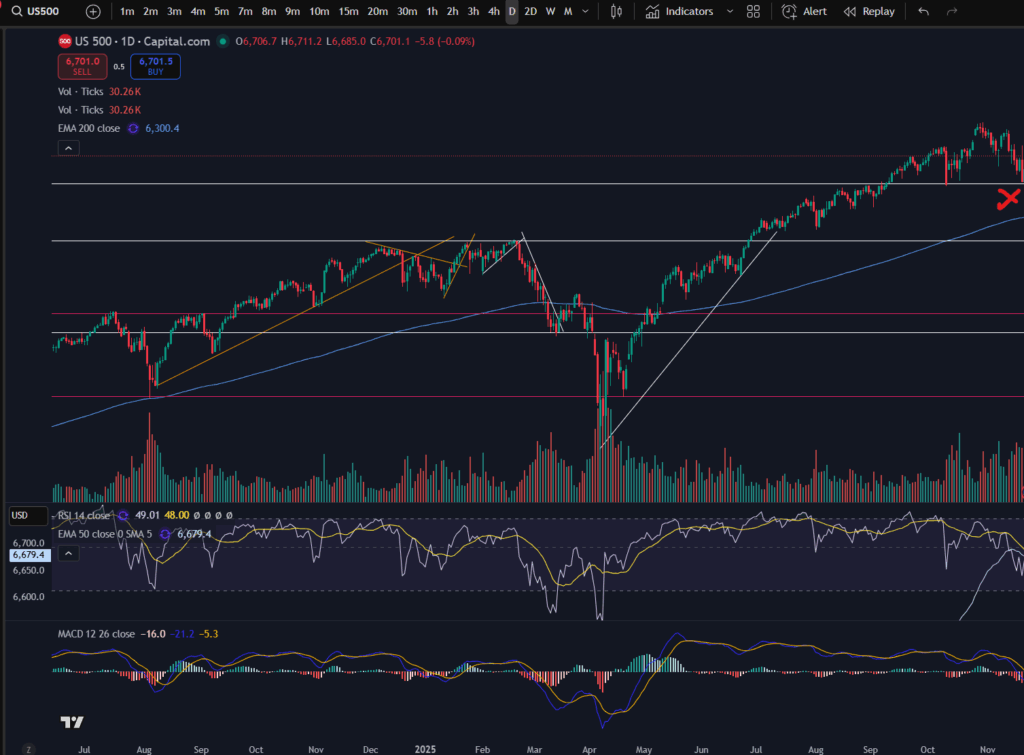
You can see that the price has found a support a few times at the white marked horizontal line on the chart (6,515). (If you think you would benefit from using this chart software, I can offer you a discount, through Trading View – please click the link below):

OK, so back to the chart analysis! Why is marking the higher timeframe in this way, important when using multiple timeframe analysis? The higher the timeframe, the more people, hedge funds, big money etc, are noticing the resistance or support level – which gives it more weight! More people are going to be respecting those levels and being mindful of them. More people will get into the market at the higher timeframe support area – meaning there will be a stronger push up from that level as a result of sheer volume and demand.

So you can use the higher timeframe to plan the general ‘area of interest’ in your trade set up. For information on how to plan trades and where to get started, please see our blog article:

How to create a Trading Plan – make big wins trading – Trader Pro

Once you have got your general ‘area of interest’ per your bird’s eye view, you can then ‘zoom in’ by using a smaller timeframe. The smaller timeframe should be about 4 timeframes away from your bird’s eye view timeframe. For example, I use the daily timeframe as my bird’s eye view, and the 30 minute timeframe to execute trades, currently. I have combined the daily with the 10 minute and this did work for me, as well.

Smaller timeframe analysis – Zooming in!

OK, so now that you have your general area of interest per the larger timeframe, you can use the smaller timeframe, under multiple timeframe analysis, to plan how to ‘execute your trade. We established that on the daily timeframe for the S&P 500, there was a general resistance level at around 6,515 price. Let’s say we were just at the red X marked below and we had not gone past this point – we knew that the price typically bounces at this level and we expect it to, because in the past, this area was a resistance, too – see how the price was bumping against it, in mid August on the chart below.

multiple timeframe analysis

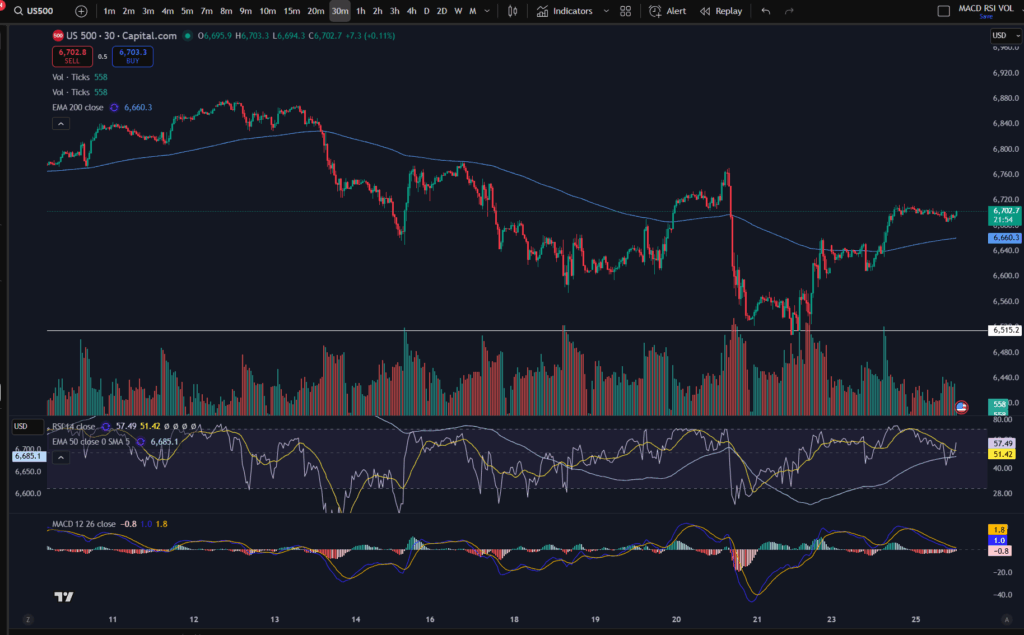
Bearing in mind this is our point of interest, we might want to get into a trade here, at the support. Now let’s take a look at the 30 minute timeframe to plan this possible trade. We are interested in the price at mid November on the 30 minute timeframe. (Usually you will not have to cut off the chart in this way, obviously – i’m just showing you, retrospectively, how you may have planned and executed a trade at this level):

multiple timeframe analysis

OK, so here we have the zoomed in view of the ‘bounce’ on the daily timeframe. Under my strategy, I would want the price to have popped up over the EMA line before I consider entering a trade. You can see my strategy here:

NASDAQ trading strategy that will make you thousands! ££££££ – Trader Pro

The point of the lower timeframe is that you can see ‘under a microscope’, what’s happening in the market. You can execute your trade at just the right place on the chart, with extra precision.

You plan and execute your trade including the ‘take profit’ and ‘stop loss’ levels per the smaller timeframe, when using multiple timeframe analysis. Do not set a take profit on the daily timeframe. You have to understand that if you put your take profit at the top of a peak on the daily timeframe, it may take weeks to get there, depending on how many days need to go by, to get up there. This is why we plan and execute per the smaller timeframe – each candle is only 30 minutes, or 10 minutes, or whatever you choose to use. So it could take 12 x 10 minutes = 120 minutes to get to your target on the smaller timeframe of 10 minutes. If you waited for 12 candles on the daily timeframe you would be waiting for 12 days!

I hope you found this helpful. I also created a video on my Youtube Channel which you may like to see on multiple timeframe analysis:

Understand my strategy in full: https://www.patreon.com/Traderpro8320

For more great tips on trading the financial markets, please visit my blog:

https://sophiatrades.co.uk

Discount on Trading View:

https://www.tradingview.com/?aff_id=117138

My performance in the live markets:

https://sophiatrades.co.uk/category/my-performance-statistics

Finally, thank you to my existing members on Patreon, and for your likes, comments and subscribes. Happy trading!

Please note any subscriptions taken via my affiliate link with Trading View may result in me earning a small commission.
Nothing in this video should be taken to constitute financial advice. Although we make observations on the current state of the markets, nothing we suggest should be taken as an indication of what they will do next. You are required to carry out your own due diligence before entering any of the markets.

What’s happening now on the NASDAQ?

In this article i’m going to talk about what’s happening now on the NASDAQ and give you some technical analysis on the recent price movements. Let’s just get straight into it:

What’s happening now on the NASDAQ? The Monthly Time Frame

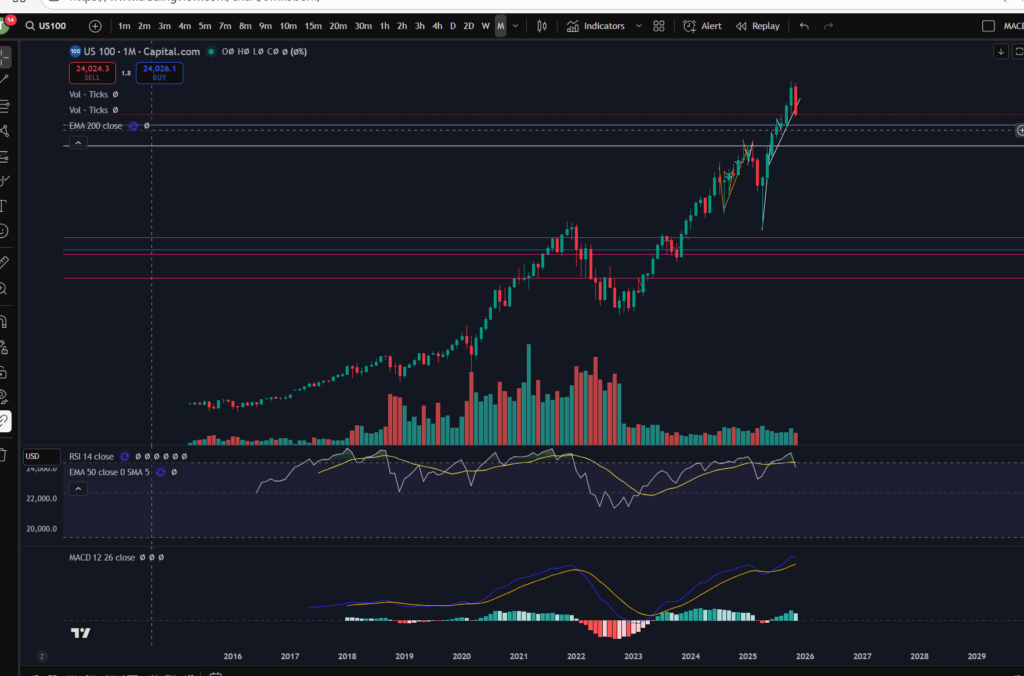
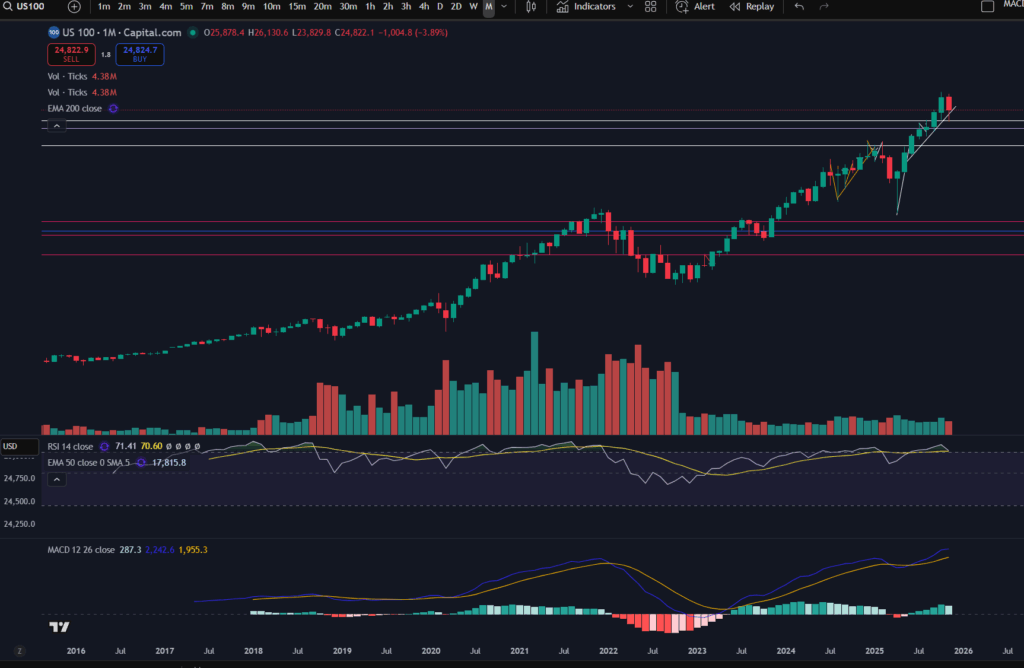
Let’s take a look at the monthly timeframe to remind ourselves of the highs the NASDAQ had reached recently:

As you can see, before this month, marked with the big red, most recent candle on the monthly timeframe, the market had pushed up considerably. The RSI was very overextended and the volume was not significant compared to the periods where significant momentum was noted (see the period between July 2018 and July 2022, for example. The market did look like it was in need of a pull back, at the very least.

Now let’s take a look at the daily timeframe.

What’s happening now on the NASDAQ? – The Daily Timeframe

happening now on the NASDAQ

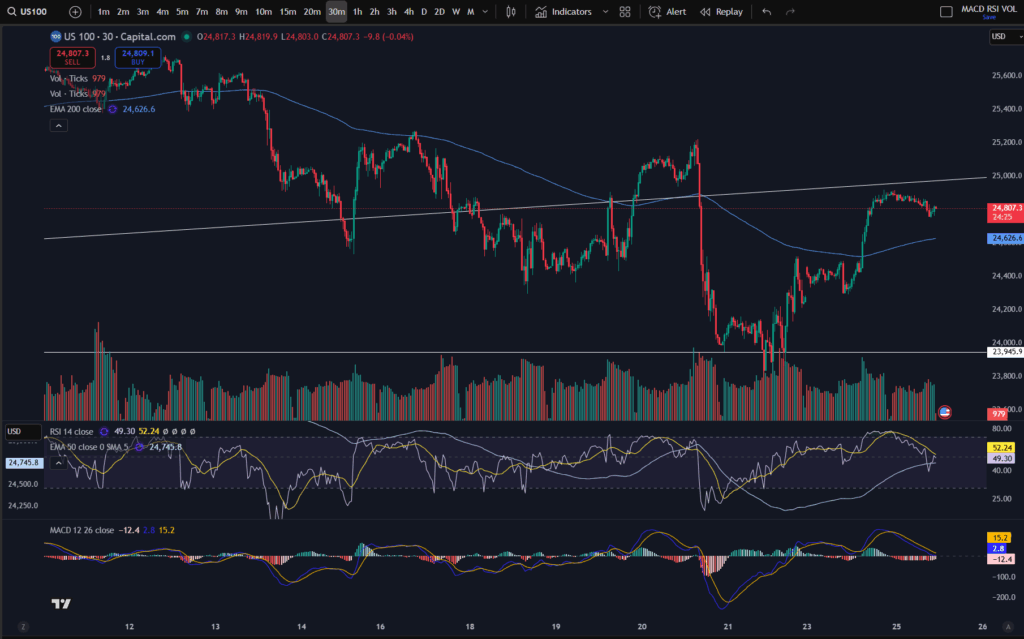
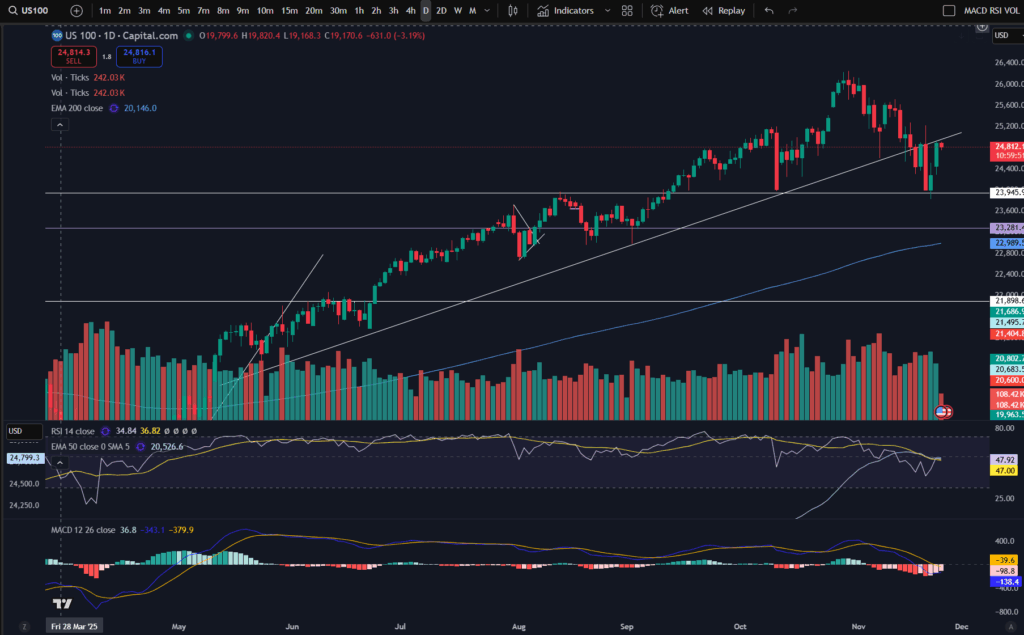
As you can see, the market was trending for a lengthy period of time, above the diagonal trend line marked on the chart. (If you would like a discount to the software I use – Trading View, please click the link below). In November the price broke this support and sailed down. It kept going until it reached the next lower level support area marked horizontally on the chart at price 23,945.

Currently the market is at a critical point – it has bounced slightly on the support level, but will it continue to sail away from this area? It’s currently touching the ‘underside’ of the diagonal support, which, as we know, can now be seen as a potential resistance.

Let’s take a look at the ‘zoomed in’ view, on the 30 minute timeframe. By the way, if you would like to understand more about ‘multiple timeframe analysis’, please see the video below:

The 30 minute timeframe:

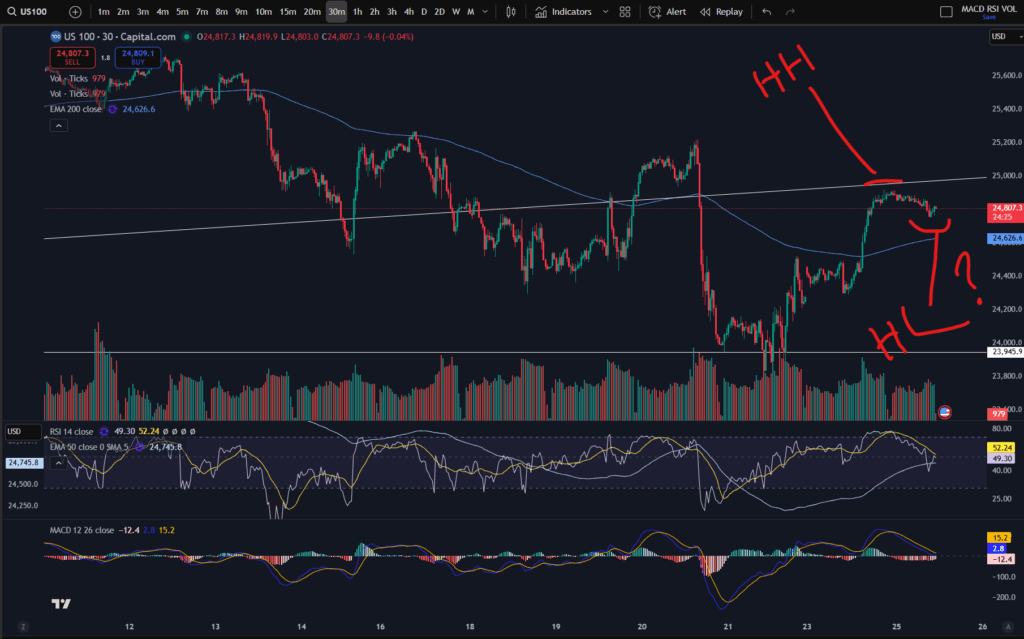
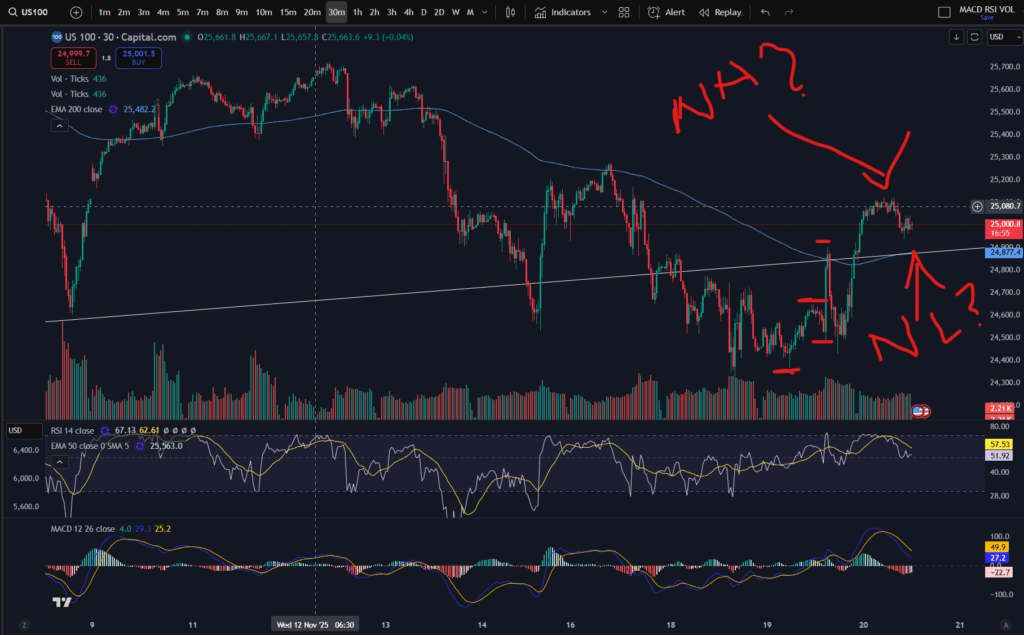
You can see more clearly on the 30 minute timeframe, that the price is currently exactly at the diagonal resistance level. It has just made a ‘higher high’ and it’s currently trying to form a ‘higher low’:

happening now on the NASDAQ

Why does this matter? The market will be considered to be trending ‘up’ once it is making higher highs and higher lows, consistently. It remains to be seen whether this will continue at the moment. As I mentioned in previous videos and posts, it could do the same thing it did previously, and pop back down, below the EMA line – you can see it did this on around the 20th – 21st November and before this, around the 13th to 14th of November.

If you would like to understand more about support and resistance levels, and how to read the markets by identifying highs and lows in a trend, please see my video here and related article:

Highs and lows video:

Blog article to help you spot whether a trend is changing direction:

Amazing secrets to help you make more money trading – spot a downtrend early! – Trader Pro

Support and resistance levels – blog article:

Support and Resistance – Trader Pro

So what’s happening on the NASDAQ then?

So ultimately, what’s happening now on the NASDAQ is that the market is trying to recover but patience is required to understand whether it will continue trying to push up. Patience is key for traders who do not short the markets.

Understand my strategy in full: https://www.patreon.com/Traderpro8320

For more great tips on trading the financial markets, please visit my blog:

https://sophiatrades.co.uk

Discount on Trading View:

https://www.tradingview.com/?aff_id=117138

My performance in the live markets:

https://sophiatrades.co.uk/category/my-performance-statistics

Finally, thank you to my existing members on Patreon, and for your likes, comments and subscribes. Happy trading!

Please note any subscriptions taken via my affiliate link with Trading View may result in me earning a small commission.
Nothing in this video should be taken to constitute financial advice. Although we make observations on the current state of the markets, nothing we suggest should be taken as an indication of what they will do next. You are required to carry out your own due diligence before entering any of the markets.

Understanding a stock chart – valuable knowledge for beginner traders

In this article i’m going to help you with understanding a stock chart, and share some tips which may help beginner traders navigate the chart’s features. This will take the beginner trader through the basic foundation of what appears on the chart, normally by default.

Understanding a stock chart – price movements

The default position you will likely find when you first look at any stock chart is that the ‘price’ movements are shown with ‘Candlesticks’. This is key to understanding a stock chart. Let’s take a look…

Understanding a stock chart

If you would like a discount to the ‘Trading View’ software which I use and highly recommend, please click the button below:

Each green or red candlestick shape you see on the chart, represents the price movement within one interval of time. The interval is determined by the ‘time interval’ buttons selected on the chart. As you can see on the above screen shot, ‘M’ is highlighted in the ribbon at the top – what this means is that this is a ‘monthly chart’ – each candlestick represents the price movements within one month’s period. I’ve posted separate articles on understanding candlesticks, which you will find here:

Make more money with Japanese Candlesticks – an Introduction – Trader Pro

The basic premise of candlesticks is that if they are green, it means the price closed higher in the interval, and if they are red, the price closed lower within the interval.

You can also understand more about the pattern formations of these, here:

Japanese Candlesticks – Trader Pro

The price ‘level’ is normally displayed down the right hand side of the chart. You can see here, that the price range is 23,281 USD to 26,000 USD.

You will need to pay careful attention to which ‘price’ is being displayed… is it the price inclusive of the spread for example, or does it not include the spread? When I was a new trader, this used to catch me out – the stop loss would sometimes be triggered when the price seemingly did not go there on the chart!? It’s because the price displayed on the chart did not include the spread so the gap which was covered with the spread seemed like a mystery to me, and almost felt like broker manipulation. I understand more now.

If you check the settings in your chart carefully, you will find a setting to tell the chart to either include the spread, or not. Your wish with this, may change depending on what you are doing on the chart! If you are setting an order to ‘buy’ at a particular price, you may want to include the spread in the settings…

Understanding a stock chart – Time intervals

Each chart will have a couple of ribbons of time intervals – probably along the top and also the bottom. One of these ribbons allows you to select alternative time intervals to be displayed, as mentioned above. When these are clicked, you can toggle between for example, the ‘daily’ timeframe, and the 4 hour time frames. The daily timeframe will show you candlestick price movements, with each one representing the movement within one day, and the four hour will likewise, show you the movements for each four hours that have occurred. The other ribbon shows you the relevant tie that the price movements occurred – so you can see on the above chart, that the time spans from the year 2016 to 2029 (no candles formed yet as this is in the future at the time of writing this article).

Deal tickets

You can bring up a ‘deal ticket’ or ‘order ticket’ by clicking on the Buy or Sell buttons at the top of the screen. The value indicated on the button, is the buy or sell price and the ‘spread’ sits in between these values as below:

You do need to understand the spread, and I have linked another article below, which gives you an understanding of this:

Understanding the spread – Trader Pro

In short, the spread is the bit of price, in between the buy and sell values and it’s the ‘cut’ that the broker takes from the market.

The different types of deal tickets and orders you can place in the market, will be covered in another article.

Toolbar

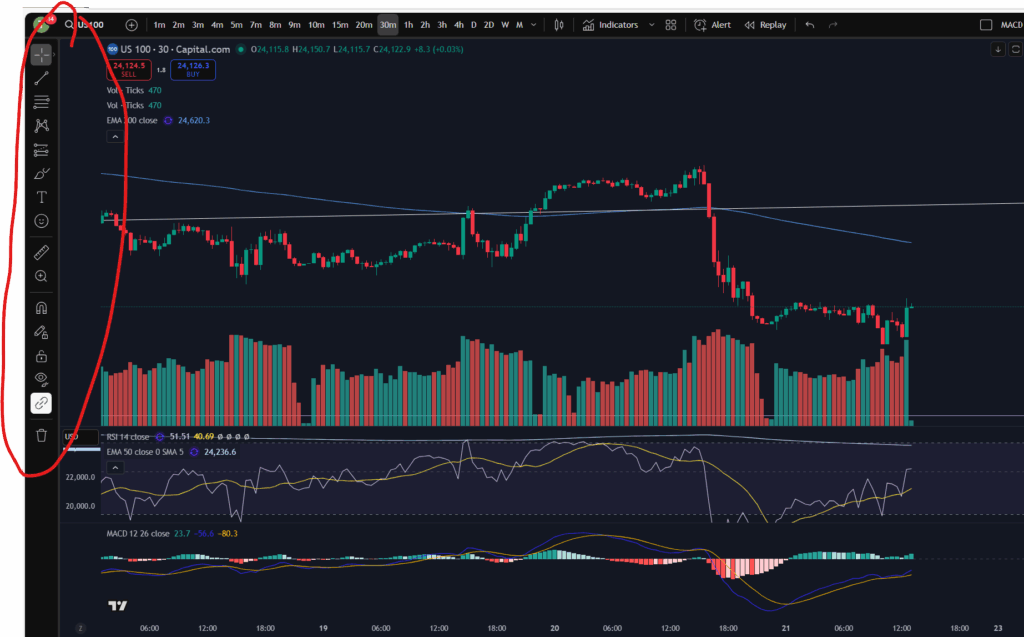
You will see somewhere on your chart, a toolbar with different symbols on it. On Trading View, this is down the left hand side of the screen:

This gives you various different tools for drawing symbols and diagrams on your chart. You can draw ‘support and resistance’ lines including horizontal and diagonal ones. You can also measure price and time interval values with the ‘ruler’ shown. It’s got a zoom in/out function. You can make notes and keep them pinned to the chart indefinitely.

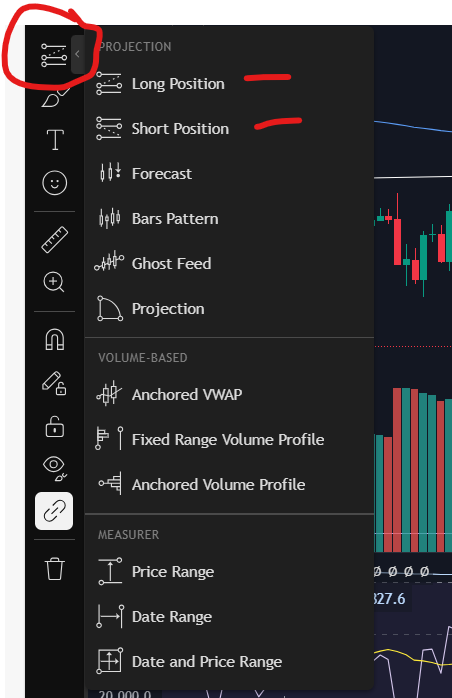
You can also plan trade set ups in terms of where you will enter, take profit or take a loss, with this icon:

Technical indicators

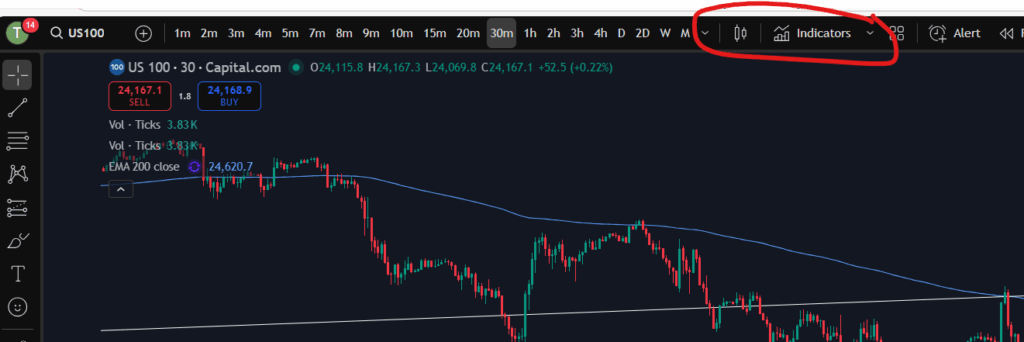
Another important aspect of understanding a stock chart which you will want to become familiar with, is the technical indicators menu. This is where you will find the MACD indicator, the volume, moving averages – any type of indicator you wish to add to your chart. There is a wide variety with Trading View which is another reason I really like the software.

For my own strategy and set up, I use the RSI, the MACD, the volume, and the 50 and 200 period EMA lines (exponential moving averages).

In Trading View, you can find the Technical Indicators menu, here:

Understand my strategy in full: https://www.patreon.com/Traderpro8320

To see my YouTube video explaining this article, please click the following link:

For more great tips on trading the financial markets, please visit my blog:

https://sophiatrades.co.uk

Discount on Trading View:

https://www.tradingview.com/?aff_id=117138

My performance in the live markets:

https://sophiatrades.co.uk/category/my-performance-statistics

Finally, thank you to my existing members on Patreon, and for your likes, comments and subscribes. Happy trading!

Please note any subscriptions taken via my affiliate link with Trading View may result in me earning a small commission.
Has the NASDAQ pull back ended? Trade now?

Has the NASDAQ pull back ended? In this article i’m going to consider the answer to this. I will talk about some signs which ‘could’ indicate that the NASDAQ may have finished pulling back. As with all my technical analysis you are strongly encouraged to do your own due diligence before placing any trades or investments in the markets. Let’s take a look at whether the NASDAQ pull back has ended.

NASDAQ pull back ended? – Recent movements

As I mentioned a day or so ago, the markets in general are in a well needed correction phase. They had pulled back quite a bit per the daily timeframe… Let’s take a look at the NASDAQ per the daily timeframe to get a reminder of where it sits currently. This will help us to decide whether the NASDAQ pull back ended…

NASDAQ pull back ended

For a discount to the chart software I use, and highly recommend, please click the link below!

As you can see above, the NASDAQ had pulled back down to just below the diagonal trend line. It seems like it could be bouncing there… Note the MACD histogram is losing it’s pigmentation and shrinking in size, and this can indicate that the move is running out of steam.

Let’s take a look at the 30 minute timeframe.

Let’s zoom in with the 30 minute timeframe!

NASDAQ pull back ended

I mentioned a day or so, ago, that the market looked like it was forming new highs and lows after the downward move and this trend seems to have continued. As you can see marked above, it seems to be forming a new high and a new low, but I would want to wait to see another MACD cross over for this high/low to be confirmed. You can see my separate blow article, on how to decide where the highs and lows are, here:

Amazing secrets to help you make more money trading – spot a downtrend early! – Trader Pro

So has the market finished its pull back?

Since the markets were very overbought recently, I would want to see continued highs and lows in this way before I decide that the market has turned around. It does look for now, like it’s trying to recover and push up. I’m conscious the US market is not currently open at the time of writing this, so I will be interested to see what happens at market open today. I am also very conscious that the markets are quite choppy currently and this scenario is a repeat of what happened previously, mid-downtrend – see the section to the left of the 30 minute timeframe chart above, where, in a similar way, the price popped up over the EMA lines and started up trending temporarily, only for it to descend further, subsequently. There is a possibility that this will happen again – I will be watching and waiting.

I hope you found this article helpful.

For more great tips on trading the financial markets, please visit my blog:

https://sophiatrades.co.uk

Discount on Trading View:

https://www.tradingview.com/?aff_id=117138

My performance in the live markets:

https://sophiatrades.co.uk/category/my-performance-statistics

Finally, thank you to my existing members on Patreon, and for your likes, comments and subscribes. Happy trading!

Please note any subscriptions taken via my affiliate link with Trading View may result in me earning a small commission.
How to Switch to Dark Mode in Trading View

This is a super quick article to explain how to switch to dark mode in Trading View charts, to reflect the ‘dark mode’ option. This is useful for people who spend a lot of time on screens – it can be more gentle on the eyes using a dark screen. I hope you find this helpful.

Why switch to dark mode in Trading View?

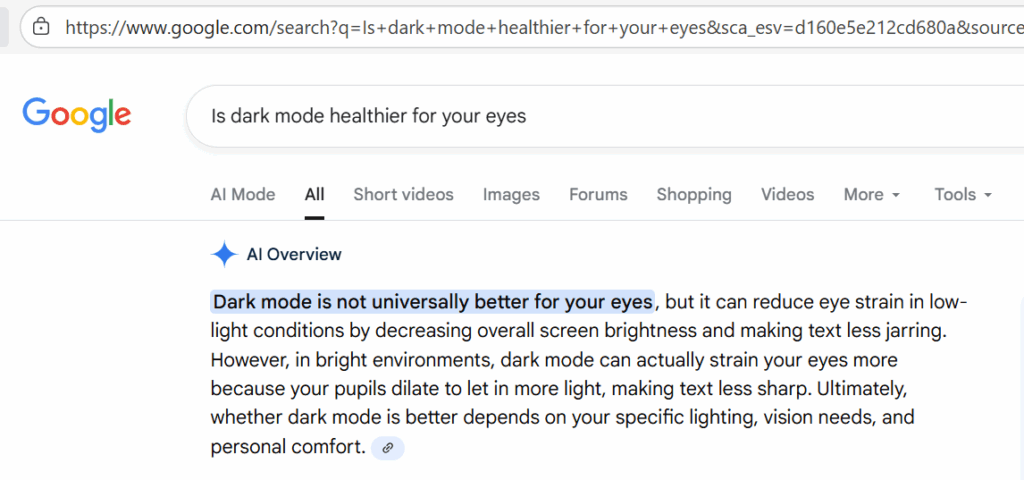
I asked Google what it had to say about this… I personally find it more comfortable, especially in the evenings, so what I found in the answer Google gave me, was interesting.

This seems to be a very personal choice, but if you have clicked on this article, the chances are, you have already decided you need dark mode, so let’s get into it!

How to switch…

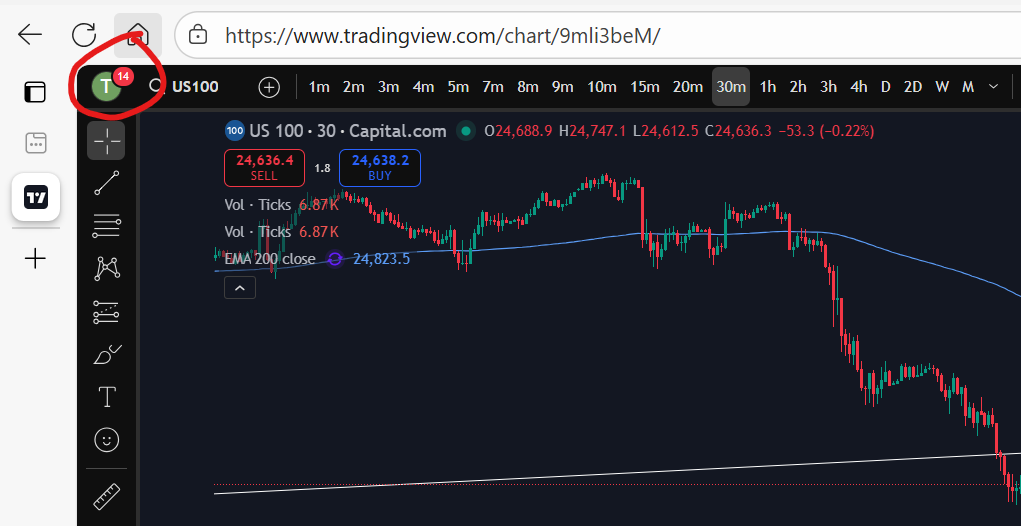
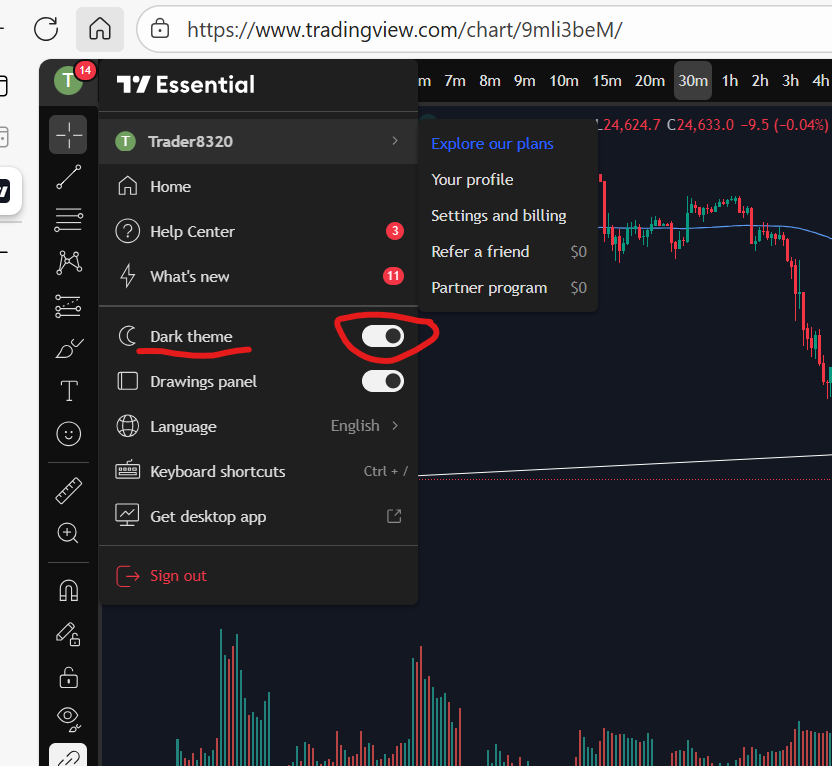
You will find that the default is for a chart to have a white background. To switch to dark mode, first go to your usual chart set up and you will see your profile icon in the top left of the screen:

If you don’t yet have trading view, I highly recommend the software. By signing up to them through my link below, you will receive a discount:

You can see here, my charts display a ‘T’ for Trader Pro – the name on my Trading View subscription. If you click on this, you will get the following display/options:

how to switch to dark mode in trading view

As you can see, there is a toggle switch, which can be toggled on or off allowing you to turn ‘dark mode’ on and off very easily.

I hope you found this article helpful!

Understand my strategy in full: https://www.patreon.com/Traderpro8320

For more great tips on trading the financial markets, please visit my blog:

https://sophiatrades.co.uk

Discount on Trading View:

https://www.tradingview.com/?aff_id=117138

My performance in the live markets:

https://sophiatrades.co.uk/category/my-performance-statistics

Finally, thank you to my existing members on Patreon, and for your likes, comments and subscribes. Happy trading!

Please note any subscriptions taken via my affiliate link with Trading View may result in me earning a small commission.
Markets are dropping – how to beat them!

Markets are dropping and in this article we take a look at the recent activity on the NASDAQ and possible technical factors which have triggered this. We hope you find this useful.

Markets are dropping – recent NASDAQ activity

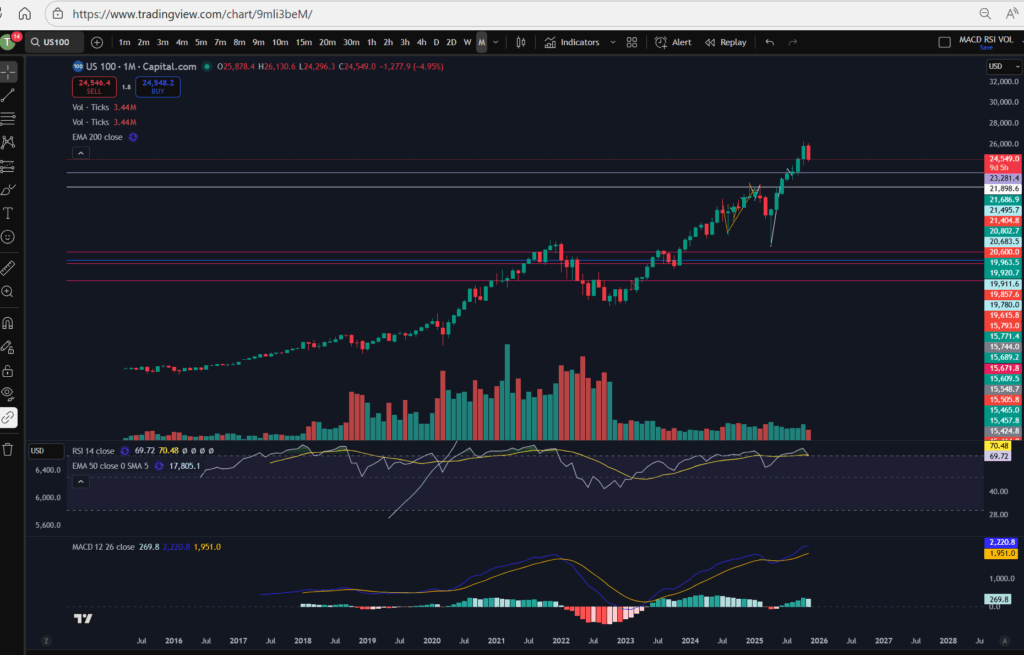
The recent activity on the NASDAQ has been extremely bullish… let’s take a look at the monthly chart:

As you can see, the NASDAQ recently reached all time highs. The RSI was very over extended, and the price had been pushing up for a sustained bull run period. It was about time they pulled back! You can see the history of the RSI indicator above. When uptrending, the RSI purple line above, pulls back and forth at the top of the RSI indicator area. Each time the RSI level reaches the highs it had stretched to before, a pull back happened. This time was no different – we were waiting for it! The pull back currently happening feels large, but in reality, it is small in comparison to the amount the markets have pushed up recently.

Markets are dropping – a view from the Daily Time Frame…

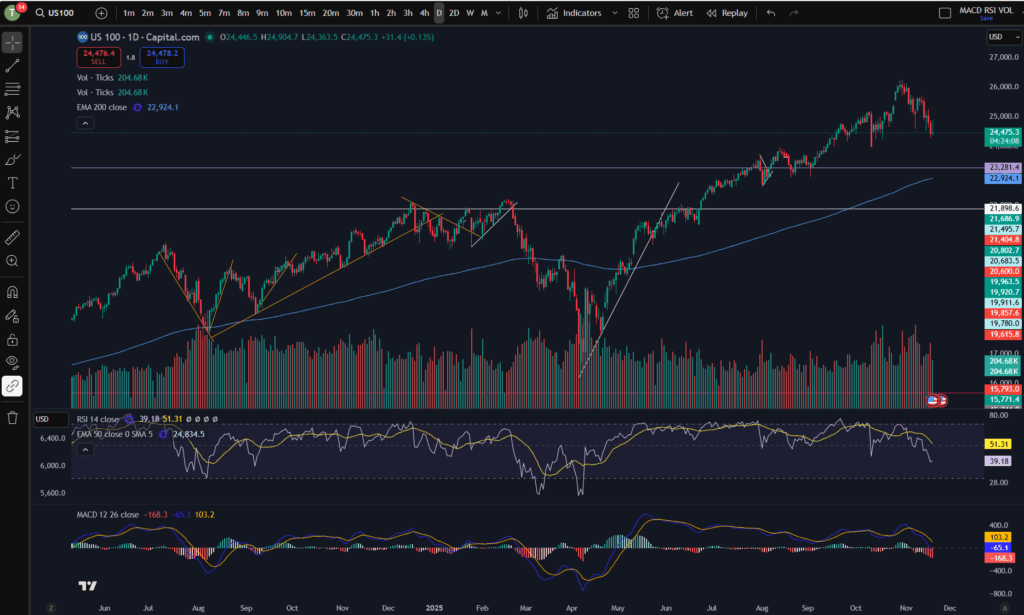
Markets are dropping

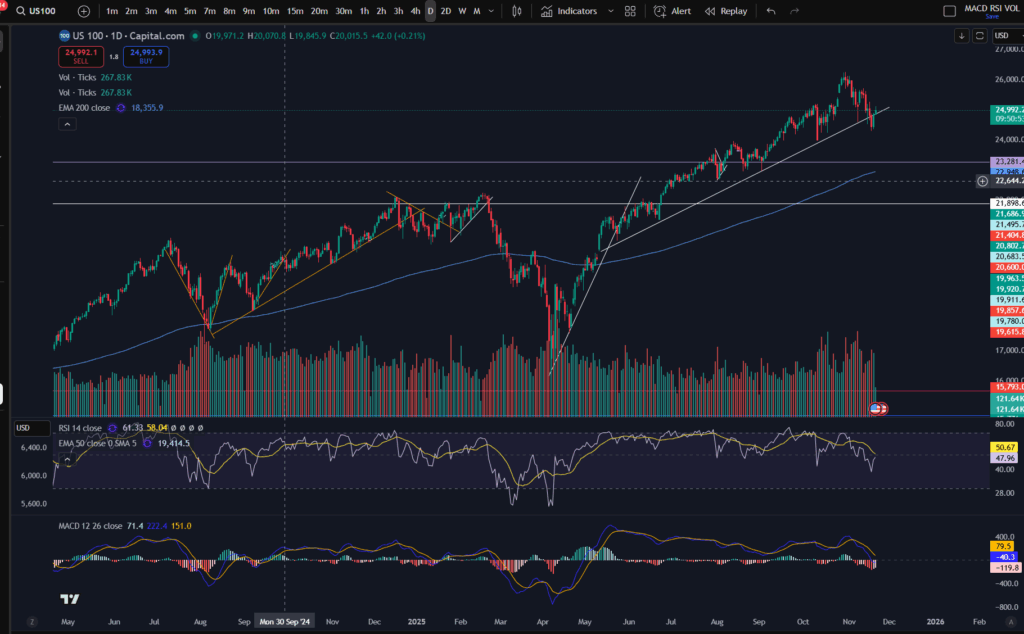
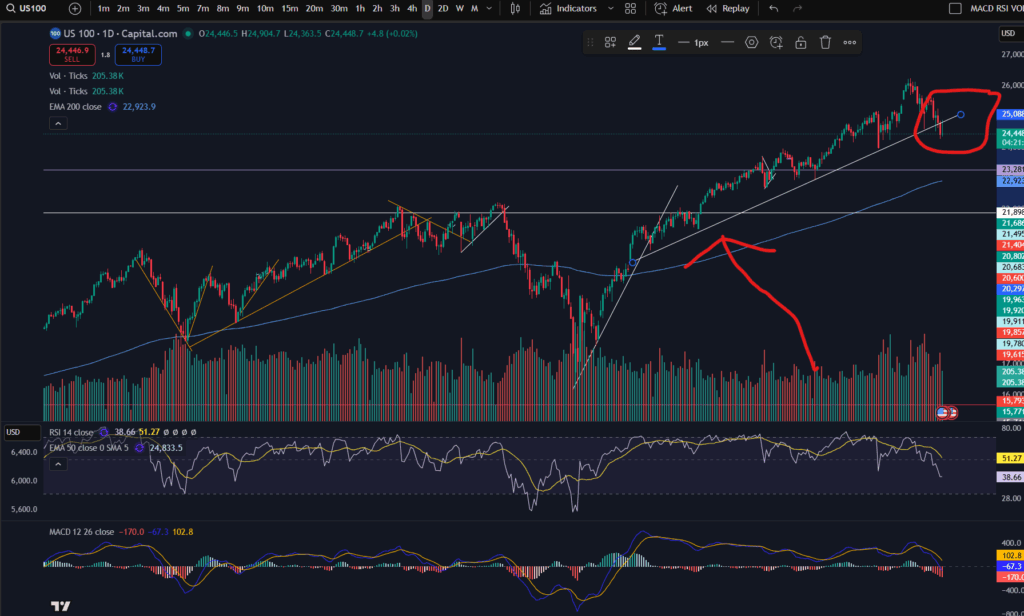
As you can see from the daily timeframe above, the pull back happening was almost necessary. The price has pulled back down further than the diagonal trend you can see on the bottom of the pattern above – please see this marked below…

You can see above, that the price as bouncing on a nice diagonal support level on the daily time frame, but within the last couple of days, the price has broken this support level.

The RSI has sunk down quite low on the daily timeframe – as you can see above, but the MACD histogram is still showing dark red bars which are growing in size (meaning the downwards move is not yet running out of steam). We could see lower prices still – it remains to be seen whether the price will start recovering or commence a return back up to where it was.

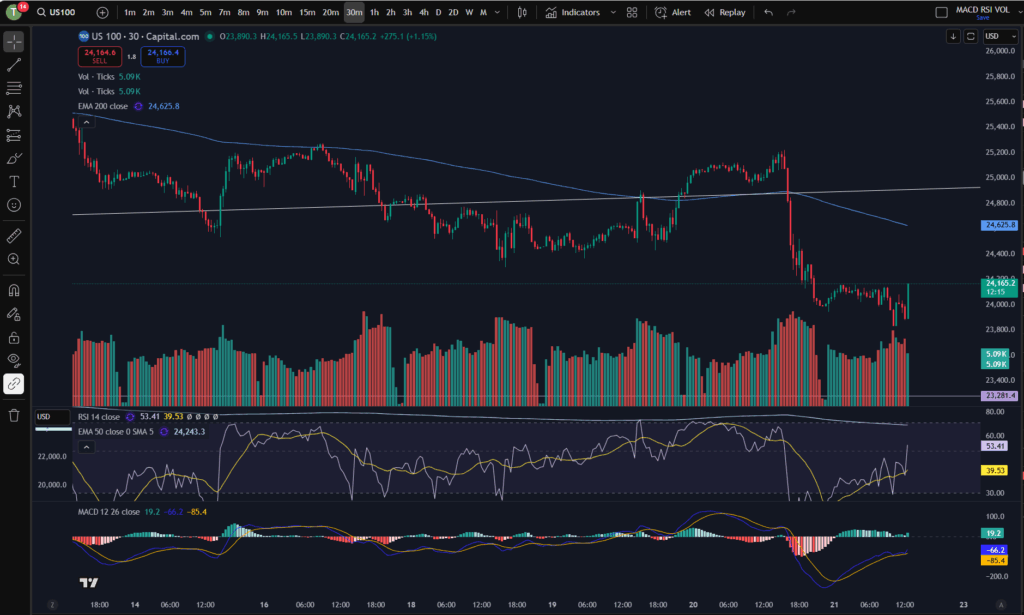
This evening I can see it has started bouncing around on the 30 minute timeframe:

A view from the 30 minute timeframe:

You can see the downtrend on this 30 minute screen shot in more detail… however, note that the price is currently trying to find support… Note the ‘steps’ I have marked on the chart in terms of the highs or lows… the first three marks counting from the left, were confirming that the 30 minute timeframe was still down trending. However, note that the fourth mark created a ‘higher low’ and the next one reached a ‘higher high’… it may be that the market has started to recover – I will be watching it carefully. My next steps will be to look out for solid signs of support and a turn around on the chart. Once I feel comfortable that the price is recovering, I will be more comfortable to place some more trades… for now, I wait….

I hope you found this article and my technical analysis helpful. If you would like to reach out with any trading questions or analysis questions, I would love to hear from you.

For more great tips and advice on trading the stock market, please visit:

https://sophiatrades.co.uk

To watch me trade live please visit my patreon page here:

https://www.patreon.com/Traderpro8320

Finally, if you would like to receive a discount on the Trading View charting software I use, please click on the relevant link here:

https://www.tradingview.com/?aff_id=117138

Please note any subscriptions taken via my affiliate link with Trading View may result in me earning a small commission.  However, I provide complete transparency on me using Trading View personally – I publish my success on the financial markets via my broker reports and any profits earned were done so by using my own Trading View subscription,  so I genuinely do recommend them and have been using the Trading View charts for many years.