How to add the Exponential Moving Average indicator in Trading View – Everything you Need to Know

How to add the Exponential Moving Average indicator in Trading View – Everything you Need to Know

In this article i’m going to give you some simple instructions on how to add the Exponential Moving Avearge (EMA) indicator in Trading View. Let’s jump straight into it!

First of all, what is Trading View?

Trading View is a chart package which you can subscribe to. It’s the best one I have ever used. I’m still using it in my own trading – any screen shots I take in the ‘Chart Analysis’ section of my blog, are taken from my Trading View chart package:

Chart analysis – Sophia Trades – Learn how to Trade the Stock Market

Trading View is extremely intuitive as a chart package. You can filter and sort your watchlists in exactly the way you would like to – adding flags, sections – anything that can help with keeping your watchlists organised.

It allows you to log into many different brokers, and I have three different accounts of my own, hooked up on Trading View.

You can set alerts and have it email you when the price reaches a certain position or when particular scenarios occur in relation to your indicators.

I can offer users of my blog, a discount to this amazing software – just click the link below:

Where is the Exponential Moving Average indicator in this chart package?

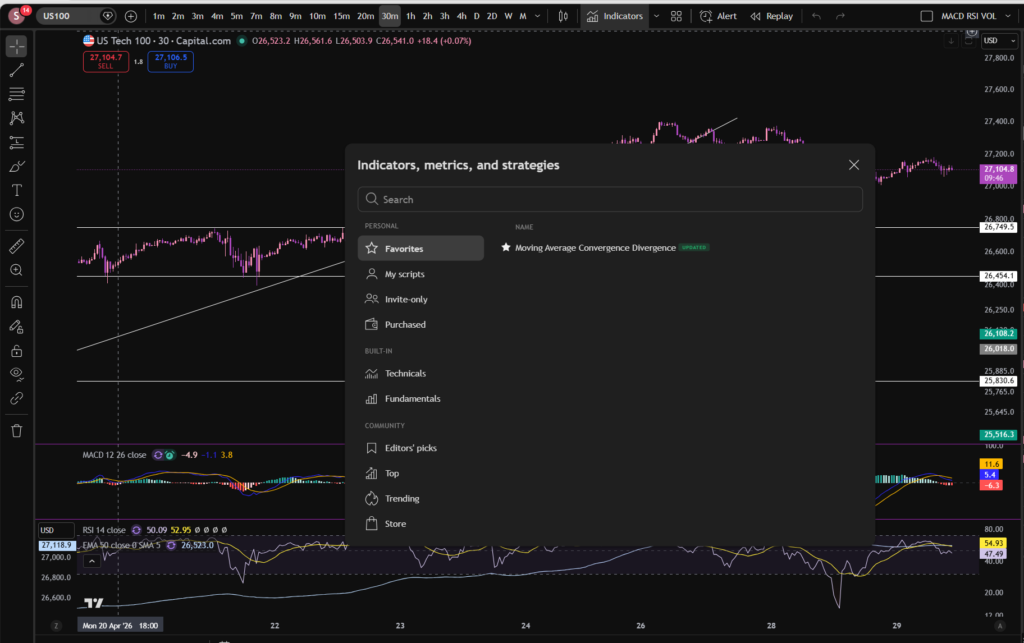
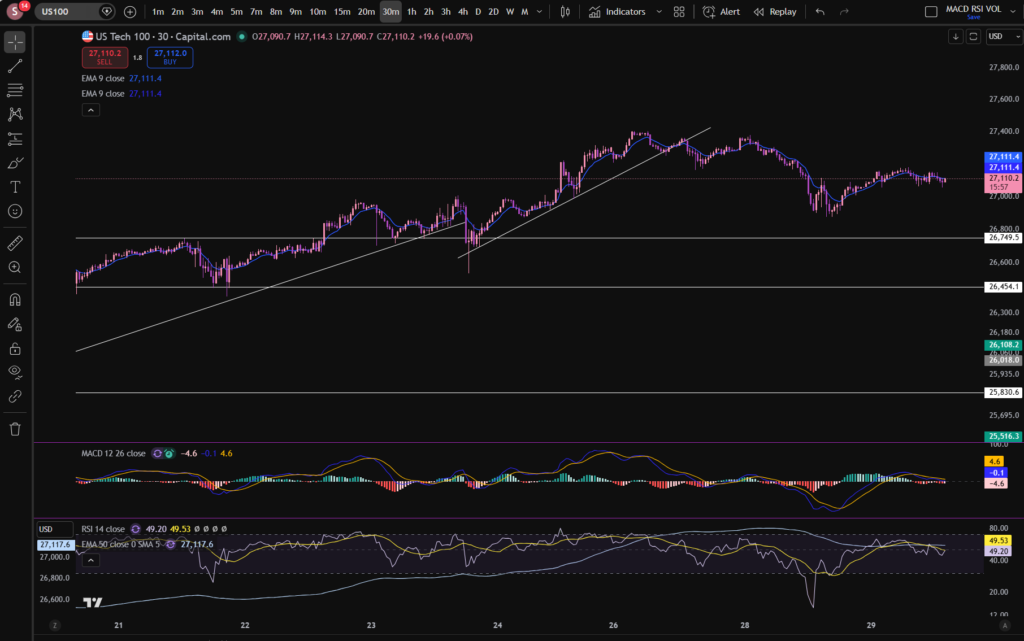
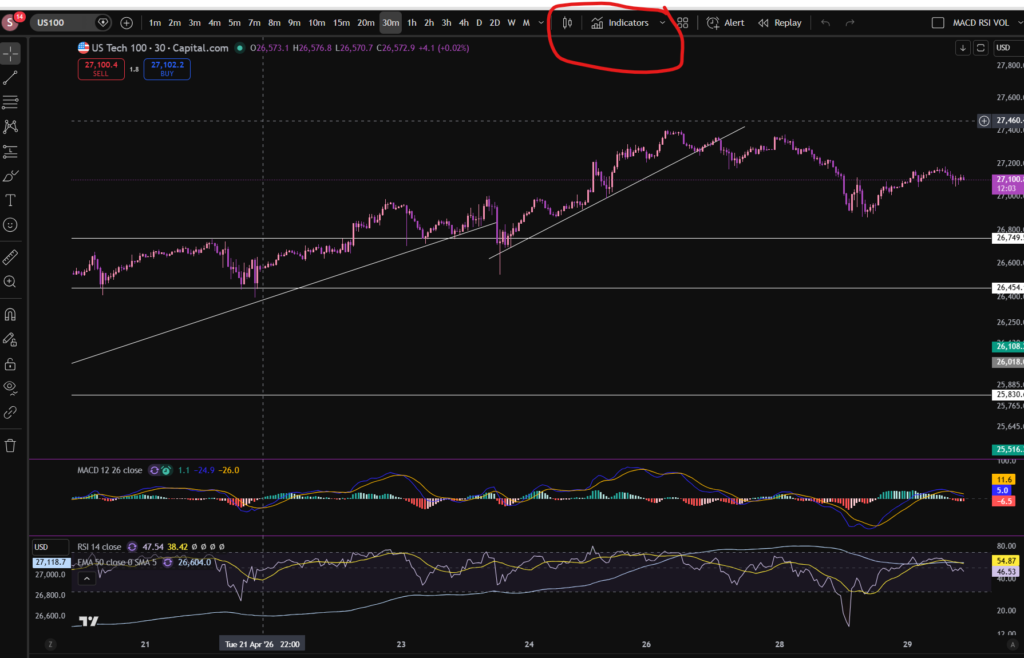
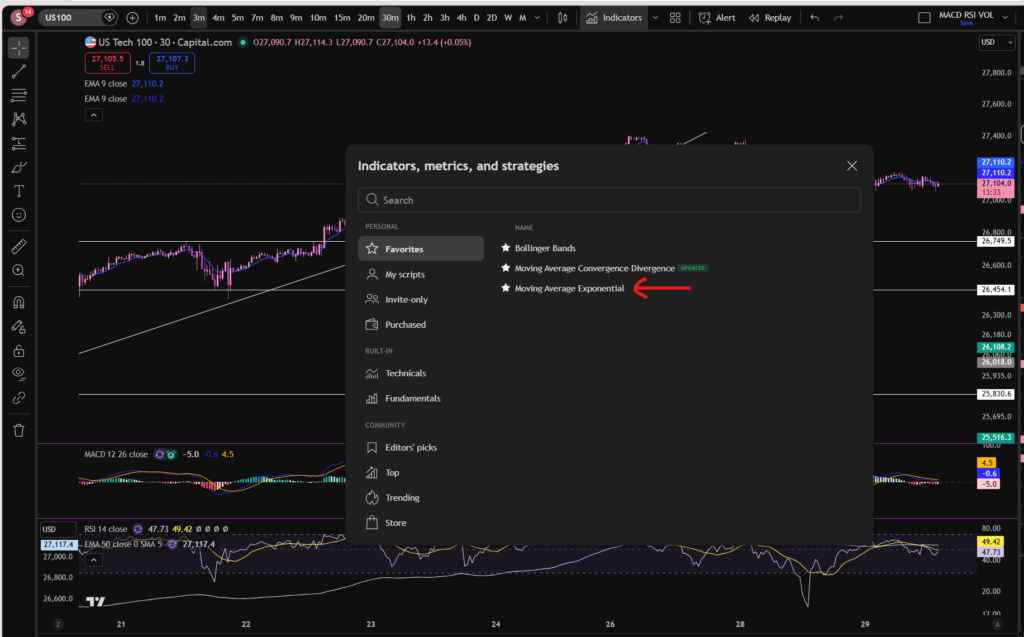
You can find the indicators by going to the indicators tab at the top of the charts. When you click on this tab, you will get a list come up of hundreds of different types of indicators. You can find the Exponential Moving Average indicator by typing in the search box, “Exponential Moving Average”. You will see the indicator appear. Note there are many different versions so you want to select the plain default version – people are building their own indicators in there so you want to avoid any that you are not familiar with:

Trading View

Here is what the plain default indicator looks like:

As you can see, my Exponential Moving Average indicator is in my favourites as this is one of the key indicators I use when implementing my strategy.

Once you have applied this indicator to your chart, you can tailor its settings by following the instructions in a related blog article. Please see the Trading View or Exponential Moving Average sections of the blog:

Best software reviews – Sophia Trades – Learn how to Trade the Stock Market

Technical indicators – Sophia Trades – Learn how to Trade the Stock Market

I hope you found this article helpful!

Socials:

You Tube:

Sophia Trades – YouTube

Patreon:

patreon.com/sophiatrades

Disclaimer!

Nothing on this blog should be taken as financial advice or encouragement for you to enter a trade.  You are expected to speak to a financial adviser or carry out your own due diligence before entering any positions.  Everything on this blog is made for educational purposes and to equip you with the knowledge you need to be able to make your own financial decisions.

For more great tips and advice on trading the stock market, please visit:

https://www.sophiatrades.co.uk

To watch me trade live please visit my patreon page here:

https://www.patreon.com/sophiatrades

Finally, if you would like to receive a discount on the Trading View charting software I use, please click on the relevant link here:

https://www.tradingview.com/?aff_id=117138

Please note any subscriptions taken via my affiliate link with Trading View may result in me earning a small commission.  However, I provide complete transparency on me using Trading View personally – I publish my success on the financial markets via my broker reports and any profits earned were done so by using my own Trading View subscription,  so I genuinely do recommend them and have been using the Trading View charts for many years.
How to add the Bollinger Bands indicator in Trading View – Everything you Need to Know

How to add the Bollinger Bands indicator in Trading View – Everything you Need to Know

In this article i’m going to give you some simple instructions on how to add the Bollinger Bands indicator in Trading View. Let’s jump straight into it!

First of all, what is Trading View?

Trading View is a chart package which you can subscribe to. It’s the best one I have ever used. I’m still using it in my own trading – any screen shots I take in the ‘Chart Analysis’ section of my blog, are taken from my Trading View chart package:

Chart analysis – Sophia Trades – Learn how to Trade the Stock Market

Trading View is extremely intuitive as a chart package. You can filter and sort your watchlists in exactly the way you would like to – adding flags, sections – anything that can help with keeping your watchlists organised.

It allows you to log into many different brokers, and I have three different accounts of my own, hooked up on Trading View.

You can set alerts and have it email you when the price reaches a certain position or when particular scenarios occur in relation to your indicators.

I can offer users of my blog, a discount to this amazing software – just click the link below:

Where is the Bollinger Bands indicator in this chart package?

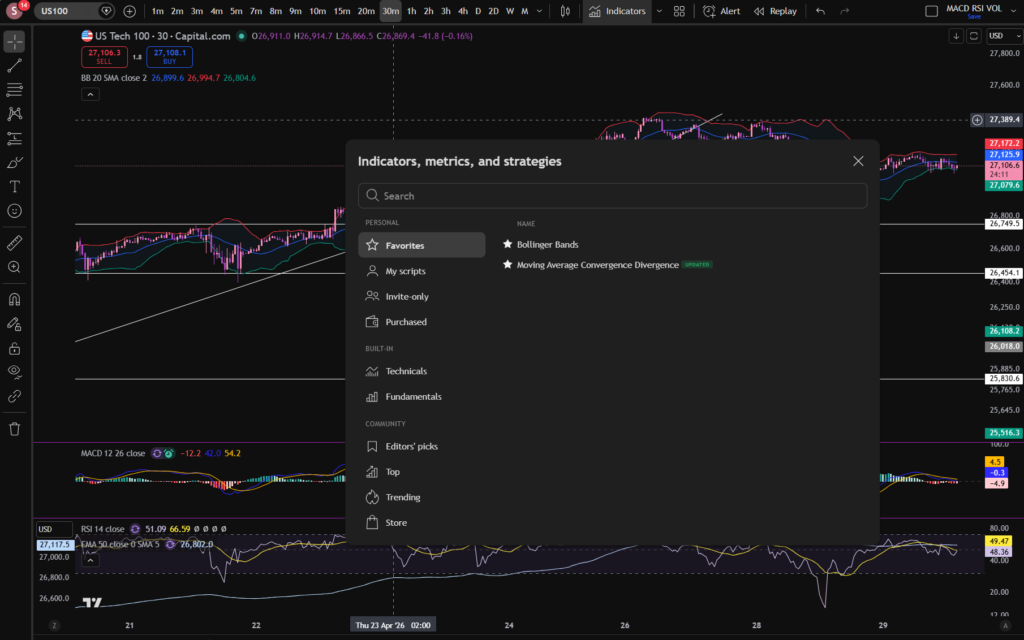
You can find the indicators by going to the indicators tab at the top of the charts. When you click on this tab, you will get a list come up of hundreds of different types of indicators. You can find the Bollinger Bands indicator by typing in the search box, “Bollinger Band”. You will see the indicator appear. Note there are many different versions so you want to select the plain default version – people are building their own indicators in there so you want to avoid any that you are not familiar with:

Trading View

Here is what the plain default indicator looks like:

As you can see, my Bollinger Band indicator is in my favourites as this is one of the key indicators I use when implementing my strategy.

Once you have applied this indicator to your chart, you can tailor its settings by following the instructions in a related blog article. Please see the Trading View or Bollinger Bands sections of the blog:

Best software reviews – Sophia Trades – Learn how to Trade the Stock Market

Technical indicators – Sophia Trades – Learn how to Trade the Stock Market

I hope you found this article helpful!

Disclaimer!

Nothing on this blog should be taken as financial advice or encouragement for you to enter a trade.  You are expected to speak to a financial adviser or carry out your own due diligence before entering any positions.  Everything on this blog is made for educational purposes and to equip you with the knowledge you need to be able to make your own financial decisions.

For more great tips and advice on trading the stock market, please visit:

https://www.sophiatrades.co.uk

To watch me trade live please visit my patreon page here:

https://www.patreon.com/sophiatrades

Finally, if you would like to receive a discount on the Trading View charting software I use, please click on the relevant link here:

https://www.tradingview.com/?aff_id=117138

Please note any subscriptions taken via my affiliate link with Trading View may result in me earning a small commission.  However, I provide complete transparency on me using Trading View personally – I publish my success on the financial markets via my broker reports and any profits earned were done so by using my own Trading View subscription,  so I genuinely do recommend them and have been using the Trading View charts for many years.
How to Change the MACD settings on Trading View

How to Change the MACD settings on Trading View

In this article i’m going to talk about how you can change the MACD settings in Trading View, to suit your trading style and strategy. I’m going to talk about the length of the MACD and signal lines, and the colours of the histogram and the lines. Let’s jump straight into it!

First of all, what is the MACD indicator?

‘MACD’ stands for Moving Average Convergence Divergence. It does what it says on the tin! It’s the consecutive convergence and divergence of two moving averages. I published a separate blog article, explaining how you can use the MACD indicator to make more money in your trading, linked below, so I won’t go into that here. However, I do want to explain to you how you can change the settings on the indicator.

How to change the settings on the MACD indicator in Trading View

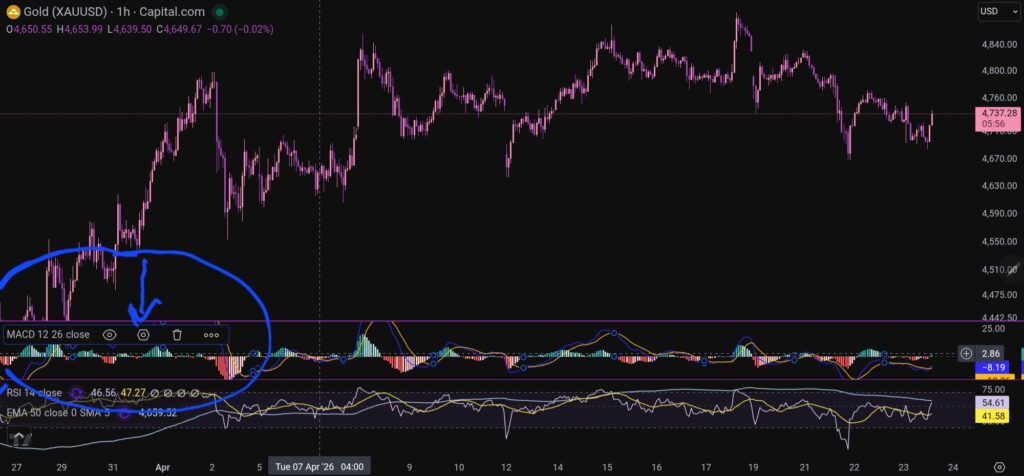
OK, so now i’m going to share with you how you can change the settings on the MACD indicator. To change the length of the moving average lines, tap anywhere on the MACD indicator, and you will see the settings menu come up – it appears on the leeft of the sceen, as shown below:

When you click on the little hexagon shape, it will bring up a menu, as follow:

Trading View

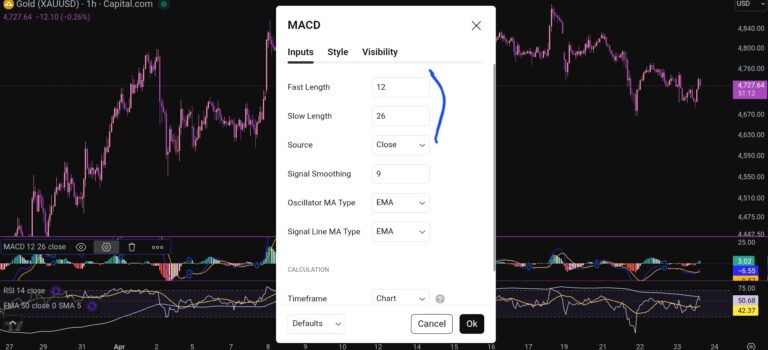
You want to click next on the ‘inputs’ tab as shown above, and you will see this screen next:

Trading View

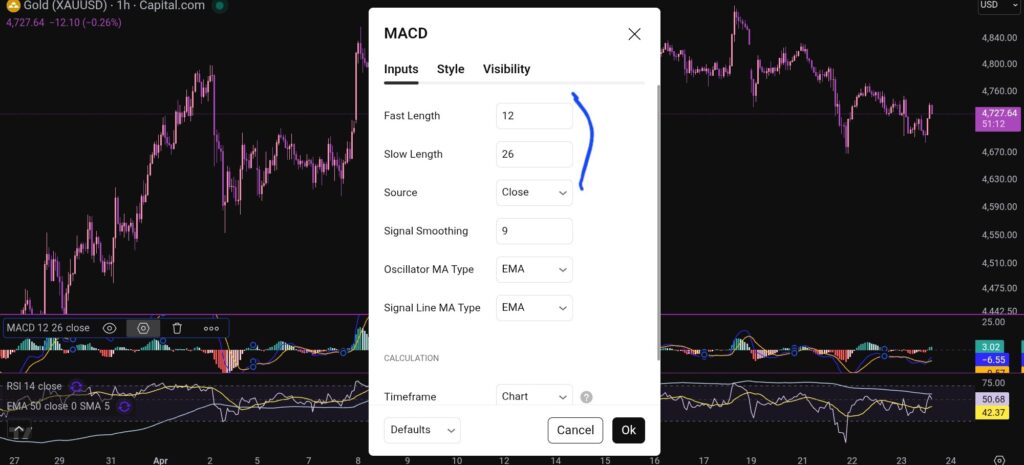
As you can see, you can alter the lengths of the moving averages here by changing the values in the field boxes.

How do you change the colour scheme of the MACD indicator?

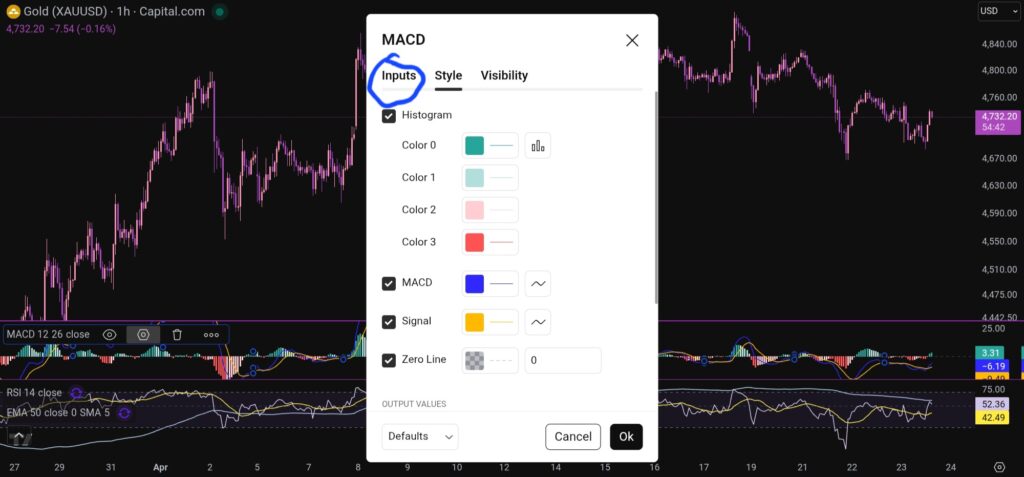
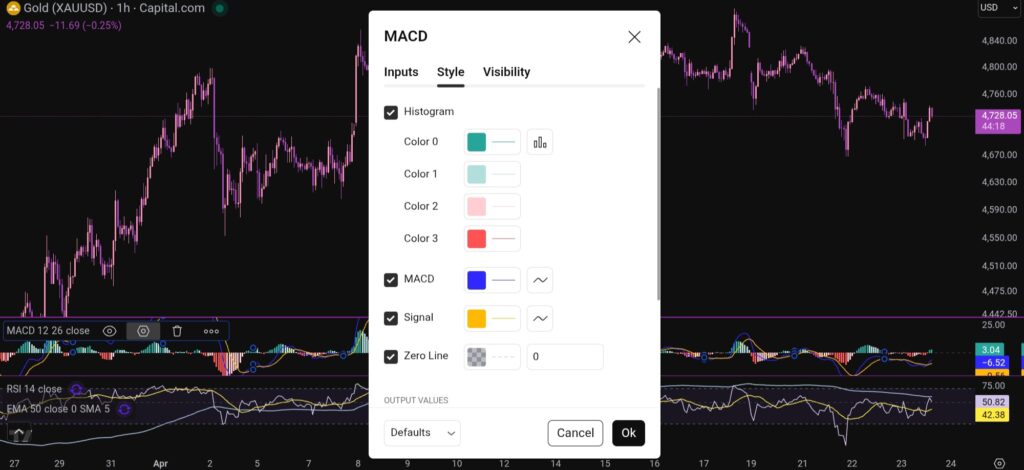
Changing the colour scheme of the MACD indicator in Trading View is just as easy as changing the moving averages. You simply click on settings with the hexagonal shape again, and the first box which comes up, is the menu where you have the option to change the colours of the MACD indicator:

Trading View

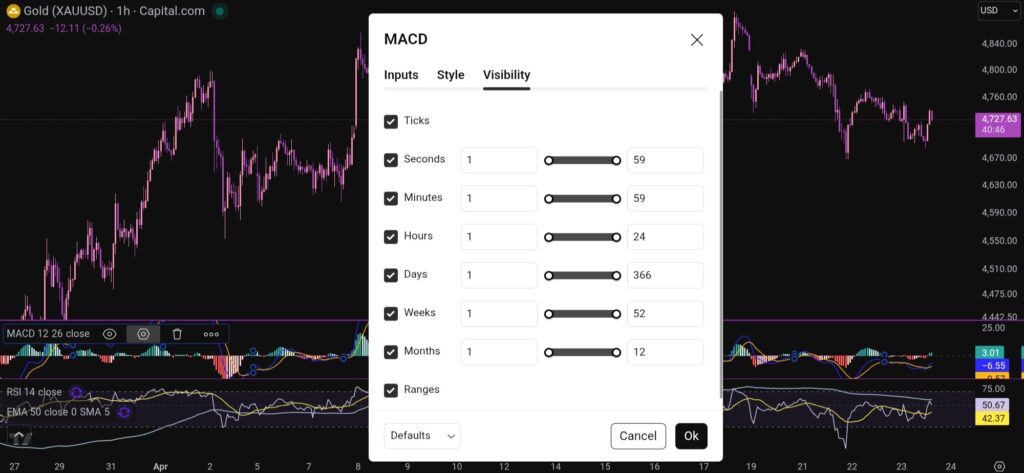
You can also change the visibility of the MACD indicator by clicking on the tab for this, and you will see this menu:

Trading View

I hope you found this article helpful!

Disclaimer!

Nothing on this blog should be taken as financial advice or encouragement for you to enter a trade.  You are expected to speak to a financial adviser or carry out your own due diligence before entering any positions.  Everything on this blog is made for educational purposes and to equip you with the knowledge you need to be able to make your own financial decisions.

For more great tips and advice on trading the stock market, please visit:

https://www.sophiatrades.co.uk

To watch me trade live please visit my patreon page here:

https://www.patreon.com/sophiatrades

Finally, if you would like to receive a discount on the Trading View charting software I use, please click on the relevant link here:

https://www.tradingview.com/?aff_id=117138

Please note any subscriptions taken via my affiliate link with Trading View may result in me earning a small commission.  However, I provide complete transparency on me using Trading View personally – I publish my success on the financial markets via my broker reports and any profits earned were done so by using my own Trading View subscription,  so I genuinely do recommend them and have been using the Trading View charts for many years.
How to add the MACD indicator in Trading View

How to add the MACD indicator in Trading View

In this article i’m going to give you some simple instructions on how to add the MACD indicator in Trading View. Let’s jump straight into it!

First of all, what is Trading View?

Trading View is a chart package which you can subscribe to. It’s the best one I have ever used. I’m still using it in my own trading – any screen shots I take in the ‘Chart Analysis’ section of my blog, are taken from my Trading View chart package:

Chart analysis – Sophia Trades – Learn how to Trade the Stock Market

Trading View is extremely intuitive as a chart package. You can filter and sort your watchlists in exactly the way you would like to – adding flags, sections – anything that can help with keeping your watchlists organised.

It allows you to log into many different brokers, and I have three different accounts of my own, hooked up on Trading View.

You can set alerts and have it email you when the price reaches a certain position or when particular scenarios occur in relation to your indicators.

I can offer users of my blog, a discount to this amazing software – just click the link below:

Where is the MACD indicator in this chart package?

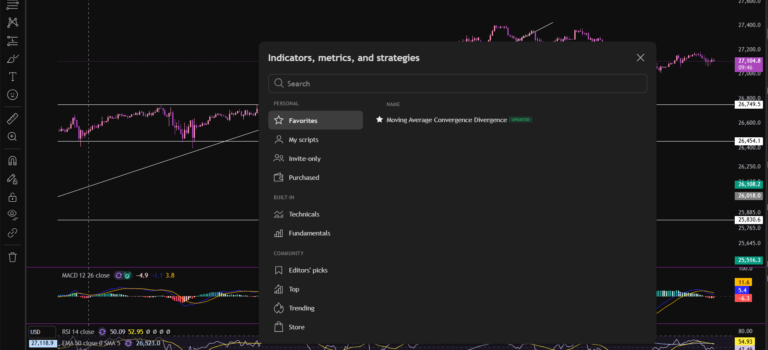
You can find the indicators by going to the indicators tab at the top of the charts. When you click on this tab, you will get a list come up of hundreds of different types of indicators. You can find the MACD indicator by typing in the search box, “Moving Average Convergence Divergence”. You will see the indicator appear. Note there are many different versions so you want to select the plain default version – people are building their own indicators in there so you want to avoid any that you are not familiar with:

Trading View

Here is what the plain default indicator looks like:

Trading View

As you can see, my MACD is in my favourites as this is one of the key indicators I use when implementing my strategy.

Once you have applied this indicator to your chart, you can tailor its settings by following the instructions in a related blog article. Please see the Trading View or MACD sections of the blog:

MACD – Sophia Trades – Learn how to Trade the Stock Market

Best software reviews – Sophia Trades – Learn how to Trade the Stock Market

I hope you found this article helpful!

Disclaimer!

Nothing on this blog should be taken as financial advice or encouragement for you to enter a trade.  You are expected to speak to a financial adviser or carry out your own due diligence before entering any positions.  Everything on this blog is made for educational purposes and to equip you with the knowledge you need to be able to make your own financial decisions.

For more great tips and advice on trading the stock market, please visit:

https://www.sophiatrades.co.uk

To watch me trade live please visit my patreon page here:

https://www.patreon.com/sophiatrades

Finally, if you would like to receive a discount on the Trading View charting software I use, please click on the relevant link here:

https://www.tradingview.com/?aff_id=117138

Please note any subscriptions taken via my affiliate link with Trading View may result in me earning a small commission.  However, I provide complete transparency on me using Trading View personally – I publish my success on the financial markets via my broker reports and any profits earned were done so by using my own Trading View subscription,  so I genuinely do recommend them and have been using the Trading View charts for many years.
How to buy stocks, using Fibonacci Retracement as a Day Trader – Everything you Need to Know

In this article i’m going to talk about how to buy stocks using a Fibonacci Retracement as a day trader. Fibonacci is a magical mathematical proportion which exists in everything in the universe. It’s no surprise that it exists as significant levels for buying and selling demand in the stock market. Price movements are driven, after all, by human beings – biological organisms. Let’s take a look at how you can use this as a day trader to make more money trading.

What is Fibonacci?

Before we can understand how to buy stocks using Fibonacci Retracement, we first need to understand what it is. Fibonacci is an almost ‘magical’ pattern which exists in the universe. It represents a sequence where every number in the sequence is the sum of the two preceding numbers. It was discovered by the mathematician, Leonardo of Pisa. These ratios and patterns can be found in the human body, leaves, flowers, other animals – the list is endless. Mother nature uses it to build organisms on the Earth and it also exists in ancient archaeological structures too! The sequence is identified by the formula Fn = Fn-1 + Fn-2, starting with F0=0 and F1 = 1.

As the sequence progresses, the results tend to a special value – 1.618. This is known as the Golden Ratio.

How to buy stocks using the Fibonacci Retracement as a Day Trader then?

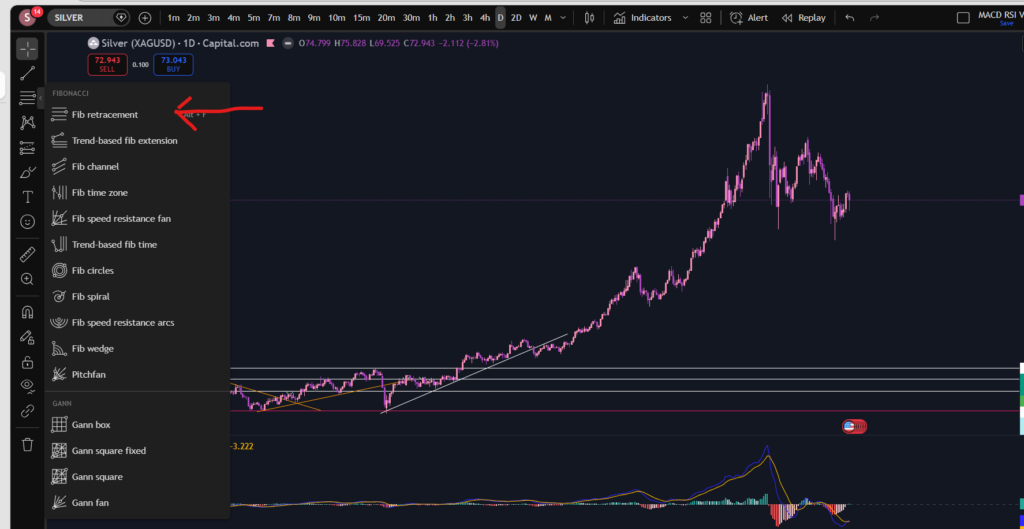
The special Fibonacci proportions can indicate areas of buying and selling pressure on a stock chart. It can help traders to identify areas for entry points and pull backs. You can use the Fibonacci tool in Trading View, by accessing it on the menu in the left, as shown below:

How to buy stocks

Once selected you can click the chart and drag the indicator down over the price movements, to show the various levels of the Fibonacci Retracement tool- you line the tool up with the lowest or the highest point, and then pull/extend it over the price movements, to the highest if you started at the lowest, or vice versa.

How to buy stocks

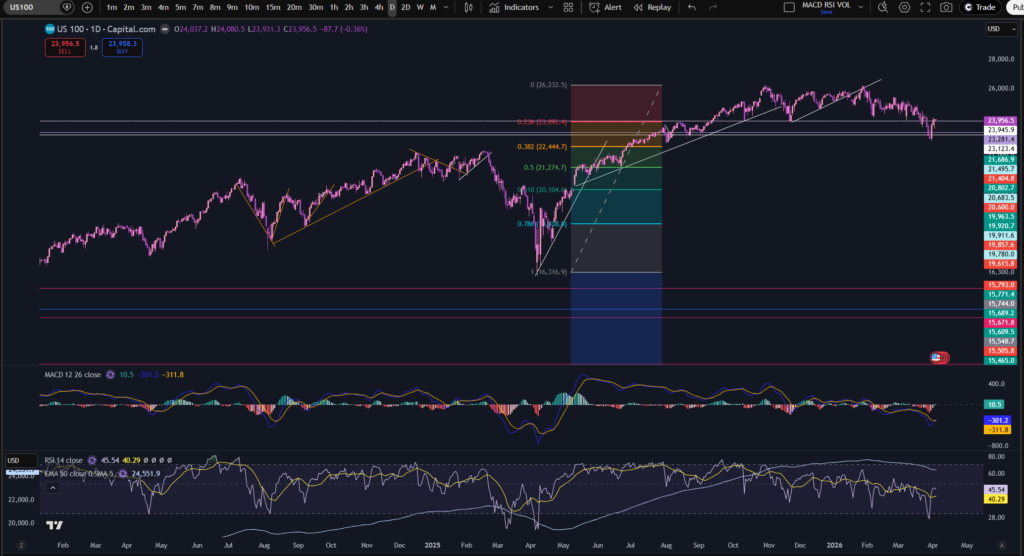
Let’s take a look at where this indicator ended up being accurate, in terms of support and resistance levels:

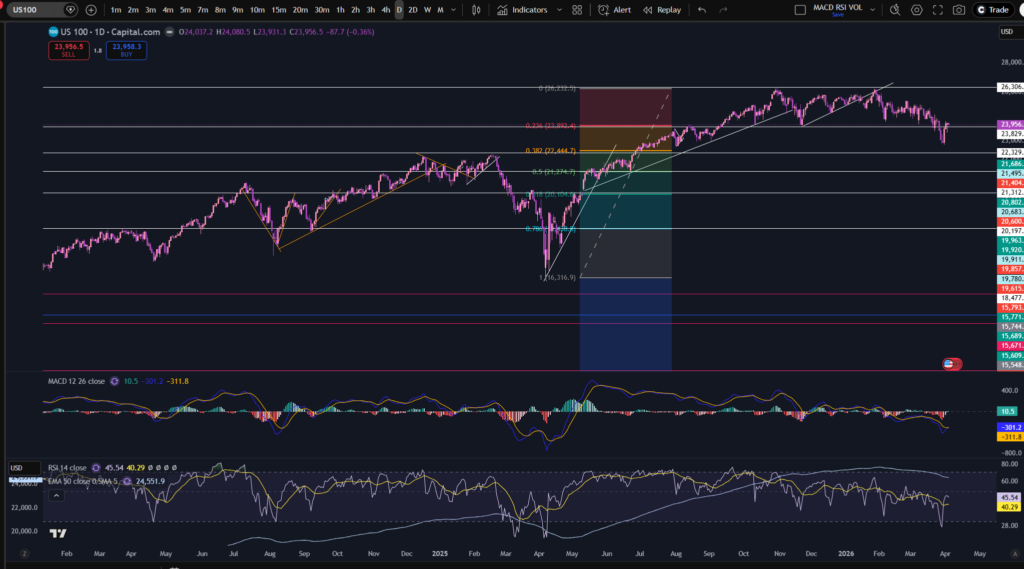
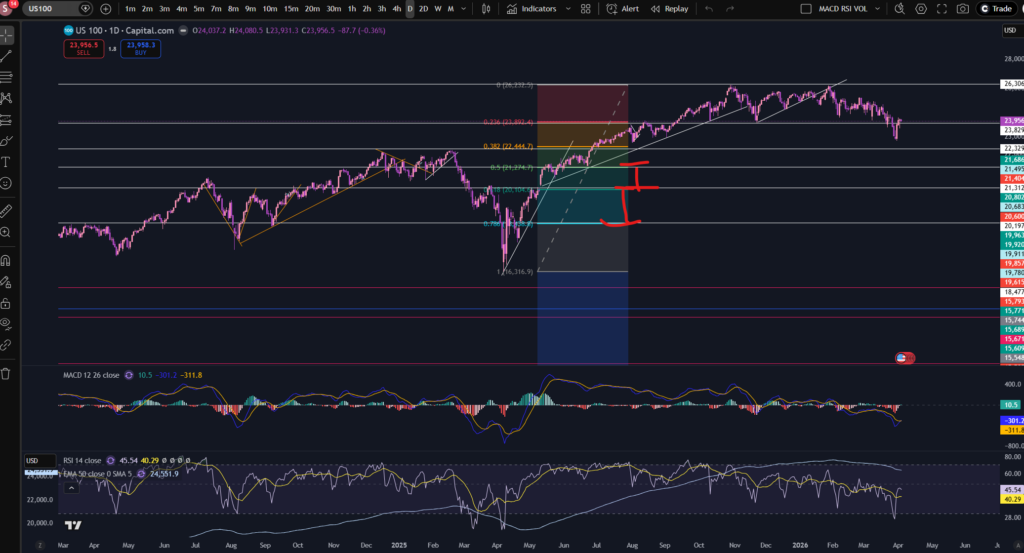
As you can see, i’ve added support and resistance lines everywhere where you can see significant levels of buying or selling pressure. I also stretched the Fibonacci indicator vertically, to line it up with the pull back/resistance and support areas.

As an example, the next level up is half the height of the previous one, as shown below:

Amazingly, these line up perfectly with the Fibonacci retracement levels?! How is this possible? It’s amazing but it’s real, and you can probably now imagine how you will be able to use this in your trading… let’s take a look at this next…

Where to buy or sell with Fibonacci Retracement

So as you can see the Fibonacci Retracement tool can be very useful in understanding how to buy stocks. The idea is to buy at the level where the market pulls back to. You can see these types of levels at, for example, 21.686, 21.495, 22.329…You can see the price pulled back to these levels and then went on higher. You could add a stop loss underneath the level, and then set a take profit at the next level up! Or continue to ride the trend, by moving your stop loss up to the next successive levels, as the price moves.

I hope you found this article helpful.

Disclaimer!

Nothing on this blog should be taken as financial advice or encouragement for you to enter a trade.  You are expected to speak to a financial adviser or carry out your own due diligence before entering any positions.  Everything on this blog is made for educational purposes and to equip you with the knowledge you need to be able to make your own financial decisions.

For more great tips and advice on trading the stock market, please visit:

https://www.sophiatrades.co.uk

To watch me trade live please visit my patreon page here:

https://www.patreon.com/sophiatrades

Finally, if you would like to receive a discount on the Trading View charting software I use, please click on the relevant link here:

https://www.tradingview.com/?aff_id=117138

Please note any subscriptions taken via my affiliate link with Trading View may result in me earning a small commission.  However, I provide complete transparency on me using Trading View personally – I publish my success on the financial markets via my broker reports and any profits earned were done so by using my own Trading View subscription,  so I genuinely do recommend them and have been using the Trading View charts for many years.

How to use Bollinger Bands for Day Trading

In this article i’m going to talk about how to use Bollinger Bands for day trading. I’m going to talk about how you can use this technical indicator to give you entry and exit signals, and to show you levels where the price is overbought or oversold. Let’s get straight into it!

How to use Bollinger Bands for Day Trading… but first, what are Bollinger Bands?

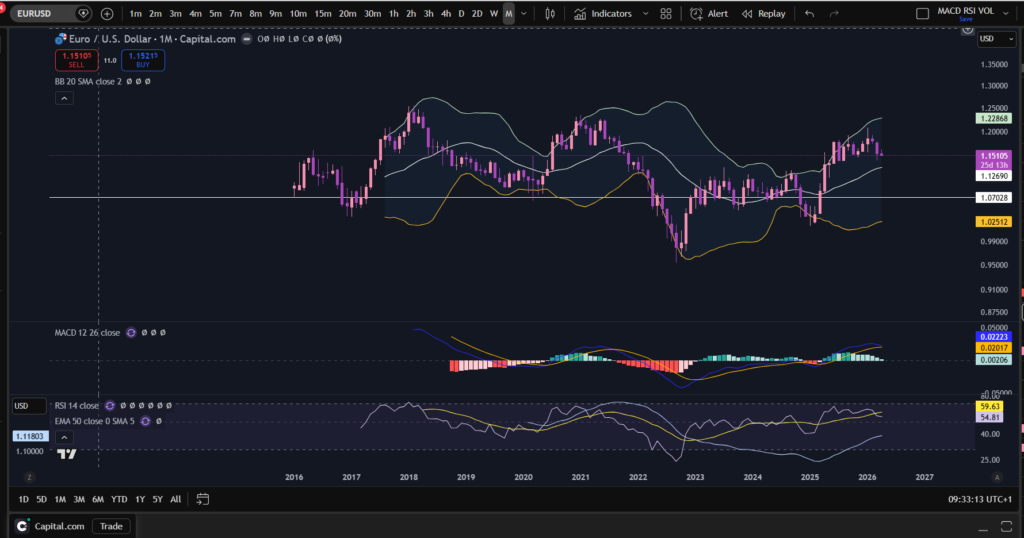
Bollinger Bands is a technical analysis tool which was developed by John Bollinger. They can measure market volatility and determine, relatively, whether prices are high or low. The way they work is they contain a simple 20 period moving average (“SMA”), and two outer lines (bands) which are a standard deviation away from the 20 SMA, of + or – 2. The bands expand and become wider around the 20 period SMA at times of high volatility and contract at times of low volatility. This is what the bands look like:

How to use bollinger bands for day trading

I have shown you what they look like here, using my favourite Trading View platform. If you would like a discount to this software, click the button below!

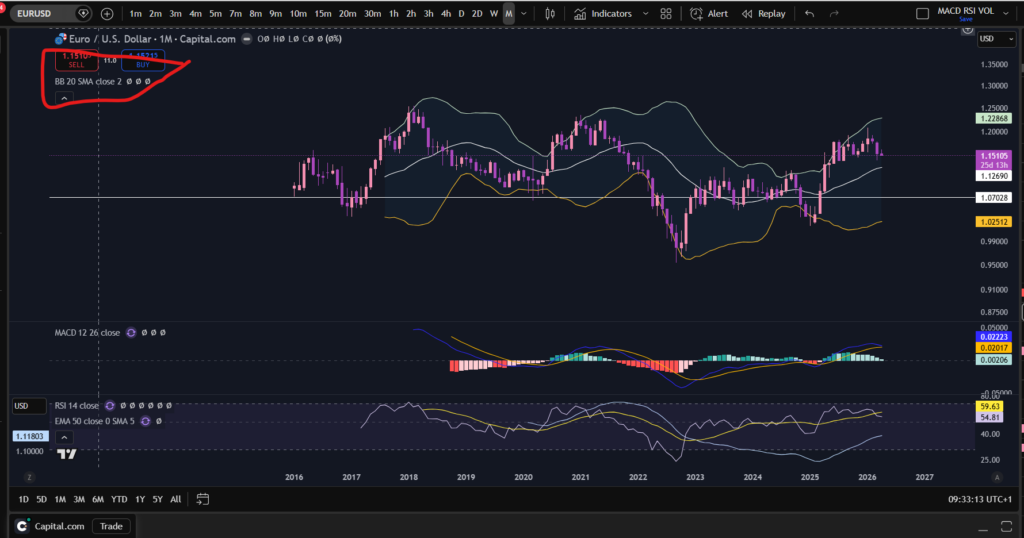
OK, so as you can see on the above chart, there is a line at the top, a line in the middle and a line below. The top and bottom lines are + and – 2 standard deviations away from the centre SMA line. You can change the settings of the bollinger bands, to use a slightly different SMA period for example, by clicking on the settings, in Trading View, here:

How to use bollinger bands for day trading

It’s sometimes best to use the default settings – set to 20 period SMA with 2 standard deviations. I have changed the colours on my Trading View charts, because I like using dark mode and the bands show up here, a bit more by changing them to white, light green and light orange.

How can you use Bollinger Bands for entry signals?

So lets talk about how to use Bollinger Bands for Day Trading…With Bollinger Bands you can buy the market when the price goes to or dips down below the lower band, and enter a take profit when it reaches the top band.

Similarly, you could sell when the price is at the top band, and then buy back on a short, when the price reaches the bottom band.

You can also use the bands to follow trends by entering and then waiting for the price to ride up the bands.

How to avoid false signals with Bollinger Bands?

You can avoid false entry signals by confirming the entry with another indicator such as the RSI. To learn about the RSI indicator please see the link below:

RSI Indicator – Sophia Trades – Learn how to Trade the Stock Market

I hope you found this article helpful.

Disclaimer!

Nothing on this blog should be taken as financial advice or encouragement for you to enter a trade.  You are expected to speak to a financial adviser or carry out your own due diligence before entering any positions.  Everything on this blog is made for educational purposes and to equip you with the knowledge you need to be able to make your own financial decisions.

For more great tips and advice on trading the stock market, please visit:

https://www.sophiatrades.co.uk

To watch me trade live please visit my patreon page here:

https://www.patreon.com/sophiatrades

Finally, if you would like to receive a discount on the Trading View charting software I use, please click on the relevant link here:

https://www.tradingview.com/?aff_id=117138

Please note any subscriptions taken via my affiliate link with Trading View may result in me earning a small commission.  However, I provide complete transparency on me using Trading View personally – I publish my success on the financial markets via my broker reports and any profits earned were done so by using my own Trading View subscription,  so I genuinely do recommend them and have been using the Trading View charts for many years.
MACD secrets to help you make more money trading

MACD secrets to help you make more money trading

In this article I’m going to share with you some MACD secrets on how you can use the MACD indicator in a really practical way to make more money trading. You will not likely find these useful, very simple and practical tricks discussed anywhere! If you are intrigued please read on!

MACD Secrets… First, what is the MACD indicator?

The MACD indicator stands for Moving Average Convergence Divergence. We discussed in detail the technical side of how this indicator works in one of our other blog posts. You can read the technical detail here:

OK. So now you know what the MACD is, how can you use it in a practical way to make even more money when you are trading?

MACD tips which other traders don’t tell you…

The first MACD secrets we would like to share with you, is how to use the MACD to help you avoid taking losses when an uptrending market is starting to change direction and it’s running out of steam. We discussed how this can be done by noting the swings high or low of the MACD indicator, and whether or not the market is making higher highs based on these, in this article:

So how else can you use the MACD? What other MACD secrets are there to share? The MACD can show you the strength of momentum. Let’s take the histogram bars as an example… when the histogram bars are growing in size, it means the market is either increasing strongly or decreasing strongly in price. Also, when the histogram bars turn from dark green or dark red to light green or light red, it means the market’s price is losing it’s strength in which ever way it has been travelling… let’s take a look at some examples:

For a discount on the charting software used (Trading View), please click here:

https://www.tradingview.com/?aff_id=117138

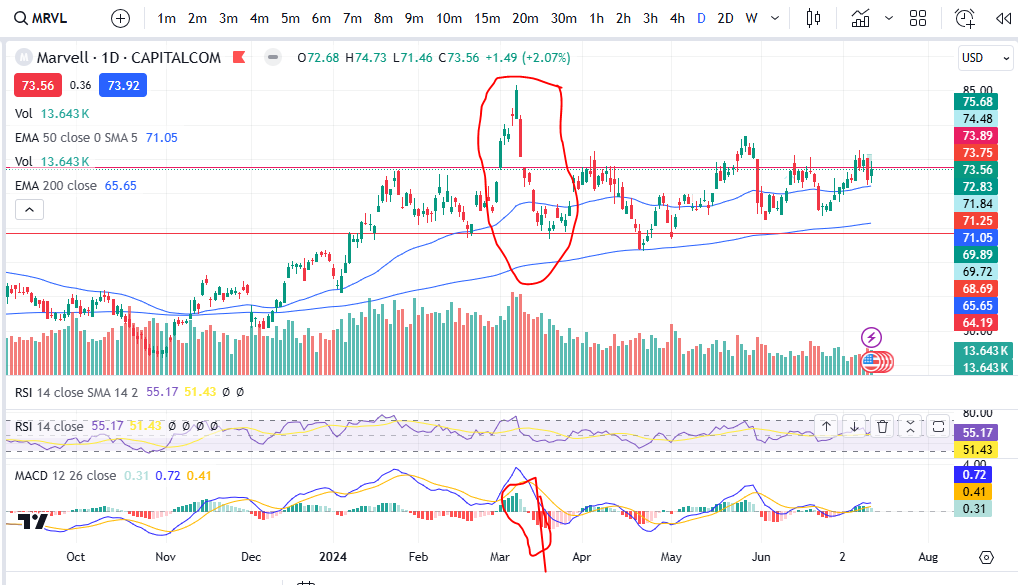
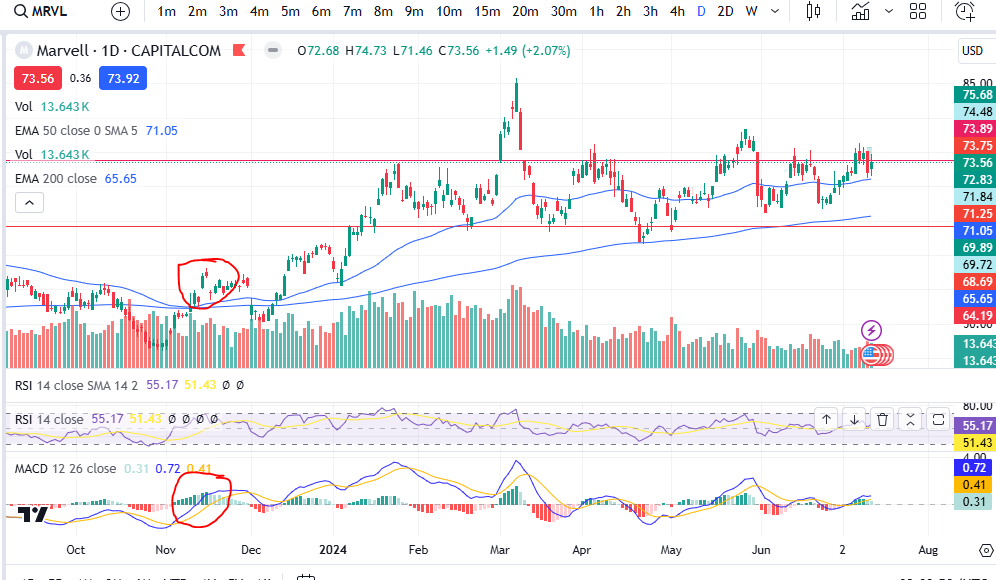
I’ve provided the example of Marvel above. As you can see, the MACD histogram bars are dark green usually straight after a cross over, which is why this indicator can be used to spot an entry signal after a cross over below the zero line of the histogram, but after the cross over, how do you know whether the market is losing it’s strength? Note the colour change of the histogram bars on the above chart and then compare that to the price action above:

I’ve circled an example – you can see when the histogram started turning light green, the market’s price started dropping like a brick. On this occasion the indicator was slightly ‘lagging’ but you can see other examples where there was an early warning before the market dropped! See the example below:

You can see the colour of the histogram bars were flicking on and off from dark to light green – a warning sign! Then what followed? The upwards move completely lost it’s strength and the market started making a pull back.

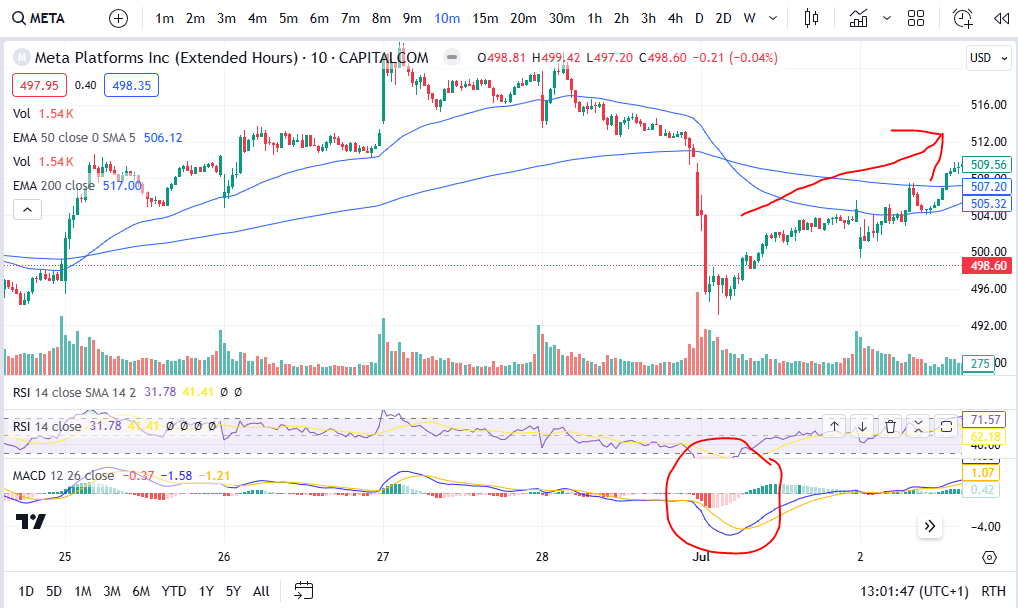
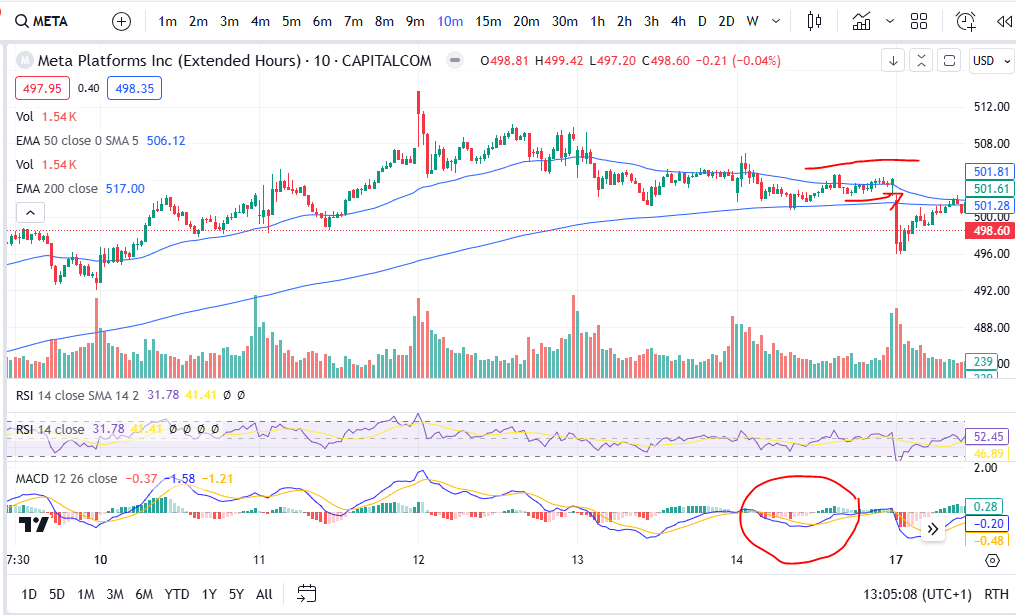
Another way you can use the MACD to tell you what the market is likely to do, is by looking at the shape of the MACD cross over. If the shape of the MACD and Signal lines going into the cross over are such that they are almost at a vertical angle, this can be a really good indication that the price is going to move quickly in the direction of your choice… if the cross over is happening with a gradual ‘sliding’ ‘converging’ of the two lines this can be less fruitful. Let’s take a look at some examples:

As you can see in this example on Meta Platforms, the blue MACD line scooped under in such a way that it had a lot of momentum and the price pushed significantly higher after this on the chart. Let’s look at the opposite situation:

MACD secrets

As you can see here, the price movements are almost flat after the cross over circled above- the MACD and Signal lines were very closed up after the cross and before the cross – and the price movement following the cross was insignificant. Indeed, the price actually took a nose dive shortly after this area on the chart! The momentum for the price to go up was weak and exhausted.

Once you get the hang of spotting these very practical MACD secrets, they really can help you in understanding the markets. We hope you found this article helpful.

For more great tips and advice on trading the stock market, please visit:

https://sophiatrades.co.uk

To watch me trade live please visit my patreon page here:

https://www.patreon.com/Traderpro8320

Finally, if you would like to receive a discount on the Trading View charting software I use, please click on the relevant link here:

https://www.tradingview.com/?aff_id=117138

Please note any subscriptions taken via my affiliate link with Trading View may result in me earning a small commission.  However, I provide complete transparency on me using Trading View personally – I publish my success on the financial markets via my broker reports and any profits earned were done so by using my own Trading View subscription,  so I genuinely do recommend them and have been using the Trading View charts for many years.
Support and Resistance – how to make more money trading

Support and Resistance – how to make more money trading

In this article I’m going to explain what support and resistance is, how it affects the markets and how you can use it to make more money in your trading. All traders have got knowledge about support and resistance, and they use this knowledge frequently when placing trades on the market – it would be suicide to attempt trading without it! So let’s get started in understanding it!

What is support and resistance?

Support and resistance refers to areas which are particular zones of a financial chart where the price tends to touch the area and then rebound away from it. These areas are where there tends to be a lot of buying and selling pressure. Let’s take a look at some examples:

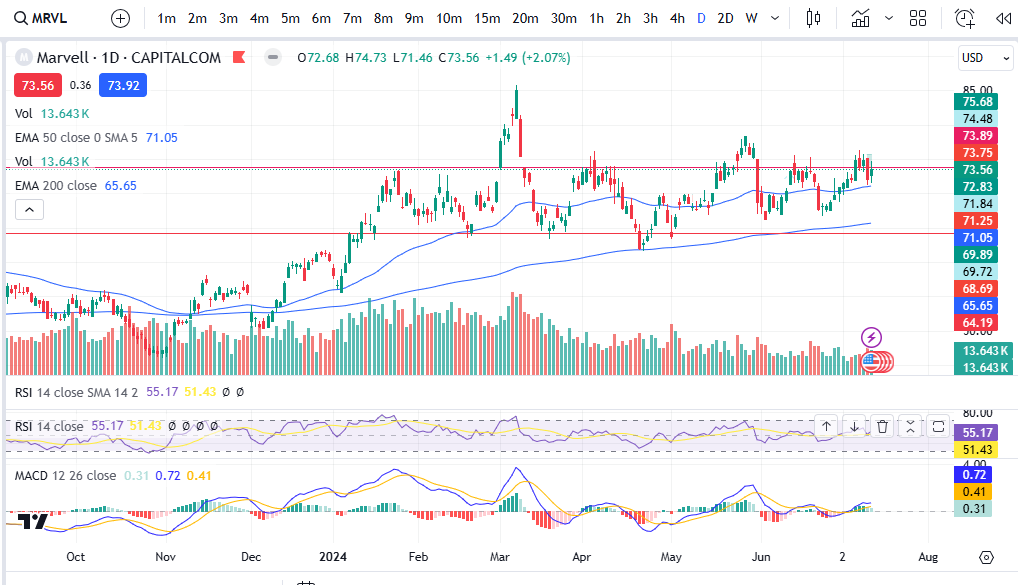
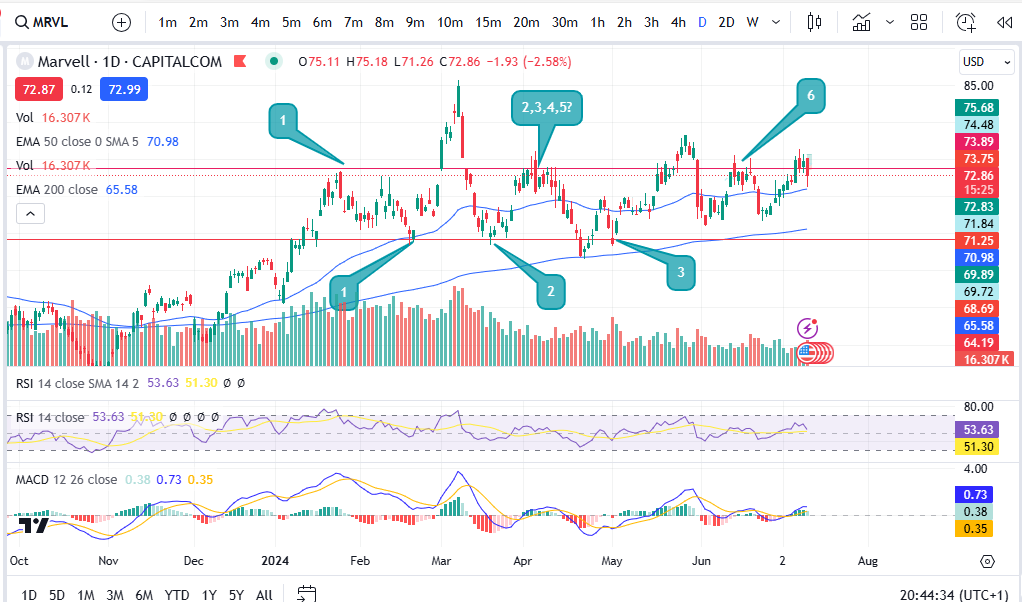
OK… So I’ve given you the example of the chart of Marvell. (If you would like a discount on the chart software I use, please click here):

https://www.tradingview.com/?aff_id=117138

As you can see on the chart, the price tends to touch the red lines and then rebound away. It has done this several times (numbered with the chat bubbles). When the price gets to around 71.25, the price tends to react at this level and push up from there. The opposite is true for the red line at the top of the price movements which is around 73.69.

So why does the price move in this way?

The answer is that many sellers including hedge funds and institutional investors, are aware that the price historically has reached such a level as a limit to the extent to which it can stretch before rebounding. Sellers and buyers are aware of these historical levels – and they then reinforce them by buying and selling at these levels even more, which creates something similar to a self fulfilling prophecy.

For example, if historically on the chart it can be noted that the price always moves up after it falls to the 71.25 level, many buyers will be watching and waiting for the price to reach this level before they place a buy order. They know there is a strong probability that the price will increase from this area. This in turn leads to more buying pressure and volume, creating the movement again away from the area – and so a pattern is formed after some time where this happens repeatedly. This leads me on to discuss the ‘usefulness’ of support and resistance in trading.

So how can support and resistance be used in trading?

If you can see historically that the price tends to move upwards after it touches a particular point on the chart, you can make a note of this and wait patiently for the price to enter the ‘support’ zone. The area will be called a support if there is a lot of buying pressure there. Likewise, the area is referred to as a ‘resistance’ when there is a lot of selling pressure at the area. Once the price has entered the support zone, the buyer can place a buy order and wait for the price to ascend upwards in line with the historical movements. The movement upwards from a support is not guaranteed but it will have a strong probability to move upwards from that spot.

The same is true for placing a sell order at a resistance level. A seller can place an order there and wait for the price to descend towards a profit target.

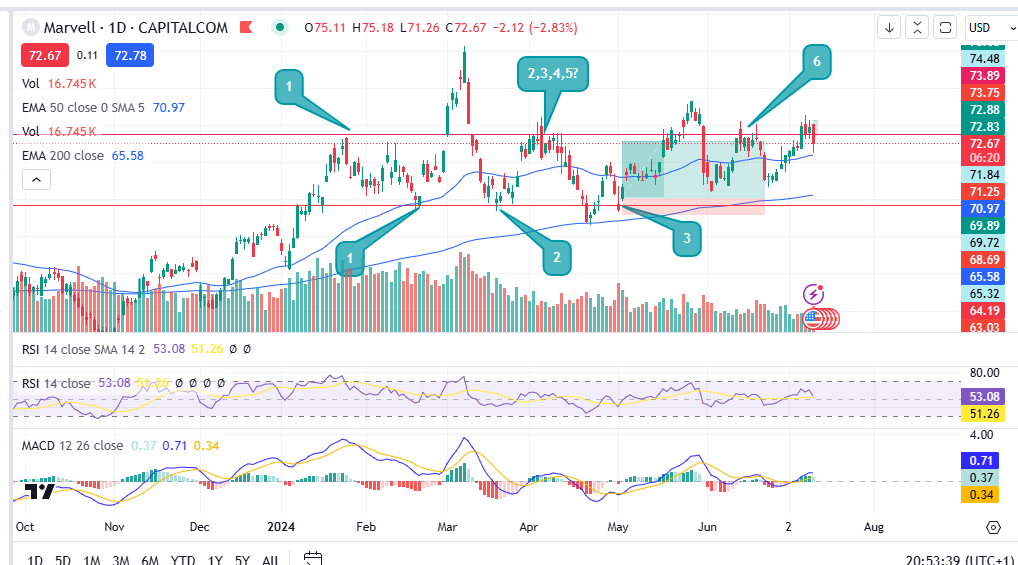
The stop losses can be set to the other side of the support/resistance zone, as so:

The stop loss would be placed where the bottom of the red zone is on the trade set up diagram above. The target could be set for the upper resistance area/line. This would apply the opposite way for a sell at the top line with the stop loss being placed above the top red line and the profit target being placed at the bottom red line.

As well as taking profit at these types of zones, some traders also place ‘break out’ trades. Break out trades work on the basis of the event of the price breaking through a strong support or resistance level. If this happens the price tends to move far and quickly beyond the level. Some break out traders achieve a 4:1 reward risk ratio for example. To understand risk management, please see my other article here:

How do you identify and draw these lines on the charts?

When ‘identifying’ support and resistance zones, you want to go to the daily time frame and zoom out as far as you can go, to see the greatest amount of historical price movement on the screen. Then take note of any really obvious levels. If you are squinting to see whether a level is present or not, it’s not! It needs to jump out at you and be really obvious. You want the price to have touched the level and rebounded at least three times but preferably more. The greater number of times it has touched the level and rebounded away, the better! I shared a video on my Patreon channel on how to draw support and resistance, here:

https://www.patreon.com/posts/support-and-102073984

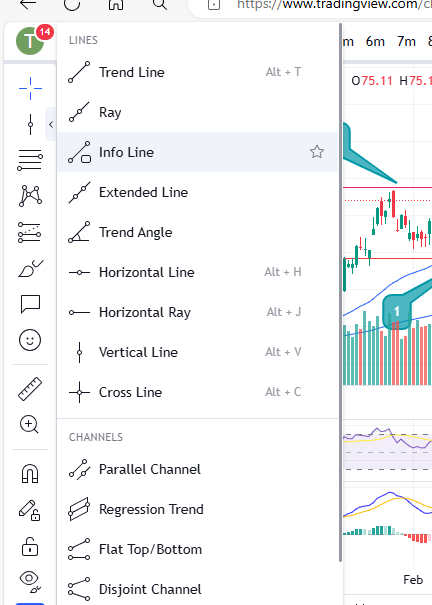
You can select some tools on most charts to apply horizontal or diagonal lines to a chart (support and resistance can happen diagonally too but these are less strong than the horizontal lines) – you can see them in Trading View in the menu on the left here:

support and resistance

Also note that the most recent activity is the most important activity. Be sure to observe any recently formed support and resistance lines as well as really old ones.

Another thing to be aware of is that when the price busts through one of these zones, let’s say a resistance level, this resistance will then likely become a support for the higher prices – meaning it will in future touch it and go up, whereas previously it was touching the level and rebounding down.

I hope you found this article helpful.

For more great tips and advice on trading the stock market, please visit:

https://sophiatrades.co.uk

To watch me trade live please visit my patreon page here:

https://www.patreon.com/Traderpro8320

Finally, if you would like to receive a discount on the Trading View charting software I use, please click on the relevant link here:

https://www.tradingview.com/?aff_id=117138

Please note any subscriptions taken via my affiliate link with Trading View may result in me earning a small commission.  However, I provide complete transparency on me using Trading View personally – I publish my success on the financial markets via my broker reports and any profits earned were done so by using my own Trading View subscription,  so I genuinely do recommend them and have been using the Trading View charts for many years.
Amazing secrets to help you make more money trading – spot a downtrend early!

In this article I’m going to show you how to spot a downtrend early and identify whether or not a market is still genuinely uptrending. The first thing you look at is whether or not the price is floating above the 200 period EMA – sure, but how do you know if it’s started to downtrend, inspite of this? I share this secret below.

Spot a downtrend early – the highs and lows of the trend

The highs and lows of a trend really are the trader’s bread and butter. Without identifying these there are multiple things that can go wrong with the trading set up. New traders should really slow right down and take some time to identify these – they are critical to success. You will make a lot more money trading by spotting the highs and lows and avoiding bad entries where the market has just started to reverse to the downside.

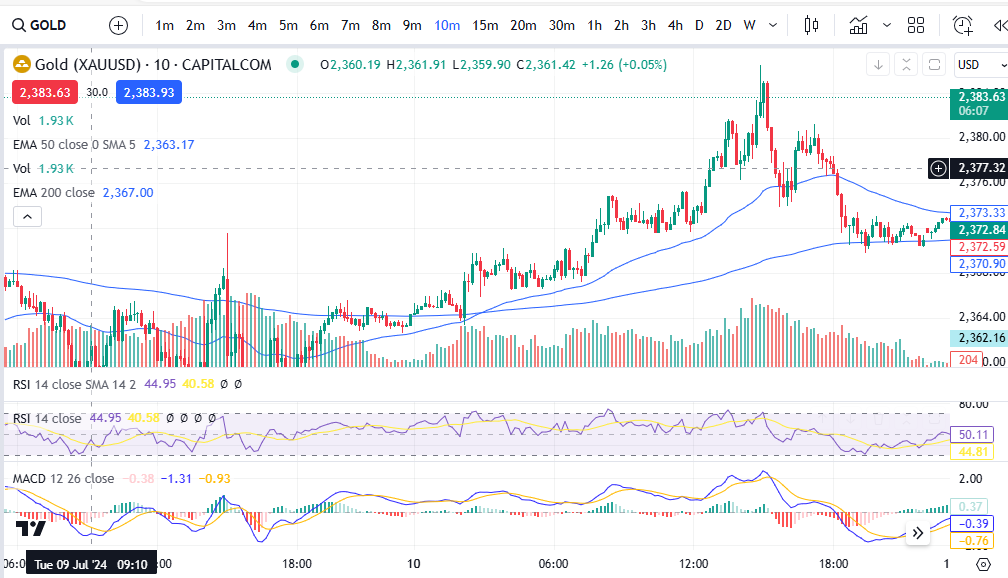
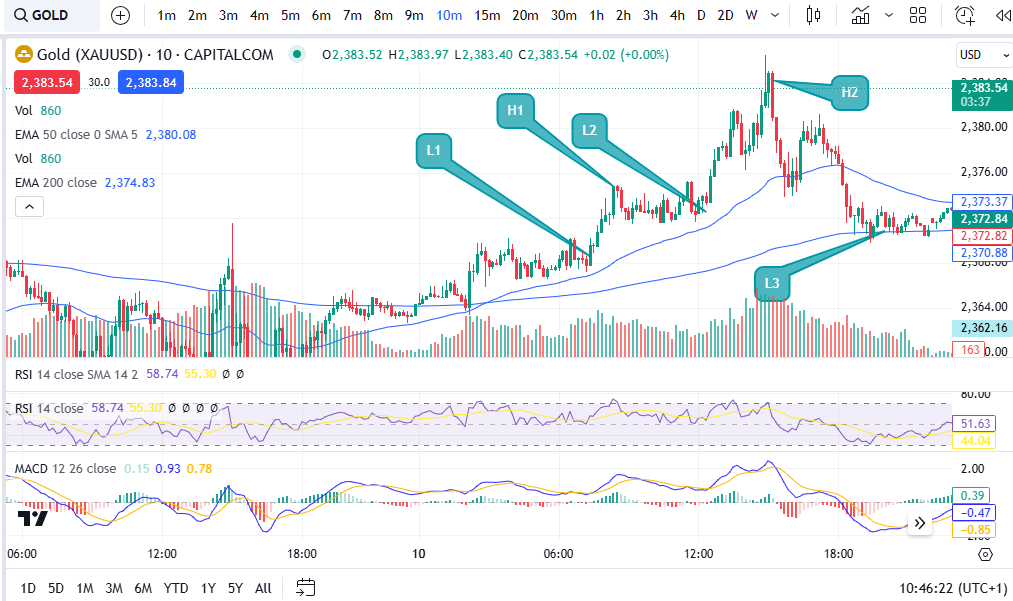
Let’s take a look at some examples. Let’s consider the market of Gold as an example, on the 10 minute timeframe… take a brief look at the chart below, and try to decide whether it’s uptrending based on recent activity, before continuing to read on…….. did you do it?

OK, let’s consider my answer to this question. It’s above the 200 period EMA – GREAT! However, let’s now look at the highs and lows. You can check exactly where the highs and lows are and use these to spot a downtrend early, on the basis of the ‘swings’ of the MACD indicator and this is one of the practical ways the MACD can really help you in your trading – aside from giving you entry signals:

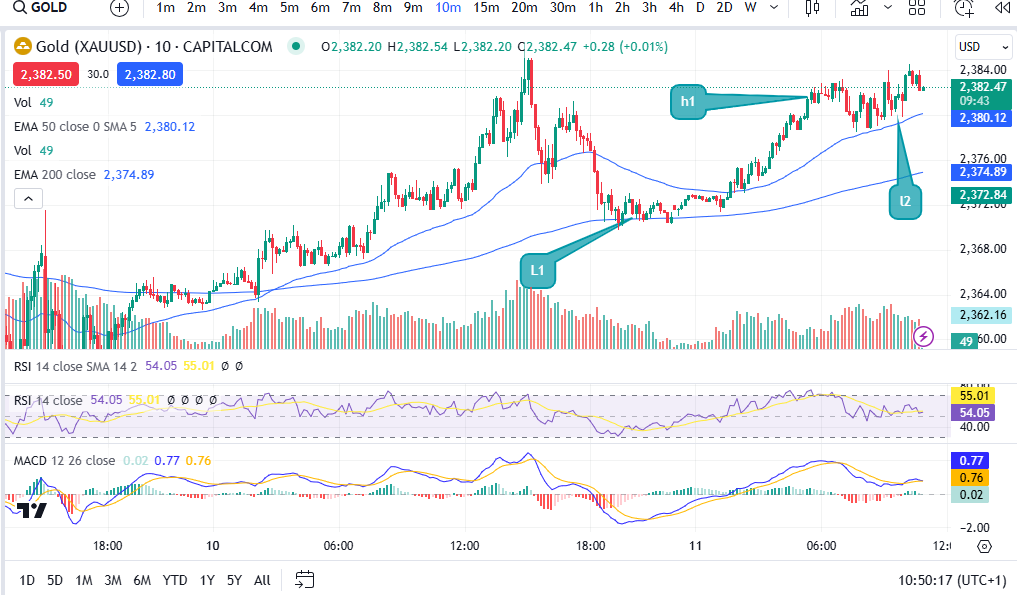
As you can see, at first glance the market does look like it’s now uptrending, but when you look closely, low 3 is now lower than low 2. In an uptrending market, the market makes ‘higher highs’ and ‘higher lows’. The pattern of uptrend has been anialated at the point of low 3. It starts again at that point – you can wait and see if it starts making higher highs and higher lows from that point onwards… a bit like this:

OK, so the pattern has started again at the original ‘low 3’ which I now refer to as low 1. As you can see it did go on to make higher lows again at low 2 in the above chart. You need the confirmation of it forming new highs and lows before placing a trade!

How this can help or hinder your strategy

Let’s consider what this could have done to your trade set up and win rate and profits/losses, if you ignored this break of pattern…

Let’s say you wanted to get in at the MACD cross over as your entry signal. (To understand more about this please see my strategy that I teach on Patreon, here:

https://www.patreon.com/collection/485557?view=expanded

You can also see my other article about how the MACD indicator works, and what it does, here:

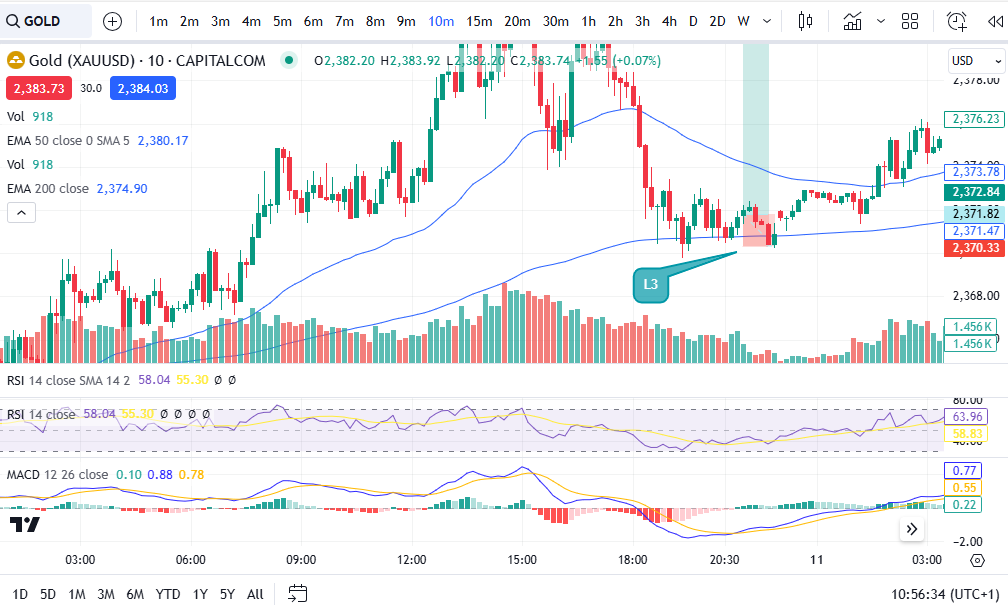
Let’s further suppose that you entered the market at the MACD cross over at the low which was previously referred to as low 3, here:

SPOT A DOWNTREND

You set your stop just below the low of the trend at the level which is shown in line with the bottom of the trade set up diagram applied (2370.33). As you can see, because the market was making lower highs, it went on to chop down into the stop loss before recovering. This loss would have been something that could have been completely avoided had the trader taken the time to spot a downtrend forming by identifying the highs and lows. Consistency in the pattern is key, before entering the market!

I have seen this help me avoid bad entries on many, many occasions. It does mean that you end up ‘avoiding’ placing trades and you place fewer trades, but with trading, less is more!! You will make more money trading, by placing fewer trades.

I hope you found this article helpful.

For more great tips and advice on trading the stock market, please visit:

https://sophiatrades.co.uk

To watch me trade live please visit my patreon page here:

https://www.patreon.com/Traderpro8320

Finally, if you would like to receive a discount on the Trading View charting software I use, please click on the relevant link here:

https://www.tradingview.com/?aff_id=117138

Please note any subscriptions taken via my affiliate link with Trading View may result in me earning a small commission.  However, I provide complete transparency on me using Trading View personally – I publish my success on the financial markets via my broker reports and any profits earned were done so by using my own Trading View subscription,  so I genuinely do recommend them and have been using the Trading View charts for many years.